Can ChatGPT Make an Invoice? AI and Voice Invoicing Tested
Can ChatGPT make an invoice? We tested it against a dedicated AI invoicing tool and a template, spoke a real invoice in English and Bangla, and list the checks AI always needs.
- Written by
- Monjur Hossain
- Published
- Last updated
- Reading time
- 18 min read

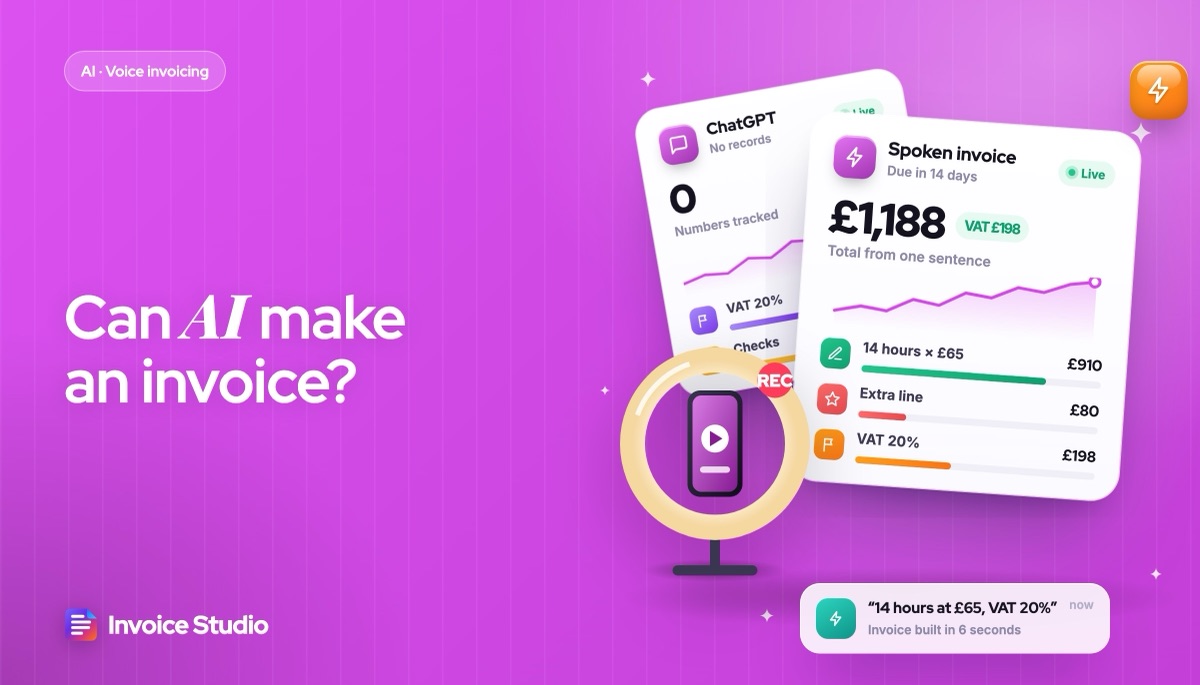
Yes, ChatGPT can make an invoice as a table or file if you give it every detail, but it cannot number, store or track it. A dedicated AI invoicing tool uses AI to read your typed or spoken words and fixed formulas for totals and numbering. Either way, check tax, currency, rounding and client name.
On this page 11 sections
- What is AI invoicing and how does it work?
- Can ChatGPT make an invoice?
- How to make an invoice with your voice (real example)
- ChatGPT vs an AI invoicing tool vs a template: which is more accurate?
- Voice invoicing in 20 languages, including Bangla
- What does AI get wrong on invoices and how do you check it?
- Is it safe to put client data into an AI invoice tool?
- What should an AI invoicing tool include?
- Who uses AI invoicing? Freelancers and field trades
- How do you test an AI invoicing tool before trusting it?
- FAQs
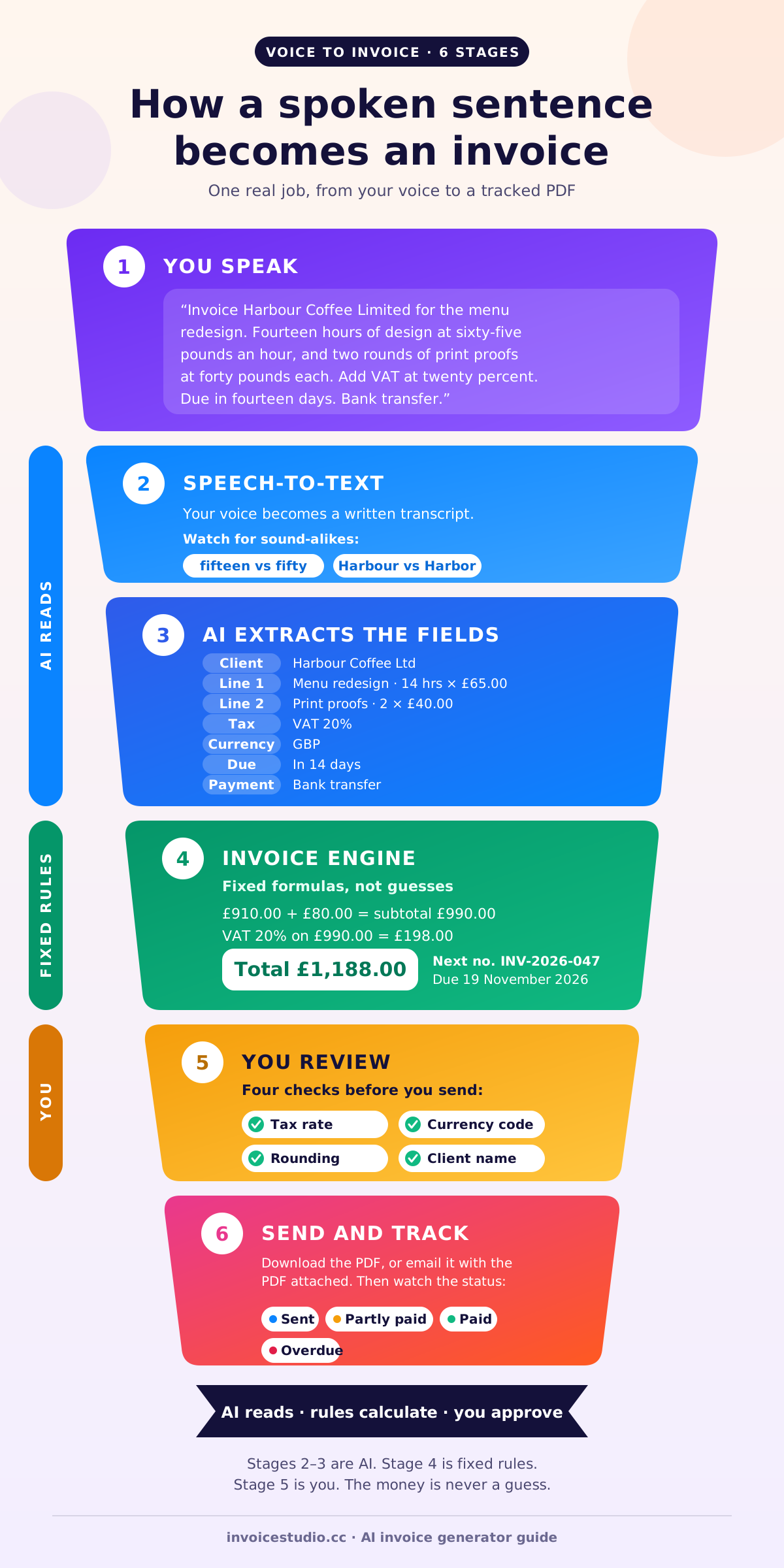
Can ChatGPT make an invoice? Yes. Give it every detail and it will draft a decent invoice as a table or a file. What it cannot do is number, store or track that invoice, and that gap is why dedicated AI invoicing exists: you describe the job in natural language, typed or spoken, and a tool turns it into line items, tax, totals and a PDF. You say "14 hours of design at £65, add 20% VAT, due in 14 days", and the invoice fills itself in.
I have sent a few hundred invoices, most of them typed at night after the real work was done. The first time I dictated one from my phone while walking back from a client meeting, it took under a minute, and I had the PDF in their inbox before I reached the station. It was also wrong. The app heard "fifteen" as "fifty". That is invoice AI in 2026: fast, mostly right, and its accuracy still depends on you checking it.
This guide shows a real spoken sentence turning into line items and a PDF, in English and in Bangla. It compares a ChatGPT prompt, a dedicated AI invoicing tool and a plain template on maths, numbering, storage and tracking. Then it covers the four checks AI always needs (tax rate, currency, rounding and client name) and a privacy checklist to run before you speak client data into any tool.
What is AI invoicing and how does it work?
An AI invoice generator is invoicing software that uses speech recognition and a language model to read your words and fill in the fields of an invoice for you. The AI does the reading. Normal invoice software still does the maths, the numbering and the record keeping.
There are really three jobs inside "invoice AI":
- Listening or reading. Speech-to-text turns your voice into words. If you type, this step is skipped.
- Understanding. A language model pulls out the client, each line item, quantity, unit, price, tax rate, discount, due date and payment method from a messy sentence.
- Building. The invoice engine places those values into a template, calculates subtotal, tax and total with fixed rules, gives the invoice the next number in your sequence, and saves it.
When freelancers ask for an AI invoice generator for freelancers, they usually mean steps 1 and 2 bolted onto step 3. When people mean ChatGPT, they mean step 2 trying to do step 3 too. That is where most errors come from: a language model predicts text. It is not a calculator or a ledger.
In Invoice Studio, the free tool uses a built-in parser that works in the browser in English and Bangla. Signed-in accounts on plans with AI get Claude plus ElevenLabs in 20 languages: ElevenLabs turns speech into text, and Claude pulls the fields out as structured data (think of it as JSON) that the invoice engine then fills in.
AI invoice generator vs invoice OCR: what's the difference?
Invoice OCR goes the other way. An invoice scanner reads invoices you receive, such as a supplier's PDF, and extracts the amounts for accounts payable. An AI invoice generator creates invoices you send. If you are searching for "invoice OCR" to digitise supplier bills, you need a different tool. For most freelancers and trades, the faster route is just to say what you did.
An AI invoicing tool fills the same fields any invoice needs. For the full list with a labelled sample, see how to make an invoice.
Can ChatGPT make an invoice?
Yes, ChatGPT can make an invoice as text, a table or, depending on your plan and settings, a downloadable file. What it cannot do on its own is remember your last invoice number, store the invoice as a record, track whether it was paid, send reminders or guarantee the maths.
The same is true of Google Gemini, Microsoft Copilot and Claude in a chat window: each can draft an invoice from natural language, and none of them keeps an invoice record on its own. For a one-off invoice, a chatbot prompt is fine. I'd use it if I billed once a year and had nothing else to hand. Here is a prompt that gets a decent result, copy and paste it and swap the details:
Create an invoice as a table. Seller: Jane Doe Design, 12 Mill Lane, Leeds LS1 4AB, VAT number GB123456789. Client: Harbour Coffee Ltd, 3 Quay Street, Hull HU1 1AA. Invoice number INV-2026-047. Issue date 5 November 2026. Due date 19 November 2026. Line items: menu redesign, 14 hours at £65.00 per hour; print proofs, 2 rounds at £40.00 each. VAT at 20% on all lines. Show each line total, subtotal, VAT and total in GBP to two decimals. Payment by bank transfer to sort code 00-00-00, account 00000000. Do not invent any details I have not given you. Show your calculation for each total.
"Do not invent any details" stops it adding a fake tax ID. "Show your calculation" makes errors visible. The correct answer: 14 × £65.00 = £910.00, 2 × £40.00 = £80.00, subtotal £990.00, VAT £198.00, total £1,188.00. On a short invoice the chatbot will usually match. With eight lines, mixed tax rates and a discount, check every line.
The bigger problem is everything after the invoice is made. Next month, ChatGPT will not know you used INV-2026-047. It will not tell you Harbour Coffee is 12 days overdue. If you lose the chat, you lose the invoice. Tax authorities expect you to keep invoice records for years (the IRS says three years in most cases and longer in some, and HMRC expects VAT records for six years), and a chat history is not a filing system.
How to make an invoice with your voice (real example)
To create an invoice by voice, open a voice invoicing app, tap the microphone, say the client, each item with quantity and price, the tax and the due date in one go, then review the draft and send it. The whole thing takes about a minute once you have done it twice.
Here is the exact sentence I'd say for the Harbour Coffee job above, at normal speaking speed:
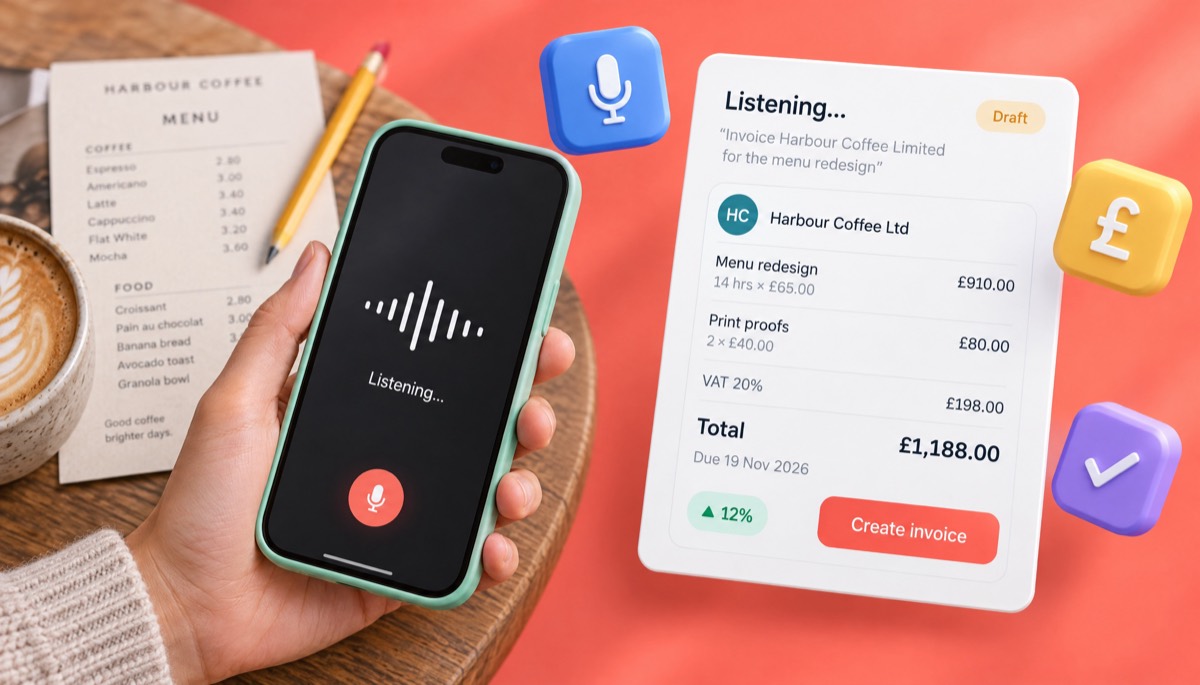
"Invoice Harbour Coffee Limited for the menu redesign. Fourteen hours of design at sixty-five pounds an hour, and two rounds of print proofs at forty pounds each. Add VAT at twenty percent. Due in fourteen days. Bank transfer."
And here is what a good voice invoicing tool should turn it into:
| Field | What you said | What the invoice shows |
|---|---|---|
| Client | "Harbour Coffee Limited" | Harbour Coffee Ltd (matched to the saved client, with address) |
| Line 1 | "Fourteen hours of design at sixty-five pounds an hour" | Menu redesign, 14 hrs × £65.00 = £910.00 |
| Line 2 | "Two rounds of print proofs at forty pounds each" | Print proofs, 2 × £40.00 = £80.00 |
| Subtotal | (calculated) | £990.00 |
| Tax | "VAT at twenty percent" | VAT 20% = £198.00 |
| Total | (calculated) | £1,188.00 |
| Currency | "pounds" | GBP (£) |
| Due date | "Due in fourteen days" | 19 November 2026 (issued 5 November) |
| Invoice number | (not said) | Next in your sequence, e.g. INV-2026-047 |
| Payment | "Bank transfer" | Your saved bank details under "How to pay" |
Notice what you did not have to say: your own address, your VAT number, the client's address, the invoice number and the bank details. Those come from your saved profile and client list. The less you have to say, the less can be misheard.
Step by step: voice to PDF
- Set up once. Add your business details, logo, tax number and payment methods, and pick a template. Add your regular clients.
- Tap the microphone and speak the job in one sentence or two. Say numbers clearly: "sixty-five", not "sixty, five".
- Read the draft line by line. Check the client, every quantity and price, the tax rate and the currency.
- Fix anything by tapping, not by re-recording the whole thing.
- Download the PDF or email it with the PDF attached. The invoice is saved with its number and status.
Speak in invoice order: client, items, tax, due date, payment. You will spot gaps faster when you review.
The same job, typed as text
Typed text works the same way. You can paste a line from a WhatsApp chat or your notes app, like "harbour coffee - 14h design @65, 2 proofs @40, vat 20, 14 days", and get the same draft. Text is better in noisy places or for long product codes.
ChatGPT vs an AI invoicing tool vs a template: which is more accurate?
A dedicated AI invoicing tool is the most accurate of the three for totals and numbering, because the AI only reads your words while fixed formulas do the maths. A ChatGPT prompt is fast but unreliable on longer maths and keeps no records. A template is accurate only if you set the formulas up yourself and never break them.
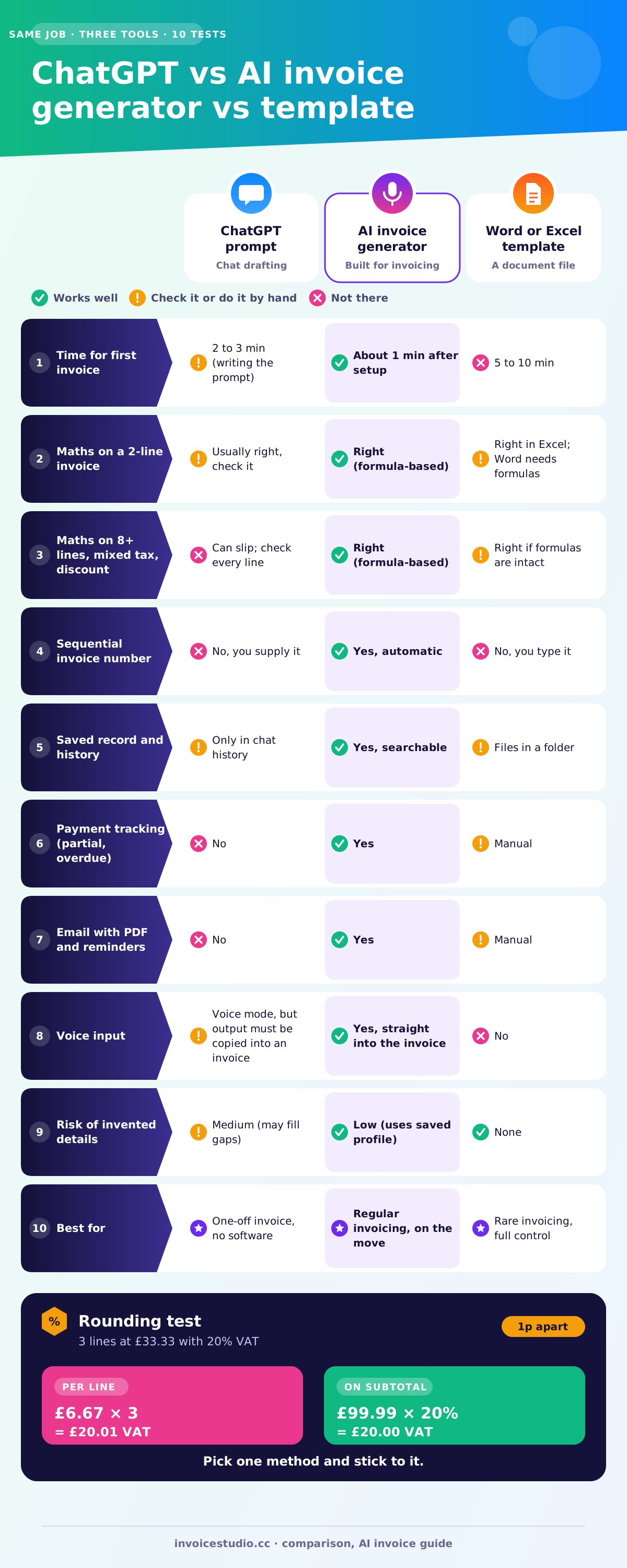
Here is how the three compare on the same Harbour Coffee job, scored on what actually matters once the first invoice is out:
| Test | ChatGPT prompt | AI invoicing tool | Word or Excel template |
|---|---|---|---|
| Time for the first invoice | 2 to 3 minutes (writing the prompt) | About 1 minute after setup | 5 to 10 minutes |
| Maths on a 2-line invoice | Usually right, check it | Right (formula-based) | Right in Excel; Word does not calculate unless you add formulas |
| Maths on 8+ lines, mixed tax, discount | Can slip; check every line | Right (formula-based) | Right if formulas are intact |
| Sequential invoice number | No, you supply it | Yes, automatic | No, you type it |
| Saved record and history | Only in chat history | Yes, searchable | Files in a folder |
| Payment tracking (partial, overdue) | No | Yes | Manual |
| Email with PDF and reminders | No | Yes | Manual |
| Voice input | Voice mode exists, but output still needs copying into an invoice | Yes, straight into the invoice | No |
| Risk of invented details | Medium (may fill gaps) | Low (uses saved profile) | None |
| Best for | One-off invoice, no software | Regular invoicing, on the move | Rare invoicing, full control |
ChatGPT is a drafting tool. A template is a document. An AI invoicing tool is a drafting tool joined to a record system. Past two or three invoices a month, numbering and tracking cost you more time than typing ever did.
If you prefer templates, our freelance invoice template guide shows how to set up the formulas. For apps generally, the free invoice app guide has a 12-point scorecard.
Voice invoicing in 20 languages, including Bangla
Voice invoicing works in many languages, not just English. On AI plans, Invoice Studio's voice invoicing understands 20 languages, including Bangla (the free parser handles English and Bangla), so you can speak the job the way you would describe it to a colleague and get a finished invoice.
Many small sellers, tailors and repair shops run their business in their own language, take payment through bKash or Nagad, and still need a clean invoice. Typing Bangla on a phone is slow. Speaking it is not.
A real Bangla example
Here is a sentence a clothing wholesaler in Dhaka might say:
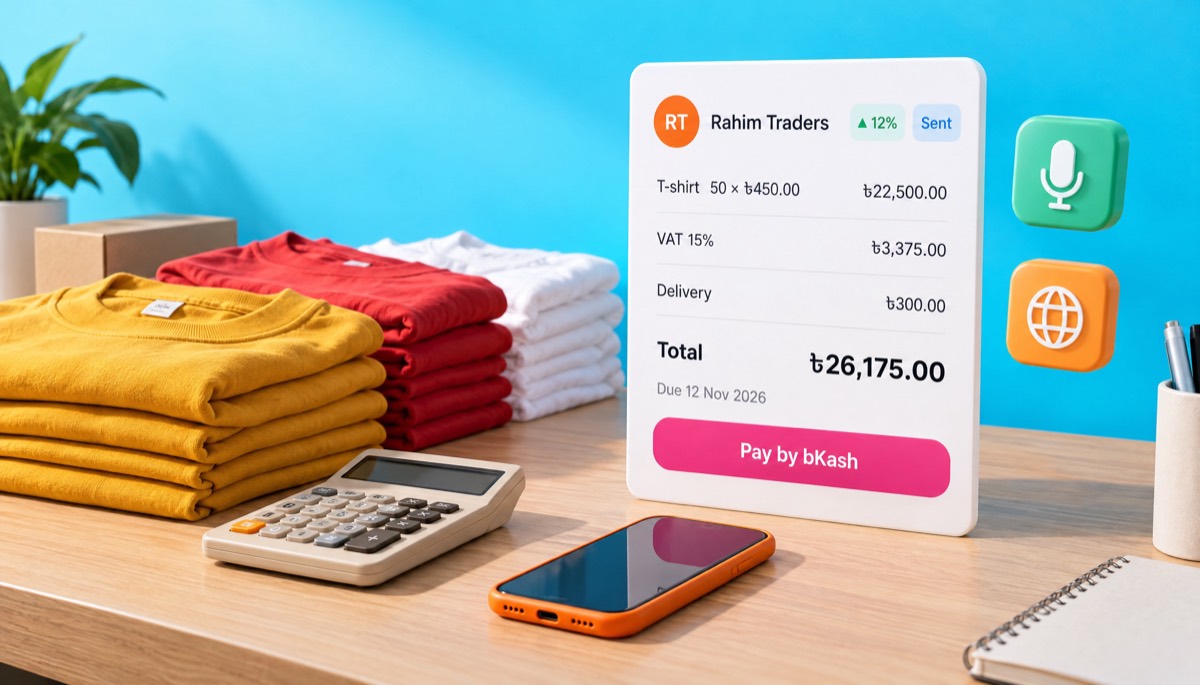
"রহিম ট্রেডার্সের জন্য ইনভয়েস বানাও। পঞ্চাশটা টি-শার্ট, প্রতিটা চারশো পঞ্চাশ টাকা। ডেলিভারি চার্জ তিনশো টাকা। টি-শার্টের উপর পনেরো শতাংশ ভ্যাট। সাত দিনের মধ্যে বিকাশে পেমেন্ট।"
In English: "Make an invoice for Rahim Traders. Fifty T-shirts at 450 taka each. Delivery charge 300 taka. Fifteen percent VAT on the T-shirts. Payment by bKash within seven days."
And the invoice it should produce:
| Line | Qty | Unit price | Amount |
|---|---|---|---|
| T-shirt | 50 | ৳450.00 | ৳22,500.00 |
| VAT 15% (on T-shirts) | ৳3,375.00 | ||
| Delivery | 1 | ৳300.00 | ৳300.00 |
| Total | ৳26,175.00 |
Currency: BDT. Due: 12 November 2026. How to pay: bKash, with your number printed under the payment section. Check two things: "পনেরো" (fifteen) and "পঞ্চাশ" (fifty) sound close when spoken fast, and whether VAT should also apply to delivery is your decision, not the tool's.
Bangladesh's standard VAT rate is 15%. If you are VAT registered, the National Board of Revenue expects its Mushak-6.3 tax invoice format for taxable sales, so check that your invoice carries the fields it requires. Rules change, so confirm with the NBR or your VAT consultant.
Tips for speaking invoices in any language
- Say the currency once, early: "in taka", "in dollars", "in rupees". Do not rely on the app's default.
- Use digits for codes. If a product code is "TS-450-BLK", type it. Spoken codes get mangled in every language.
- Keep your client names saved in the spelling you want on the invoice. The model will match "রহিম ট্রেডার্স" to the saved "Rahim Traders" instead of guessing a transliteration.
What does AI get wrong on invoices and how do you check it?
AI most often gets four things wrong on invoices: the tax rate, the currency, rounding, and the client name. Each takes seconds to check.
1. Tax rate
AI tools guess tax when you do not state it, and they guess based on what is common, not what is right for you. Ask for "an invoice with tax" and you might get 10%, 13% or 20% depending on what the model thinks your country is.
Can AI calculate tax on an invoice? Yes, once the rate is set. Choosing the right rate is your job. Some examples of where it goes wrong:
- US: There is no federal sales tax. State and local rates vary, and many services are not taxed at all in some states. Never let a tool add "sales tax 8%" by default.
- UK: The standard VAT rate is 20%, with 5% and 0% rates for some goods and services (see VAT rates on GOV.UK). If you are not VAT registered, you must not charge VAT at all. Our VAT invoice requirements guide covers what a full VAT invoice needs.
- EU: Each member state sets its own rates, and cross-border B2B sales often use the reverse charge, where you charge 0% and add a note. The European Commission's VAT invoicing page sets out the rules.
- Canada: GST is 5%, but HST provinces charge a combined rate (13% in Ontario, 14% or 15% in the Atlantic provinces).
- Australia: GST is 10%, and only if you are registered. Customers need a tax invoice to claim GST credits on purchases over A$82.50 including GST.
- India: GST on many services is 18%, split as 9% CGST plus 9% SGST for a client in your state, or 18% IGST for a client in another state. AI tools get this split wrong a lot. See our GST invoice format guide.
- Bangladesh: Standard VAT is 15%, with other rates for some goods and services.
The check: say the rate out loud every time ("VAT twenty percent", "no tax"), and save your default rate in your settings so the tool never has to guess.
2. Currency
"Dollars" can mean US, Canadian, Australian or Singapore dollars. "Rupees" can mean Indian, Pakistani or Sri Lankan rupees. A tool that defaults to USD will happily put "$1,188" on a UK invoice that should be in pounds.
The check: look at the currency code (GBP, USD, CAD, BDT, INR), not just the symbol. Set a default currency per client if you bill some clients abroad.
3. Rounding
Rounding is the error nobody notices until an accountant does. There are two common ways to work out tax: per line, then add up; or on the subtotal. They can give different answers by a penny or more.
Worked example: three lines at £33.33, with VAT at 20%.
- Per line: £33.33 × 20% = £6.666, rounded to £6.67. Three lines = £20.01 VAT.
- On the subtotal: £99.99 × 20% = £19.998, rounded to £20.00 VAT.
Both methods are used in practice, and tax authorities generally accept either if you are consistent. HMRC, for example, lets you work out VAT per line or on the invoice total, with its own rounding rules. The problem is a chatbot that switches methods between invoices. Invoice software uses one fixed method every time.
The check: add up the line totals yourself on one invoice a month. If they match the subtotal, the tool is consistent.
4. Client name and details
Speech recognition writes what it hears, and names are where it hears worst. "Harbour Coffee" becomes "Harbor Coffee". "Siobhan" becomes "Shivon". "Northwind Ltd" loses the "Ltd". Accounts teams reject invoices addressed to the wrong company, and in the UK the invoice must show the customer's name or trading name and address, as listed in the GOV.UK invoice rules.
The check: save clients once, with the exact legal name and address, and let the AI match to the saved record. Read the "Bill to" block every time before sending.
Other things worth a two-second look
- Quantities that sound alike: fifteen and fifty, thirteen and thirty, forty and fourteen.
- Dates: "due in 30 days" should give a date, not the words. 05/11/2026 means 5 November in the UK and May 11 in the US, so a written date is safer. If you use net terms, our net 30 guide explains how to count them.
- Invoice number: must be the next in your sequence, never a duplicate. See how to number invoices.
Here is a short note I paste into my own checklist app, so I do the review the same way every time:
Before sending: client legal name and address / each qty and price / tax rate and tax number / currency code / line totals add up / due date as a date / invoice number is next in sequence / payment details are mine.
Is it safe to put client data into an AI invoice tool?
It is reasonably safe to use an AI invoice tool if the provider is a named company with a clear privacy policy, does not use your data to train public models without your choice, and lets you export and delete your records. It is less safe to paste client details into a general chatbot with default settings.
An invoice holds personal and business data: names, addresses, email, what you sold, what they paid, and your own bank details. In the EU and UK, if your client is a person (not a company), that is personal data under GDPR, and you are responsible for where you send it. The European Commission's data protection pages explain the basics. Other countries have their own privacy laws, and many client contracts have confidentiality clauses too.
General chatbots usually let you turn off the use of your chats for model training in their data settings, but the default varies by product and plan, so look before you paste.
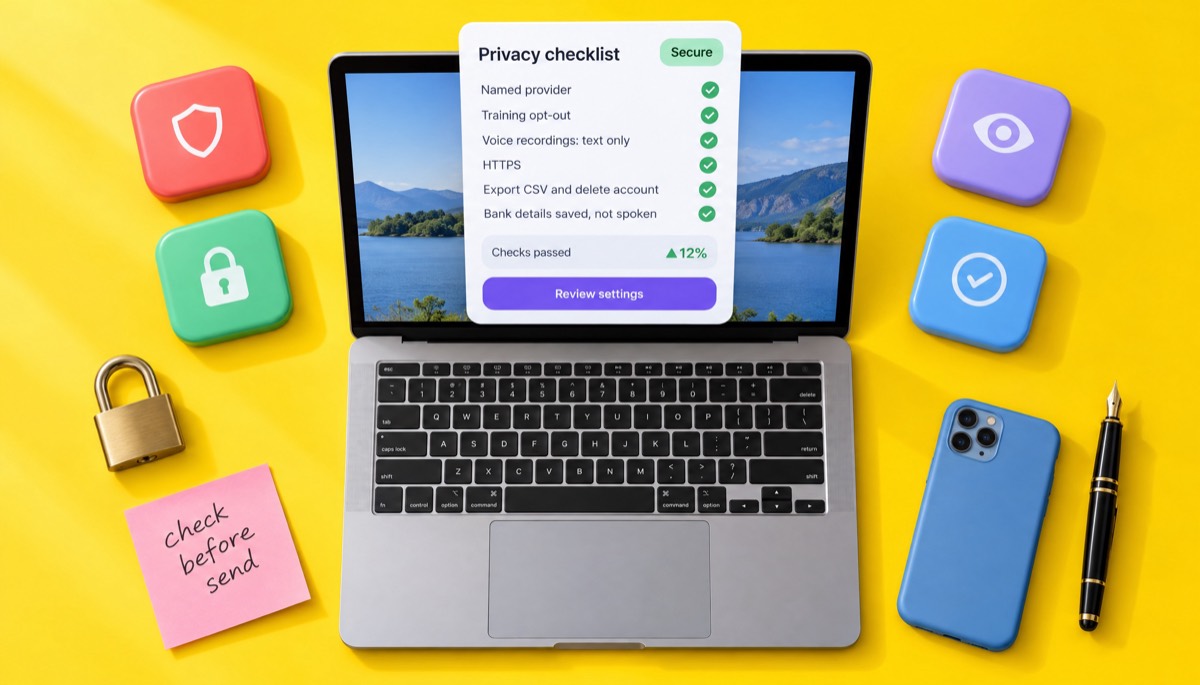
Privacy checklist for AI invoicing
- Who runs it? A named company with contact details and terms. Skip anonymous clone sites.
- Training: Does the policy say whether your invoice data or voice recordings are used to train AI models? Can you opt out?
- Voice recordings: Are audio files kept, or only the text? For how long?
- Storage: Is everything served over HTTPS? Is there a clear statement on where data is stored?
- Export and delete: Can you export your invoices as CSV and delete your account? If not, you are locked in.
- Account security: Use a strong, unique password, and lock your phone. A voice app on a phone with no screen lock is an open filing cabinet.
- Minimum data: Do not put more on an invoice than it needs. Never put full card numbers on an invoice.
- Where you speak: Do not read bank details or a client's address aloud on a train. Save them once, and say only the job.
- Contracts: If a client contract restricts sharing data with third-party services, check before you use any cloud tool, AI or not.
For teams, the US NIST AI Risk Management Framework is free and readable.
What should an AI invoicing tool include?
Any AI invoicing tool, free or paid, should at least turn your words into a correct draft, calculate tax and totals with fixed formulas, number invoices automatically and give you a PDF without a watermark. Anything less is a demo, not a tool.
Here is what I would look for, in order of importance:
- Formula-based maths. The AI fills fields; the software calculates. Ask the vendor or test it with the three £33.33 lines above.
- An editable draft. You must be able to fix any field by hand before sending.
- Saved business profile and clients, so you do not have to say your address every time.
- Automatic sequential numbering with a prefix you choose.
- Tax handling per line and on the invoice, with labels like VAT, GST or sales tax.
- Multiple currencies, including a custom one if yours is missing.
- PDF download with no watermark, and email with the PDF attached.
- Payment methods printed on the invoice: bank, PayPal, Wise, Stripe, or bKash and Nagad if you work in Bangladesh.
- Status tracking: sent, partly paid, paid, overdue.
- Export. A CSV of your invoices, so your records are yours.
Invoice Studio's free invoice generator covers the core of that list: 44 templates, your logo and brand colour, 14 currencies plus custom ones, per-line tax and discounts, "Tax & fees" rows, PDF download and print. The full app adds voice invoicing in 20 languages, emailing with reminders, recurring invoices, payment tracking with partial payments and overdue status, reports, and CSV export or import.
To be straight about what it does not do: Invoice Studio has no online card checkout, no client portal and no accounting ledger. Your client pays by the methods you list under "How to pay", and you record the payment. If you need full bookkeeping, pair it with accounting software or an accountant.
Who uses AI invoicing? Freelancers and field trades
AI and voice invoicing suits people who finish work away from a desk, or who invoice many small jobs and hate typing. In practice that means freelancers, field trades and small shops more than large companies with finance teams.
Freelancers
Designers, developers, writers and consultants bill hourly or by project, often to clients in other countries. The real win is invoicing the same day the work is approved, not three weeks later. For a $2,400 website project with 50% upfront, saying "Invoice Lumen Labs, website deposit, fifty percent of two thousand four hundred dollars, due on receipt" gets the $1,200 deposit invoice out before the kickoff call ends.
Field trades
Plumbers, electricians, cleaners, gardeners and handymen finish the job in a client's kitchen or garden. The best time to invoice is right there, while the details are fresh. A typical spoken invoice:
"Invoice Mrs Patel, 22 Elm Road. Replace kitchen tap, labour two hours at seventy-five dollars, parts one tap at one hundred twenty-nine dollars and fittings eighteen fifty. Due in seven days. Bank transfer or cash."
That gives labour $150.00, tap $129.00 and fittings $18.50, for a total of $297.50 before any tax. Whether sales tax applies to labour, parts or both depends on your state, so set that in your defaults once. For quotes, deposits and progress billing on bigger jobs, our contractor invoice template guide has worked examples.
Small shops and wholesalers
Like the Rahim Traders example, many small sellers invoice in their own language and get paid by mobile wallet. Voice in Bangla, Hindi or another local language, with totals in the local currency, saves the most time here, because typing in those scripts on a phone is the slowest part of the job.
How do you test an AI invoicing tool before trusting it?
The best AI tool for invoicing is the one that gets your real invoices right on the first or second try, keeps the maths outside the AI, and fits your languages, currencies and payment methods. Brand names matter less than a ten-minute accuracy test with your own data.
Here is the test I would run on any tool before trusting it:
- Speak a two-line invoice with a tax rate and a due date. Check every field.
- Speak a five-line invoice with a discount on one line and a delivery charge. Check the subtotal by hand.
- Try the rounding test: three lines at 33.33 with 20% tax. Confirm the method is the same every time.
- Use a tricky client name that you have saved, and see whether it matches.
- Record a partial payment and see the balance update.
- Export a CSV. If you cannot get your data out, walk away.
Then think about the long run. If you invoice every week, you will care more about recurring invoices, reminders and the payment dashboard than about the AI itself. Our guide on how to send an invoice covers the email wording.
For Invoice Studio, the plans are Free, Starter at $3 a month, Pro at $7, Business at $10 and Enterprise at $29, with yearly and lifetime options. Check Invoice Studio pricing for what each plan includes.
My honest view after years of invoicing: use AI for what it is good at, which is turning "fourteen hours at sixty-five" into a clean line item in seconds. Keep the maths, the numbering and the records in proper invoice software. And read every invoice before it goes out. That last habit has saved me more money than any tool.
Frequently asked questions
Can I use AI or ChatGPT to make an invoice?
How do I create an invoice by voice?
Can Gemini or Copilot make an invoice?
Is it safe to use AI for invoices?
Can AI calculate tax on an invoice?
Does voice invoicing work in other languages?
Monjur builds Invoice Studio and incorporated MotionTrust Digital in September 2022, where he leads Amazon strategy across the client base. Eight years in e-commerce and marketplace marketing taught him how much time invoices and late payments eat, so every guide here is tested against the real product and current tax rules before it goes live.
More guides by Monjur