Labour and materials, kept apart
Each goes on its own line with its own tax rate. Clients see what they paid for, and tax rules that treat labour and materials differently are easy to follow.
This free contractor invoice generator puts labour, materials, markup, permits and the deposit you already took on one clear invoice. Add tax, get the client's signature and send a PDF that gets paid.
Add labour hours, materials with your markup and any permit or disposal costs, then check the preview and download the PDF.
Each goes on its own line with its own tax rate. Clients see what they paid for, and tax rules that treat labour and materials differently are easy to follow.
Enter materials at cost plus your markup and the line total is worked out. Note the cost figure in the details so the client can check receipts.
Bill a deposit before you order materials, then progress draws as the job moves. Partial payments are tracked, so the balance is never a guess.
Build the estimate or quote with the same line items and get it signed. On Pro and above, save it and convert it to an invoice when the work is done.
Print bank, card, check, Stripe, PayPal or Wise details under How to pay. Payment methods sit on the invoice itself, so nobody has to call the office.
Say "46 hours at 75 dollars plus materials for Karen Liu" and the draft is built. The free parser understands English and Bangla; signed-in AI plans use 20 languages.
Your business name, licence or tax number, and contact details. Then the client, the billing address and the job site address if it's different.
Hours times rate for labour, materials at cost plus markup, then permits, disposal or equipment hire. Add tax per line and note any deposit received.
Pick a design, add your signature and the client's sign-off, check the preview and download the PDF. Paid plans from $3 a month email it with the PDF attached, and any account tracks the payment.
Pick one to load it into the tool above, then change anything.
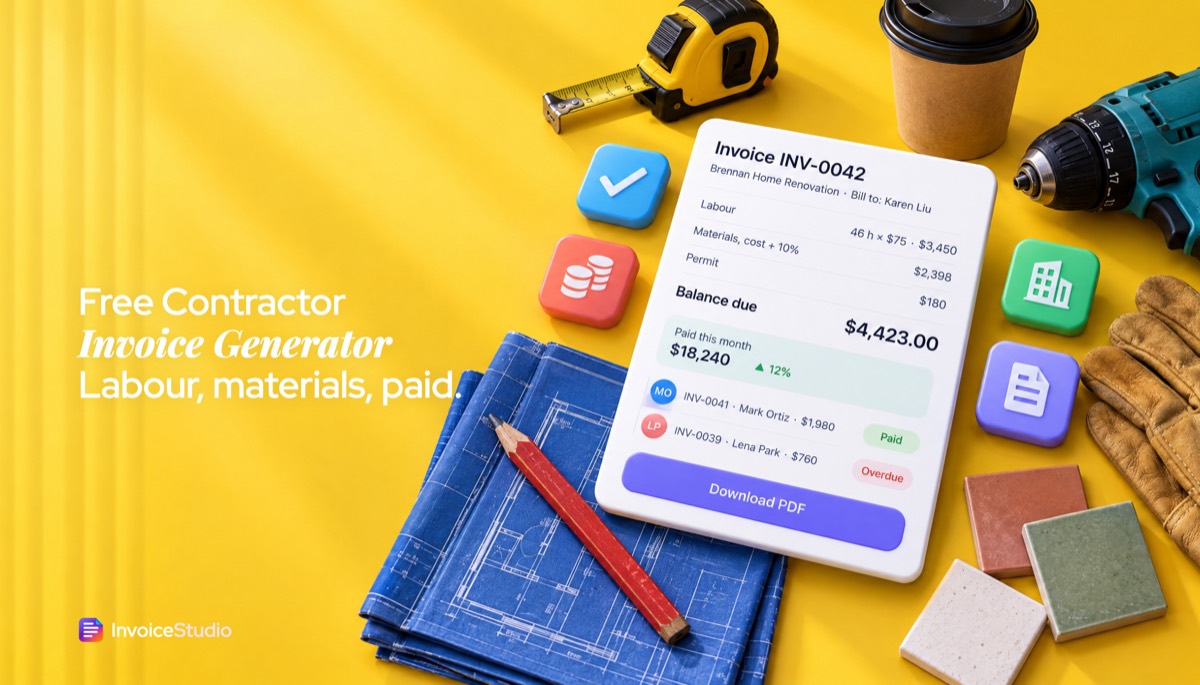
46 labour hours at $75, materials at cost plus 10% markup, a dumpster and a permit, with the $2,000 deposit shown and $4,423 left to pay.
8 hours at C$110 and C$1,450 of parts with 13% HST, plus the ESA permit fee passed through as a disbursement with no tax.
64 hours at $95 plus a $400 on-call fee, with the PO number, contract date and W-9 note that a US accounts payable team expects.
Labour and materials on separate lines, the domestic reverse charge wording, and the 20% CIS deduction worked out on labour only.
Three days at A$720 plus A$310 of materials, 10% GST on each line, the ABN and licence number printed under the business name.
Plain answers, worked examples and the rules that apply, all checked against the live product.
A contractor invoice generator builds a professional invoice for trade or contract work: labour and materials on separate lines, your markup, permits, any deposit already paid, tax, payment terms and how to pay. Invoice Studio does this free with a PDF download, both signatures and 28 designs, and tracks partial payments when you sign in.
A contractor invoice generator turns a finished job into a clear, numbered PDF: labour on one line, materials on another, permits and disposal after that, any deposit you already took, the tax, the balance and exactly how to pay. The tool above does all of that for builders, electricians, plumbers, tilers and independent contractors who bill by the hour, so it works as a plumbing invoice generator or an electrician invoice template with no setup. You fill in the lines, the totals are worked out, and you download the PDF with no watermark.
I've invoiced hundreds of clients, and the jobs that paid late almost never had a problem with the work. They had a problem with the invoice. One lump sum with no breakdown, a materials figure the homeowner couldn't check, no mention of the deposit, no due date. This guide fixes that. You'll get five worked examples you can load into the tool, a labour-plus-materials calculation with markup, a progress billing schedule with retainage, copy-paste wording, and country notes for the US, UK, EU, Canada, Australia, India and Bangladesh.
A contractor invoice generator is a tool that builds an invoice for trade or contract work from your details, the client's details and a list of labour, materials and extras, then calculates the totals and exports a PDF. It differs from a general generator because contract work has more moving parts than a product sale.
The word "contractor" means two different people, and most pages only serve one of them:
Invoice Studio handles both. Each line has its own quantity, rate, tax and discount, so labour can carry sales tax or HST while a permit passed through at cost carries none. You can add your signature and the client's, print payment methods under How to pay, and pick from 28 designs. A free account adds saved clients, automatic numbering and payment tracking. If you mostly bill creative or knowledge work, the invoice generator for freelancers has examples closer to yours.
A contractor invoice should include the word "Invoice", a unique number, the issue and due dates, your business name, address and licence or tax number, the client's name and billing address, the job site address, separate lines for labour and materials, any extras, tax, deposits received, the balance due, payment terms and how to pay.
Here's the checklist I run on every job invoice before it leaves the office:
For a deeper walk through every field, see how to make an invoice. If you'd rather start from a layout, our contractor invoice template guide has construction invoice template samples for more trades, including trucking and lawn care.
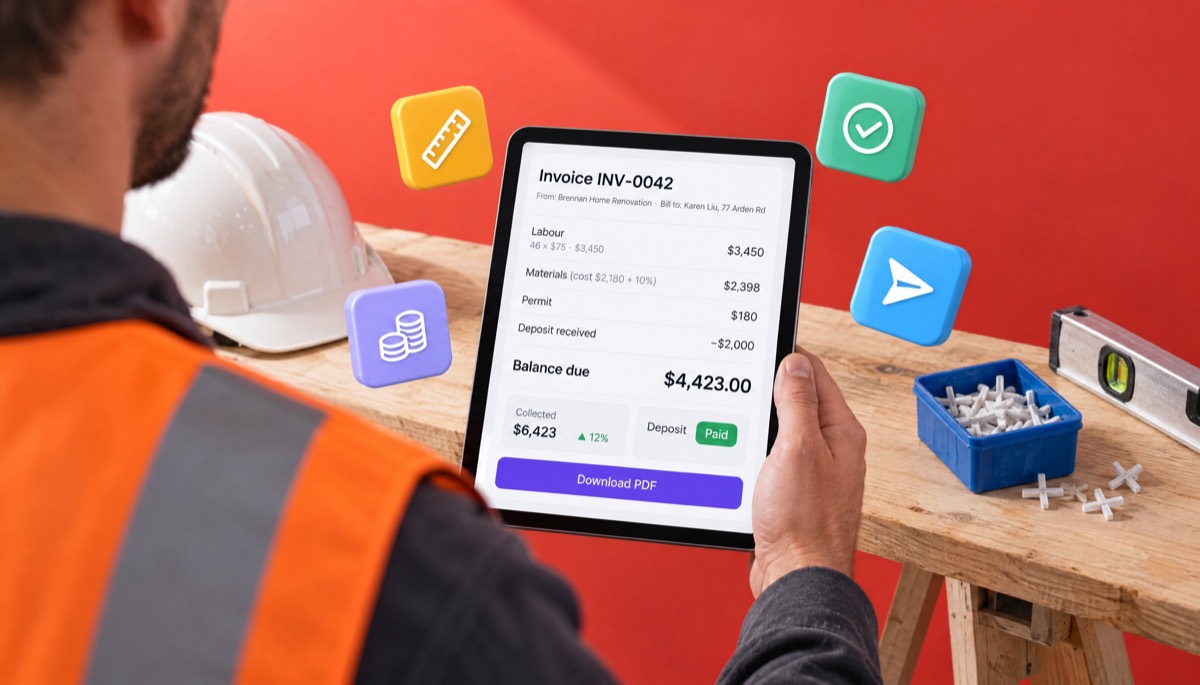
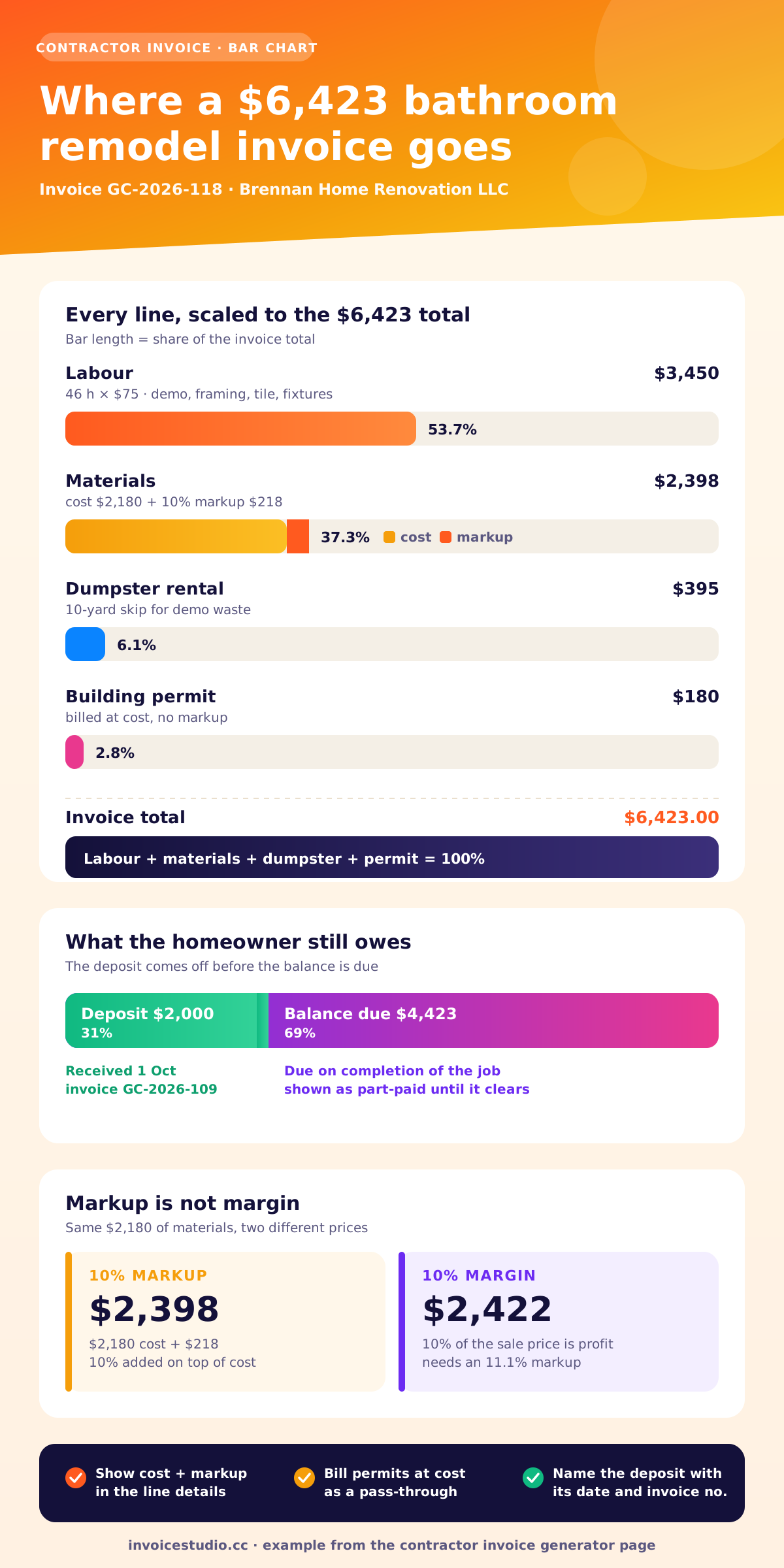
Put labour on its own line as hours times your rate, then materials on a second line at cost plus your markup, then each extra cost such as a permit or dumpster on its own line. Show the material cost in the line details so the client can match it to receipts.
Here's the bathroom remodel from the first example on this page, worked through. Brennan Home Renovation in Columbus, Ohio quoted a fixed scope, took a $2,000 deposit, and billed the rest on completion.
| Line | Quantity | Rate | Line total |
|---|---|---|---|
| Labour: demo, framing, tile and fixture install | 46 hours | $75 | $3,450.00 |
| Materials, cost $2,180 + 10% markup | 1 | $2,398 | $2,398.00 |
| Dumpster rental, 10-yard | 1 | $395 | $395.00 |
| Building permit, at cost | 1 | $180 | $180.00 |
| Total | $6,423.00 | ||
| Less deposit received 1 Oct (GC-2026-109) | -$2,000.00 | ||
| Balance due on completion | $4,423.00 |
Three things to notice. First, the markup is visible. Hide it inside one materials figure and a client will eventually find the tile online for less and ask why. Writing "cost $2,180 + 10%" answers the question before it's asked. Second, the permit is billed at cost. It's a pass-through, and marking up a government fee looks petty. Third, the deposit is named with its date and invoice number, so the client's records line up with yours.
Markup is not margin. A 10% markup on $2,180 adds $218. If you want a 10% margin on the sale price, you need to charge $2,422, which is a markup of about 11.1%. Most people get this wrong when they price from a target margin.
In the generator, enter the deposit in the notes, as the example does, and record it as a payment once you're signed in. Invoice Studio tracks partial payments and shows the invoice as part-paid, so you never chase money that's already in the bank.
If you bill a job at a property, you need a construction-style invoice with labour, materials, the job site and any deposit. If you bill a business for your time or deliverables under a contract, you need an independent contractor invoice with hours, the contract or PO reference and your tax details. The table shows how they differ.
| Field | Construction or trade invoice | Independent contractor invoice |
|---|---|---|
| Who pays | Homeowner, property manager or main contractor | A company's accounts payable team |
| Typical lines | Labour, materials, permits, disposal, equipment | Hours, days or milestones, sometimes expenses |
| Reference needed | Estimate, contract or change order number | Contract date and PO number |
| Address that matters | Job site address | Client's billing address |
| Tax details | Licence number, sales tax, VAT, GST or HST | EIN or SSN via W-9 (US), VAT or GST number if registered |
| Money held back | Deposits, progress draws, retainage | Rarely; sometimes a final milestone |
| Usual terms | Due on completion, Net 15, or a pay schedule | Net 15 to Net 30 |
| Example on this page | Ohio remodel, $6,423 | Texas data contractor, $6,480 |
For a US independent contractor, the client will usually ask for a Form W-9 before the first payment, so they can report what they paid you on Form 1099-NEC. Put "W-9 on file" in your notes once you've sent it, and AP won't hold your invoice waiting for one. The IRS also explains how it decides whether someone is an independent contractor or an employee.
The Texas example bills 64 hours at $95 plus a $400 flat on-call fee: $6,080 plus $400 is $6,480, Net 15, with the PO number and contract date in the notes. That's all an AP team needs to approve it on the first pass.
A deposit is money you invoice before work starts, usually to cover materials. Progress billing means invoicing in stages as the job reaches agreed milestones. Retainage is a percentage the client holds back from each progress payment until the job is finished and accepted, often 5% to 10% on commercial work.
Deposits first. For homeowner jobs, 10% to 50% is common, depending on how much you spend on materials up front. Check your local rules: California, for example, caps home improvement down payments at 10% of the contract price or $1,000, whichever is less. Send the deposit as its own invoice with one line, "Deposit, 30% of contract dated 29 Sep", and don't order custom items until it clears.
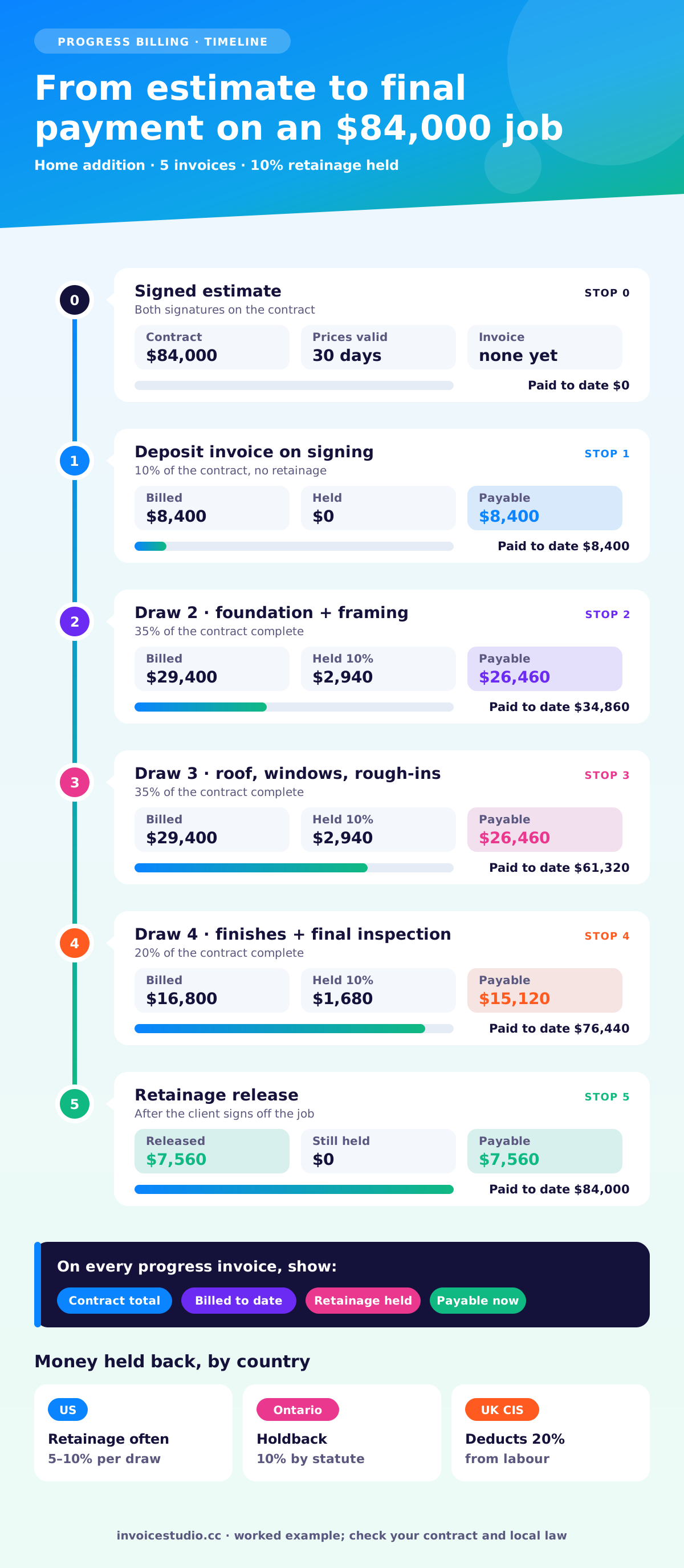
On larger jobs, progress billing keeps your cash flow alive. Here's a worked schedule for an $84,000 home addition with three draws and 10% retainage:
| Invoice | Milestone | Billed | Retainage held (10%) | Payable now |
|---|---|---|---|---|
| 1 | Deposit on signing | $8,400 | $0 | $8,400 |
| 2 | Foundation and framing complete (35%) | $29,400 | $2,940 | $26,460 |
| 3 | Roof, windows and rough-ins (35%) | $29,400 | $2,940 | $26,460 |
| 4 | Finishes and final inspection (20%) | $16,800 | $1,680 | $15,120 |
| 5 | Retainage release after sign-off | $7,560 | $0 | $7,560 |
| Total | $84,000 |
Each progress invoice should show the contract total, what's been billed to date, the retainage held so far and the amount payable now. In the generator, bill the milestone as one line, such as "Draw 2: foundation and framing complete, 35% of $84,000", and put the retainage and billed-to-date figures in the notes.
Build the estimate with the same line items you'll invoice, get the client to sign it, then switch the document to an invoice when the work is done and update the quantities to what actually happened. Any extra work goes on as a separate, approved change order line.
Here's how I do it in Invoice Studio:
If you'd rather start from a design, browse the free invoice templates. Corporate, Classic and Poster all read well on a phone.
Use due on completion or Net 15 for homeowner jobs, and follow the contract's pay schedule for commercial and subcontract work, which often runs Net 30. Whatever you choose, agree it in writing before work starts and print the actual due date on the invoice.
Late fees only work if they're agreed in the contract or set by law. In the UK, businesses can claim statutory interest and compensation on late commercial payments, at 8% above the Bank of England base rate. In the US, it depends on your contract and state law. When an invoice goes overdue, a polite reminder on day one usually works. With an account, Invoice Studio sends a reminder email in one click and marks the invoice overdue on your dashboard; see invoice payment reminders for wording.
Good invoice wording answers the client's question before they have to call. Paste these into the notes or line details and edit the numbers.
Materials at cost plus markup (line details):
Materials per attached list. Cost $2,180.00 plus 10% markup for sourcing, collection and handling. Receipts available on request.
Deposit invoice (notes):
Deposit of 30% under our contract dated 29 September 2026. Materials will be ordered when this payment clears. The balance will be invoiced on completion.
Final invoice with deposit (notes):
Total for the work: $6,423.00. Deposit of $2,000.00 received on 1 October (invoice GC-2026-109). Balance due on completion: $4,423.00.
Progress draw with retainage (notes):
Draw 2 of 4. Contract total $84,000.00. Billed to date $37,800.00. Retainage held at 10%: $2,940.00 on this draw, $2,940.00 to date. Payable now: $26,460.00.
Change order line:
Change order 2: add four recessed lights in hallway. Approved by Karen Liu by text on 14 October 2026.
Completion sign-off (above the client signature):
I confirm the work described on this invoice has been completed to my satisfaction.
Polite overdue email (subject: Invoice VE-0457, C$2,892.90, due 20 November):
Hi Priya, a quick note that invoice VE-0457 for the panel upgrade was due on 20 November. I've attached it again. You can pay by e-Transfer to billing@voltelectric.ca. If it's already on its way, thank you and please ignore this.
The core fields are the same everywhere, but tax and withholding rules for contractors change a lot by country, and sometimes by state or province. These notes are a starting point as of November 2026; check with your tax authority or accountant before relying on them.
Sales tax on construction varies by state. In many states a contractor improving real property pays sales tax on materials when buying them and doesn't charge it to the customer, while repair labour or separately stated materials may be taxable elsewhere. Look up your state's rules for contractors. Licence numbers are required on invoices and contracts in some states. Independent contractors should send a W-9 and track 1099-NEC reporting; the reporting threshold rose from $600 to $2,000 for payments made from 2026, so check the IRS page above for the current figure. Lien and notice deadlines are state-specific, so keep dated invoices for every stage, and collect a signed lien waiver with each progress payment when the job calls for one.
Under the Construction Industry Scheme, a contractor deducts 20% from a registered subcontractor's labour (30% if not registered, 0% with gross payment status). The deduction applies to labour only, not materials or VAT, which is why a CIS invoice must keep labour and materials on separate lines. Where a VAT-registered subcontractor supplies a VAT-registered contractor under CIS, the domestic reverse charge usually applies: you don't charge VAT, you state that the reverse charge applies, and you show the VAT the customer must account for. It doesn't apply when you bill the end user, such as a homeowner. The Stockport plastering example shows all of this: £3,040 total, £608 VAT for the customer to account for, £480 CIS deduction and £2,560 payable.
The EU VAT Directive lets member states apply a domestic reverse charge to construction work, and several do, including Germany and the Netherlands. Where it applies, the invoice carries no VAT and a reverse charge note. Rules and wording differ by country, so check your national tax authority.
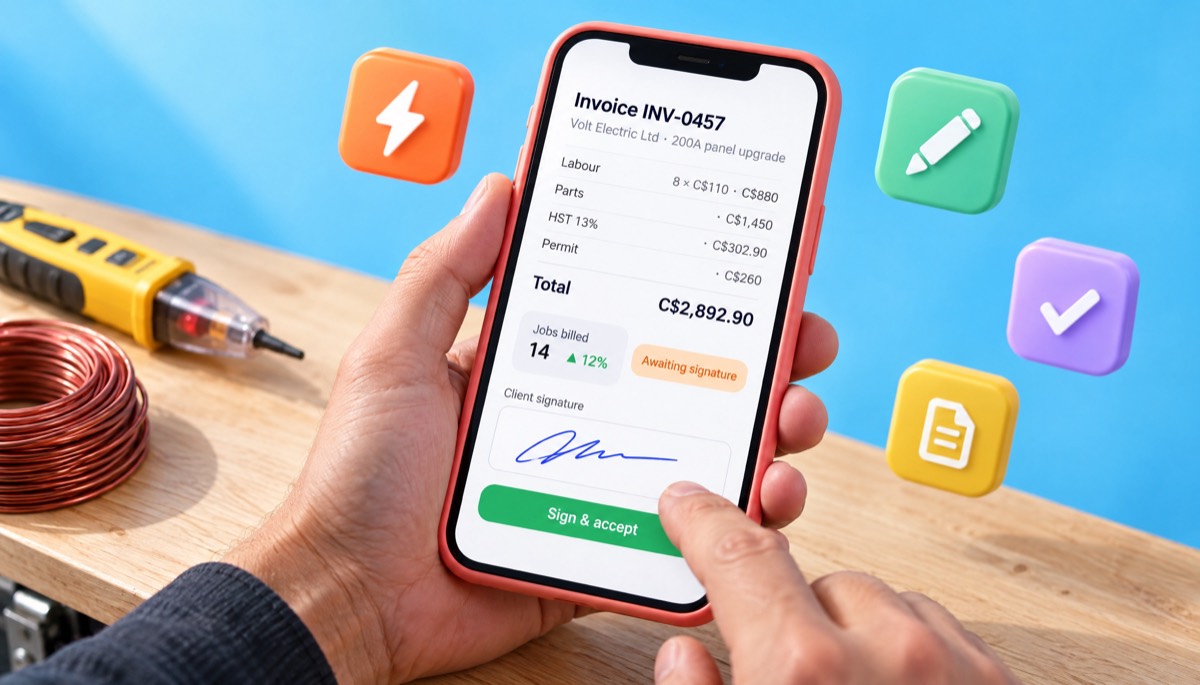
Register for GST/HST once your taxable supplies pass C$30,000 over four quarters, then show your GST/HST number and the tax. Ontario's HST is 13%, as in the Aurora electrician example: C$2,330 of labour and parts plus C$302.90 HST, plus the C$260 ESA permit fee passed through with no tax, for C$2,892.90. Ontario's Construction Act also sets a 10% holdback and prompt payment deadlines that start from a "proper invoice", so make sure yours meets the Act's content rules on covered projects.
Show your ABN on every invoice. If you don't, a business paying you may have to withhold tax at the top rate. Once registered for GST (from A$75,000 turnover), label it "Tax invoice" and show GST at 10%, as in the Queensland tiling example: A$2,470 plus A$247 GST, A$2,717 in total. Building and construction businesses report contractor payments to the ATO each year, so clients will want your ABN and details right. Each state also has security of payment laws that can treat an invoice as a payment claim, which gives you a fast route to recover unpaid amounts.
GST on works contracts is usually 18%, with lower rates for some specified works, so check the current rate notification. A GST tax invoice needs your GSTIN, the client's GSTIN for B2B work, the SAC code and the place of supply. Clients deduct TDS on contractor payments, generally 1% for individuals and HUFs and 2% for others, under the rules carried into the Income-tax Act 2025 from April 2026.
Government bodies, companies and other withholding entities usually deduct VAT and income tax at source from contractor bills, at rates set by the National Board of Revenue that change with the budget. Show your BIN and TIN on the invoice, and ask for the deduction certificate so you can claim the credit. Invoice Studio prints bKash, Nagad and bank details under How to pay.
The mistakes that delay contractor payments most are a single lump-sum line, a missing job address or PO number, unapproved extras, no due date and no clear way to pay. Each one gives the client a reason to wait.
For a handyman invoice on regular service visits, a maintenance contract or monthly cleaning, set up recurring invoices so the bill goes out on the same day every month without you remembering.
A contractor invoice generator is enough if you run a small crew and need professional invoices, estimates and payment tracking. Field service software makes sense when you need dispatching, scheduling, GPS tracking and job costing across many technicians, and it usually costs far more each month.
Most small crews use a fraction of a field service suite and pay for all of it. As your crew grows, small business invoicing software with saved clients, reports and payment tracking is usually the next step, long before you need dispatching. Invoice Studio's Free plan covers the PDF invoice, and paid plans start at $3 a month for emailing invoices and reminders. For more on choosing tools, read our free invoice app guide or browse more guides on the Invoice Studio blog.
Be clear about what Invoice Studio doesn't do today: there's no online card checkout and no client portal. Payment methods, such as bank transfer, card, Stripe, PayPal, Wise or check instructions, are printed on the invoice instead, and most contractor clients pay that way anyway.
Start with the job you finished this week. Load the closest example above, swap in your hours, materials and deposit, add your signature and download the PDF. For a quick one-off, the free invoice generator works too. Save the client in a free account, and the next invoice takes half the time. Pricing for every plan is on the pricing page.

Monjur builds Invoice Studio and incorporated MotionTrust Digital in September 2022, where he leads Amazon strategy across the client base. Eight years in e-commerce and marketplace marketing taught him how much time invoices and late payments eat, so every guide here is tested against the real product and current tax rules before it goes live.
InvoiceStudio: create invoices by voice, automate billing, and get paid faster. Bill your next job with labour, materials and the deposit on one clear page, then save the client so the next invoice takes seconds.