Free Invoice App: How to Choose One That Fits Your Business
A neutral buyer's guide to free invoice apps: what free really means, a 12-point scorecard, and how to automate recurring invoices, reminders and payment tracking.
- Written by
- Monjur Hossain
- Published
- Last updated
- Reading time
- 22 min read

A free invoice app lets you create, send and track invoices without a subscription, usually with limits on invoices, clients, monthly value or features. Pick one whose caps fit how you bill, that adds no watermark, and that includes recurring invoices, reminders, payment tracking and CSV export, so you can leave with your records.
On this page 14 sections
- What is a free invoice app and what should it do?
- Is a free invoice app really free? (caps, watermarks and trials)
- What features matter most in an invoicing app?
- Web invoice app vs phone app: which is better?
- Is there a free invoice app for iPhone, Android and Mac?
- How to automate invoicing with recurring invoices and reminders
- How to track invoices and payments without accounting software
- Free invoice software vs accounting software like QuickBooks
- Which invoice app suits freelancers, contractors and small businesses?
- Are free invoice apps safe for client data?
- How to switch invoice apps without losing your records
- How much does invoicing software cost when you outgrow free?
- My short answer on choosing a free invoice app
- FAQs
A free invoice app is software that lets you create, send and track invoices without paying a subscription, usually with some limit on how many invoices, clients or features you get. (If all you need is one PDF, an invoice generator with no signup is quicker still.) The right one depends less on the brand and more on three things: what the free plan actually caps, whether it handles the boring follow-up work (recurring invoices, reminders, payment status), and whether you can get your records out again when you leave.
I have sent a few hundred invoices over the years, first from a Word file, then from a spreadsheet, then from three different apps. Two of those apps were "free" until the month I needed them most. This guide is the buyer's checklist I wish I had at the start. It is neutral on purpose. Most pages ranking for "invoice app" are written by companies that put their own invoicing app at number one. I'll tell you what we build at Invoice Studio and, just as plainly, what it does not do, so you can rule it out if it is the wrong fit.
You will get a free-tier traps table, a 12-point scorecard you can use on any invoice app, a web vs phone comparison, a step-by-step setup for automating invoicing, worked examples with real numbers, and real plan prices for when free stops being enough.
What is a free invoice app and what should it do?
A free invoice app is a web or mobile tool that turns your job details into a professional invoice, usually a PDF, and helps you send it and see whether it was paid. At minimum it should number invoices for you, calculate tax and totals correctly, and keep a history you can search.
That last part is what separates an invoicing app from a template. A template in Word or Excel makes one document. An app keeps a record. When a client emails in March asking "did we pay invoice 1047?", a template leaves you digging through a downloads folder. An app shows you the status in two clicks.
Here is the job list I expect any invoice app to cover, free or not:
- Create: your business details, client details, line items with quantity and price, tax, discounts, due date and payment instructions. If you want the field-by-field breakdown, see how to make an invoice.
- Number: sequential invoice numbers that never repeat. Tax authorities in the UK and EU expect a unique sequential number, and it is good practice everywhere else.
- Send: download a PDF, print it, or email it with the PDF attached.
- Track: mark invoices as sent, partly paid, paid or overdue.
- Repeat: copy an old invoice, or schedule recurring invoices for retainers.
- Export: get a CSV of everything for your accountant or your tax return.
What a free invoice app does not need to do is be your accountant. Bank feeds, payroll, double-entry ledgers and balance sheets belong to accounting software. Plenty of freelancers pay for that layer years before they need it. More on that split later.
One legal point worth knowing early: the app does not make an invoice valid. The content does. In the UK, gov.uk lists what an invoice must include, such as a unique identification number, your company name and address, the date of supply and the amount due. A good app simply makes it hard to forget any of those fields.
Is a free invoice app really free? (caps, watermarks and trials)
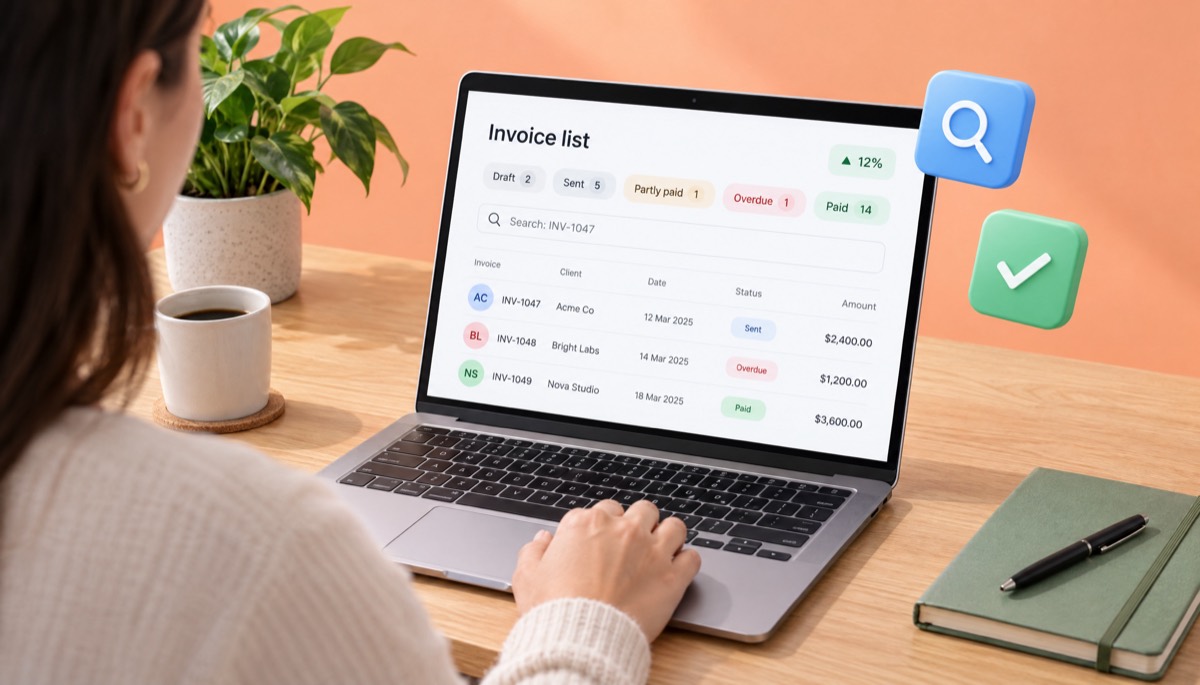
Sometimes, but usually with a catch. Search "invoice app free" and most of what you find limits you by invoice count, client count, dollar value per month or features, and some add their logo to your invoice or convert to a paid plan after a trial ends.
None of that is evil. Software costs money to run, and a free tier is a sampler. The problem is when the limit is hidden until you hit it. I once had a free plan block my fourth invoice of the month, on the 28th, with a client waiting for it. I paid on the spot, which was exactly what the design intended.
Before you enter a single client, check the pricing page for these six patterns:
| Free-tier trap | What it looks like | Why it hurts | What to check |
|---|---|---|---|
| Invoice count cap | "Up to 5 invoices a month" | Fine in a slow month, blocking in a busy one | Does the cap reset monthly, and do drafts count? |
| Client cap | "Free for up to 5 clients" | Client number six forces an upgrade | Can you archive old clients to free a slot? |
| Dollar value cap | "Free up to $1,000 invoiced per 30 days" | One mid-size project breaks it | Is it billed value or collected value? |
| Watermark or branding | "Made with [app]" footer on your PDF | Looks cheap to a corporate client | Download a test PDF and look at the footer |
| Trial that converts | "Free for 14 days", card required | You get charged if you forget | Is a card needed to start? Set a calendar reminder |
| Feature lock | Reminders, recurring or export only on paid plans | The tool is free, the useful parts are not | Can you export your data on the free plan? |
The last row matters most. An app that lets you create invoices for free but charges you to export them has your records hostage. I would skip any tool where CSV or PDF export is behind a paywall, however nice the templates look.
A quick worked example
Say you are a designer with four regular clients, billing about $3,200 a month. You send six invoices in a normal month and ten in a busy one.
- A "5 invoices a month" free plan fails you every single month.
- A "$1,000 per 30 days" cap fails you on the first invoice of any real size.
- A "5 clients" cap works today and fails when you land client number five plus one.
So the honest question is not "is it free?" but "is it free for the way I bill?" Write down your invoices per month, clients per month and typical invoice value before you compare anything. Those three numbers decide which free plan is genuinely free for you.
A totally free invoice app does exist in the sense of a free generator: you fill in a form and download a PDF with no account. That covers the "make" job. It rarely covers tracking, reminders or history, which is where the time savings live.
What features matter most in an invoicing app?
The features that matter most are correct tax and totals, automatic numbering, PDF and email sending, payment status tracking, recurring invoices and reminders, and data export. Design and template count come after those, not before.
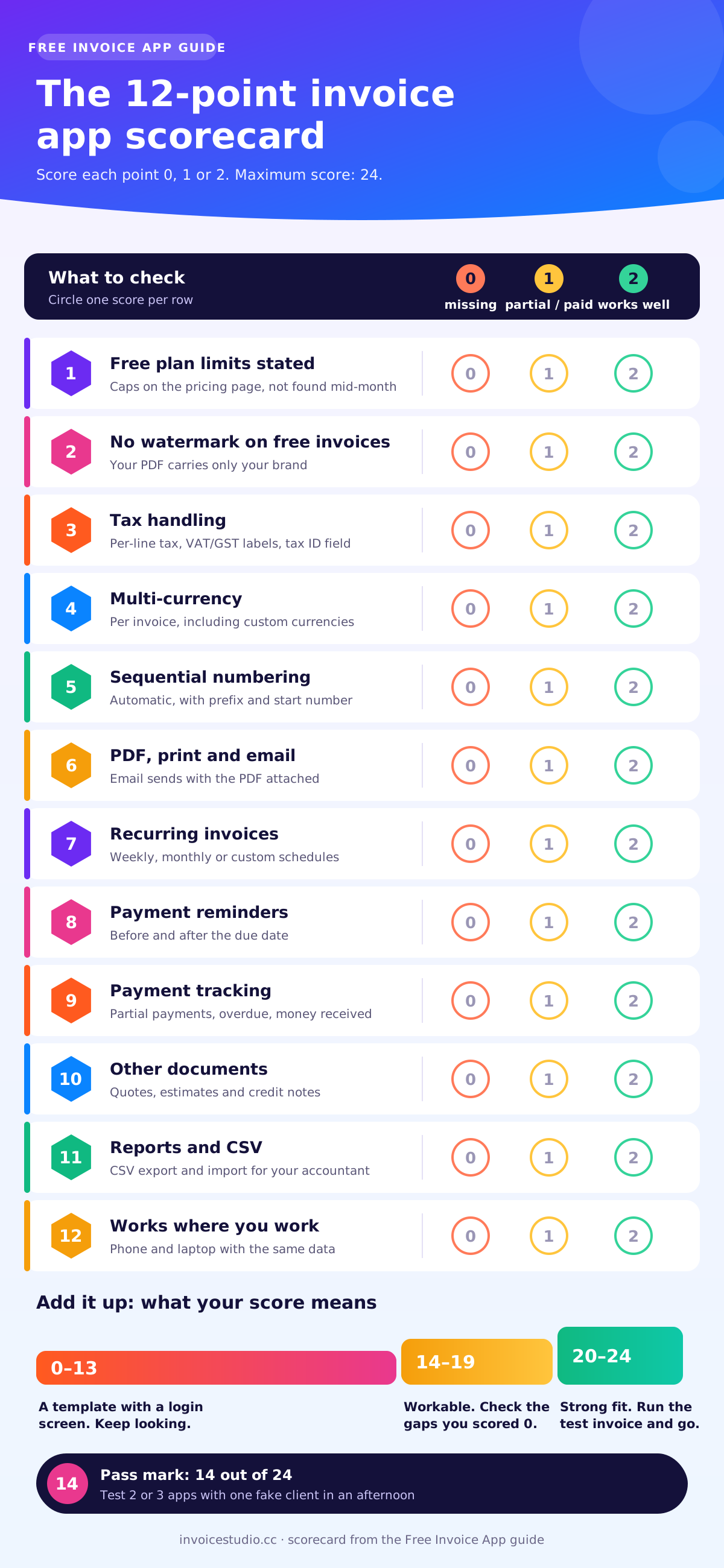
Most comparison listicles score apps on how many templates they have or how pretty the dashboard is. I score them on whether they save me time and stop me losing money. Here is the 12-point scorecard I use. Give each point 0 (missing), 1 (partial or paid only) or 2 (included and works well). Anything under 14 out of 24 is a template with a login screen.
| # | Scorecard point | What "2 points" looks like |
|---|---|---|
| 1 | Free plan limits are stated up front | Caps listed on the pricing page, not discovered mid-month |
| 2 | No watermark on free invoices | Your PDF carries only your brand |
| 3 | Tax handling | Per-line tax, invoice-level tax, VAT or GST labels, tax registration number field |
| 4 | Multi-currency | Choose currency per invoice, including ones the app does not list |
| 5 | Automatic sequential numbering | Numbers never repeat, and you can set a prefix and starting number |
| 6 | PDF, print and email | Email sends with the PDF attached, not just a link |
| 7 | Recurring invoices | Weekly, monthly or custom schedules for retainers |
| 8 | Payment reminders | Reminders before and after the due date |
| 9 | Payment tracking | Partial payments, overdue status, a total of money received |
| 10 | Other documents | Quotes, estimates and credit notes that use the same client list |
| 11 | Reports and export | CSV export and import, so you can leave or hand data to an accountant |
| 12 | Works where you work | Usable on a phone and a laptop with the same data |
When you search for the best invoice app, the names you will meet most often are FreshBooks, QuickBooks, Xero, Wave, Zoho Invoice, Square Invoices and Invoice Simple. At the time of writing, Wave, Zoho Invoice and Square Invoices offer free invoicing plans; FreshBooks, QuickBooks and Xero are paid accounting suites with trials; and Invoice Simple is a subscription invoice maker app for phones. Plans change often, so score each one on the day you compare. If you are weighing Zoho, see our Zoho Invoice alternative comparison.
Run two or three apps through this in an afternoon. Make a fake client, create a three-line invoice with tax and a discount, email it to yourself, mark it half paid, then export a CSV. You will learn more in that hour than from any review.
Features that sound good but matter less
Huge template libraries. You will use one template, maybe two. A clean layout with your logo and brand colour beats 300 designs you scroll past. If you want to see what a tidy layout looks like, the 28 Invoice Studio invoice templates show the range, and you will still end up picking one.
Built-in card checkout. Useful if your clients pay by card, but every card payment carries a processing fee, usually a few percent of the invoice plus a small fixed charge. Many freelancers and B2B suppliers get paid by bank transfer anyway. What you need for sure is clear payment instructions printed on the invoice: bank details, PayPal, Wise or whatever your clients use.
AI everything. AI is useful for drafting an invoice from a sentence or a voice note. It is not useful for deciding your tax rate. If that interests you, try an AI invoice generator, or read my test of whether ChatGPT can make an invoice.
Web invoice app vs phone app: which is better?
For most people a web invoice app is better because it works on any device, including your phone's browser, and keeps one set of records. A native phone app is better only if you invoice on job sites all day, need offline access, or want to take photos of receipts.
The App Store is full of apps called "Invoice Maker" or "Free Invoice". Many are fine. Some charge a weekly subscription after a three-day trial, which works out far more expensive than a monthly plan. Check the in-app purchase list on the listing before you install.
| Question | Web invoice app | Phone app (iPhone or Android) |
|---|---|---|
| Works on laptop and phone | Yes, in any browser | Phone first; desktop varies by app |
| Install needed | No | Yes, plus updates |
| Typing long line items | Easy on a keyboard | Slow on a small screen |
| Invoicing at the job site | Works if you have signal | Good, some apps work offline |
| Typical pricing model | Monthly or yearly plans | Often weekly or monthly in-app subscriptions |
| Switching devices | Log in anywhere | Depends on cloud sync |
Is there a free invoice app for iPhone, Android and Mac?
Yes. Any decent web app works in Safari or Chrome on a phone, and most native apps are built for exactly that. On a Mac, a browser-based billing app does the same job as invoice software for Mac, with nothing to install and no Windows-only features to miss. The trick for phone invoicing is cutting the typing. Save your common line items, reuse the client from last time, and if the app supports it, dictate the invoice. Invoice Studio has voice invoicing in 20 languages, including Bangla, where you say "invoice Rahim for three hours of plumbing at 1,200 taka an hour" and it builds the lines. That is far faster on a phone than thumb-typing.
If you specifically want an invoice app for iPhone or a free invoice maker app for Android, my advice is to try the web version of whatever you are considering in Safari first. If it works well there, you may not need an install at all, and your data is the same when you sit down at a laptop on Friday to do the week's admin.
How to automate invoicing with recurring invoices and reminders
You automate invoicing by setting up recurring invoices for any work you bill on a schedule, turning on payment reminders tied to the due date, and letting the app flip unpaid invoices to overdue on its own. Those three settings remove most of the weekly admin, which is the main job of invoicing software for small businesses.
A recurring invoice is an invoice the software creates and sends automatically on a fixed schedule, such as the 1st of every month, using the same client, line items and terms. Note what it is not: a recurring invoice is not the same as automatic card charging. Some systems also charge a saved card. Invoice Studio does not; it creates and emails the invoice, and your client pays using the methods you print on it.
Step-by-step: set up a retainer that runs itself
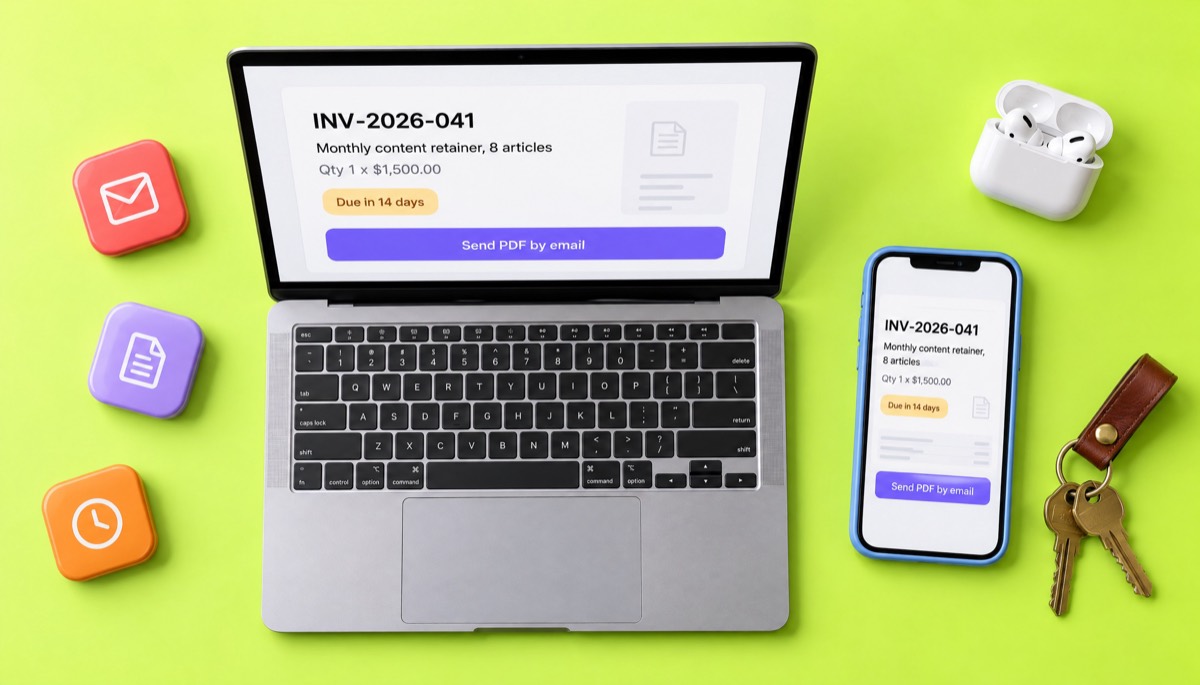
Here is the exact workflow I use for a $1,500-a-month retainer client on net 14 terms.
- Create the client once with the billing email their accounts team actually reads. Ask them. It is often not the person you work with.
- Build the template invoice: one line, "Monthly content retainer, 8 articles", quantity 1, price $1,500. Add tax if you charge it. Payment terms: due 14 days from issue. If you are unsure which terms to use, see net 30 payment terms explained.
- Set the schedule: monthly, on the 1st, starting next month, with no end date or an end date matching the contract.
- Choose how it goes out: emailed with the PDF attached, or created as a draft you glance at before sending. Send yourself a copy for the first two months to check it looks right.
- Plan your invoice reminders: ideally one friendly reminder 3 days before the due date, one on the due date and one 7 days after. If your app offers fewer options, the 7-days-after reminder is the one that matters. In Invoice Studio you send each reminder in one click from the dashboard, which lists the invoices that need one; fully automatic reminder schedules are coming soon.
- Let status do the work: on day 15 an unpaid invoice should show as overdue on your dashboard without you lifting a finger.
- Review once a month: five minutes on the 20th to see who has paid and who needs a personal email.
Over a year, that is 12 invoices and up to 36 reminders you never type. At even five minutes each, you get back roughly four hours, and more important, you stop forgetting. Most late payments I have had were not bad clients. They were busy clients plus a supplier (me) who forgot to chase.
Automation mistakes I see all the time
- Automating a wrong invoice. If the first recurring invoice has the wrong tax rate, so will the next eleven. Check the first one line by line.
- Forgetting price changes. When you raise the retainer from $1,500 to $1,650 in January, update the schedule the same day you agree it, not the day the client queries the old amount.
- Reminders to the wrong inbox. Automated reminders sent to your day-to-day contact often sit unread. Send them to accounts payable and copy your contact.
- No end date. When a contract ends, stop the schedule. Billing a former client by mistake is awkward to fix and usually needs a credit note.
Copy-paste reminder wording
Most apps let you edit the reminder text. Keep it short and specific. Here are the three I use:
3 days before: Hi Priya, a quick heads-up that invoice INV-2026-041 for $1,500 is due on 14 November. The PDF is attached and payment details are on page one. Thanks!
On the due date: Hi Priya, invoice INV-2026-041 for $1,500 is due today. If it is already on its way, please ignore this. If anything is holding it up, let me know and I will help sort it out.
7 days overdue: Hi Priya, invoice INV-2026-041 for $1,500 is now 7 days overdue. Could you confirm when payment is scheduled? I have attached the invoice again for convenience.
For firmer follow-ups past 30 days, I keep a longer set of templates in how to ask for payment politely.
UK tip: if a business client pays late, you may be entitled to statutory interest at 8% plus the Bank of England base rate, plus a fixed recovery sum. Gov.uk explains the rules on late commercial payments. Mentioning this in your terms tends to speed things up without you ever charging it.
How to track invoices and payments without accounting software
You track invoices without accounting software by recording every invoice's status (draft, sent, partly paid, paid, overdue) and each payment against it, inside your invoice app or a simple invoice tracker sheet. For a freelancer or small business with under a few hundred invoices a year, that is usually enough.
An invoice tracker, at its simplest, is a table with these columns: invoice number, client, issue date, due date, amount, amount paid, balance and status. If your invoicing app keeps those for you, you do not need a separate spreadsheet. If it does not, you will end up maintaining one by hand, and that is where errors creep in.
Recording a partial payment: a worked example
Record the payment against the invoice with the amount and date, and let the app recalculate the balance. Do not edit the invoice total down. Here is a worked example.
You quote a $2,400 website project with 50% upfront. You send invoice INV-2026-052 for the full $2,400, due on delivery, with a note that a $1,200 deposit is due now.
| Date | Event | Paid | Balance | Status |
|---|---|---|---|---|
| 3 Nov | Invoice sent | $0 | $2,400 | Sent |
| 6 Nov | Deposit received by bank transfer | $1,200 | $1,200 | Partly paid |
| 20 Nov | Site delivered, due date passes | $1,200 | $1,200 | Overdue |
| 24 Nov | Final payment via PayPal, $1,200 | $2,400 | $0 | Paid |
The invoice stays at $2,400 the whole time, which is what your records and any tax authority expect. The payments tell the story. If the client had negotiated the price down to $2,200 instead, you would issue a credit note for $200 rather than editing the original; see credit memo vs credit note for how that works.
Some people prefer two separate invoices, one for the deposit and one for the balance. Both approaches are fine. Pick one and stay consistent, so your accounts receivable numbers make sense at year end.
The monthly money check
Once a month, look at three numbers on your dashboard: money received this month, money outstanding, and money overdue. If overdue is more than about a quarter of outstanding, you have a chasing problem, not a sales problem. The SBA's guide to managing your finances makes the same point about cash flow in more general terms: profit on paper is not money in the bank.
Free invoice software vs accounting software like QuickBooks
Free invoice software handles the sales side: quotes, invoices, payments received and reports on what you billed. Accounting software like QuickBooks handles the whole business: bank feeds, expenses, a general ledger, profit and loss, and often payroll. You need invoicing software from your first client; you need accounting software when your bookkeeping gets complex.
| Job | Invoice app | Accounting software |
|---|---|---|
| Create and send invoices | Yes, the core job | Yes |
| Quotes, estimates, credit notes | Usually | Usually |
| Track payments received | Yes | Yes, matched to bank feeds |
| Record expenses and bills | Rarely | Yes |
| Double-entry ledger, balance sheet | No | Yes |
| Payroll | No | Often, as an add-on |
| Learning curve | Minutes | Hours to days |
| Typical cost | Free to around $10 a month | Usually much more, check current pricing |
When an invoice app is all you need
No. You can legally invoice from a simple app, a template or even a handwritten pad, as long as the invoice has the required details and you keep records. Many sole traders run for years on an invoice app plus a spreadsheet of expenses, then hand both to an accountant once a year.
The signs you have outgrown the invoice-only setup: you have employees, you hold inventory, you are VAT or GST registered with lots of purchase invoices to reclaim, or your accountant is charging you extra to tidy your records. At that point, pick accounting software and keep exporting your invoice data into it, or move invoicing over.
This is a good place to be blunt about Invoice Studio: it is invoicing software, not accounting software. It has no ledger, no bank feeds and no payroll. It does have reports and CSV export, which is what your accountant needs from the sales side.
Which invoice app suits freelancers, contractors and small businesses?
Freelancers need fast invoices, multiple currencies and clear payment links. Contractors need quotes that turn into invoices, deposits and progress payments. Small businesses with staff need recurring invoices, reminders, reports and room for more than one user. Match the app to how you bill, not to who ranks first in a listicle.
Invoicing software for freelancers
If you are a freelancer, especially one with overseas clients, the must-haves are multi-currency invoices and flexible payment instructions. A UK-based developer billing a US client in USD and a German client in EUR needs both on the same account. Look for the ability to print several payment methods under "How to pay": bank transfer, PayPal, Wise or Payoneer. Freelancers in Bangladesh and South Asia should check for local options like bKash and Nagad, which most Western apps ignore. A free invoice generator is often enough for your first few clients; move to a full app once you have repeat billing.
Invoice app for contractors and trades
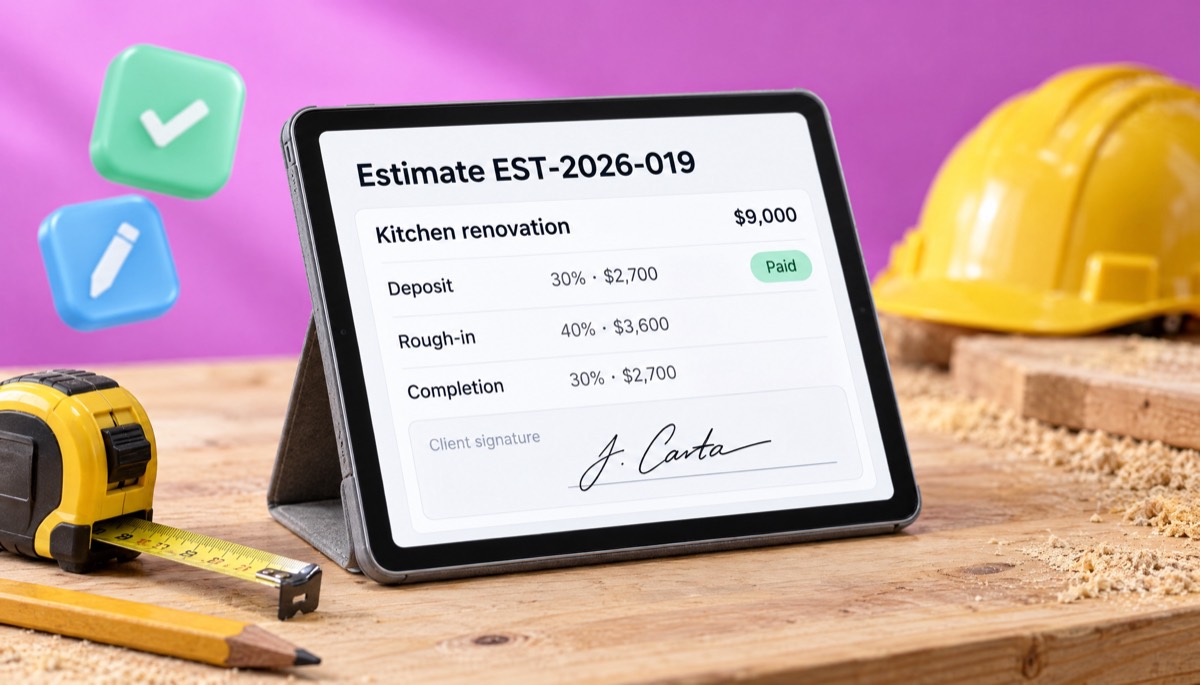
Contractors live on estimates and deposits. You want to send an estimate, get it accepted, convert it to an invoice without retyping, and take a deposit. A typical example: a $9,000 kitchen job billed 30% on booking ($2,700), 40% at rough-in ($3,600) and 30% at completion ($2,700). The app needs to show each part and the running balance. Signatures help too. A signed estimate settles a lot of "I never agreed to that" arguments.
Invoice app for small business
Once you have a team, priorities shift to consistency: the same template, the same numbering, the same terms whoever sends the invoice. Recurring invoices and automatic reminders matter more because nobody "owns" chasing. Reports by client and period matter for planning. Check whether the plan includes more than one user before you move the whole team over. Free invoicing software for small business teams often caps users at one.
Country notes worth checking
- US: no federal invoice format, but sales tax varies by state and city. The IRS expects you to keep records that support your income.
- UK: VAT-registered businesses must issue VAT invoices with specific fields, covered in HMRC VAT Notice 700/21. Our VAT invoice requirements guide walks through them.
- EU: invoice content is set by the VAT Directive, summarised by the European Commission's page on VAT invoicing rules, including reverse-charge wording. Several member states are rolling out mandatory e-invoicing, so check your country.
- Canada: GST/HST registrants need their registration number on invoices above certain amounts.
- Australia: GST-registered businesses issue tax invoices, with extra details required on sales of $1,000 or more.
- India: GST invoices need GSTIN, HSN or SAC codes and the place of supply; see our GST invoice format guide.
- Bangladesh: VAT-registered businesses follow NBR Mushak forms for VAT invoices; a general invoice app is fine for non-VAT freelance billing.
Rules change, and they vary by business type. Treat these as pointers and confirm with your tax authority or accountant.
Are free invoice apps safe for client data?
Most reputable free invoice apps are safe enough for invoice data, but "free" does not tell you how a company stores, shares or monetises your data. Check for HTTPS, a clear privacy policy, two-factor or strong login options, the ability to export and delete your data, and an identifiable company behind the app.
An invoice holds more than you might think: client names and addresses, email addresses, what you charged, your bank details, sometimes tax IDs. In the EU and UK, client contact details are personal data under GDPR, so you have some responsibility for where you put them.
My five-minute safety check:
- Who runs it? A named company with a contact address, not just an anonymous app listing.
- What does the privacy policy say? Search it for "sell", "third parties" and "advertising".
- Can you delete your account and data? If the answer is buried or absent, be wary.
- Is the connection secure? The web app should run on HTTPS everywhere, not only on the login page.
- Can you export everything? Your safety net if the app shuts down or changes its pricing.
On your side, use a unique password, and avoid putting full bank card numbers on invoices. Bank account details for transfers are normal; card numbers never are. The phrase "are free invoice generators safe?" comes up on Reddit mostly in two contexts: clone sites that look like real tools, and trials that silently convert to paid. Both are avoided by checking the company and the pricing page before entering anything real.
How to switch invoice apps without losing your records
To switch invoice apps safely, export every invoice as both CSV and PDF from the old app, import clients and items into the new one, continue your invoice numbering where you left off, and keep the old archive for as long as your tax authority requires. Never delete the old account until you have checked the export.
I have switched three times. The first time I lost two years of PDFs because the old app only exported a summary CSV, and I deleted the account before checking. Do not do what I did.
The switching checklist
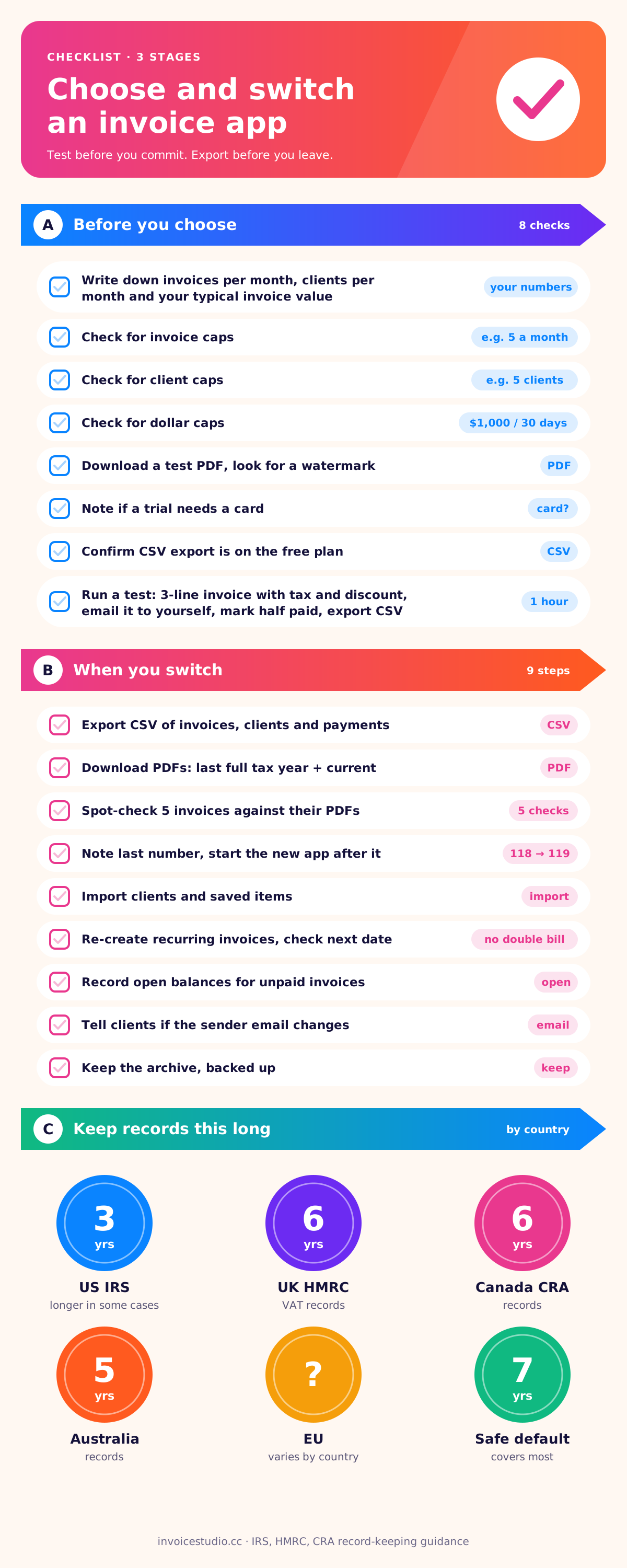
- Export a CSV of invoices, clients and payments from the old app.
- Download PDFs of every invoice, at least for the last full tax year and the current one.
- Open the CSV and spot-check five invoices against their PDFs: totals, dates, tax.
- Note your last invoice number, say INV-2026-118, and set the new app to start at 119. Gaps or restarts confuse auditors; our invoice number guide covers formats.
- Import clients and saved items via CSV into the new app.
- Re-create recurring invoices by hand and double-check the next send date so clients are not billed twice.
- Record open balances: for unpaid invoices, decide whether to track them in the old app until paid or re-enter them.
- Tell clients if anything changes on their side, such as the sender email.
- Keep the archive. Store the PDFs and CSV somewhere backed up.
How long should you keep invoice records?
It depends on where you are. The IRS explains that the period depends on your situation, commonly three years and longer in some cases; see how long to keep records. In the UK, HMRC generally expects VAT records to be kept for at least six years. Canada's CRA asks for six years from the end of the tax year they relate to, set out on its section 230 of the Income Tax Act. Australia generally expects five years. EU countries vary widely. If in doubt, keep invoices for seven years; storage is cheap and audits are not.
How much does invoicing software cost when you outgrow free?
Paid invoicing software for freelancers and small businesses usually costs somewhere between a few dollars and a few tens of dollars a month, depending on users, volume and extras like card payments or accounting. Invoice Studio's plans are Free, Starter at $3 a month, Pro at $7, Business at $10 and Enterprise at $29, with yearly and lifetime options.
Here is the context I use when deciding whether to pay: if one paid feature brings in a single overdue payment a month faster, it pays for itself. A $7 plan with recurring invoices and one-click reminders only has to recover one forgotten $500 invoice in a year to be worth it many times over.
| Invoice Studio plan | Price | Fits |
|---|---|---|
| Free | $0 | Trying the app, occasional invoices |
| Starter | $3 a month | New freelancers with regular clients |
| Pro | $7 a month | Busy freelancers using recurring invoices and reminders |
| Business | $10 a month | Small businesses with steady volume |
| Enterprise | $29 a month | Larger teams and heavy use |
Exact limits per plan are on the pricing page; check them against the three numbers you wrote down earlier (invoices, clients, value per month).
What Invoice Studio does and does not do
So you can judge the fit honestly:
- It does: 28 templates with your logo, brand colour, font and A4 or Letter paper; PDF download and print; 14 currencies plus custom ones; per-line tax and discounts, shipping and "Tax & fees" rows for VAT, sales tax or processing fees; payment methods printed under "How to pay" (Stripe, PayPal, Wise, crypto, bank, card, Payoneer, bKash, Nagad, cash); your signature and your client's; quotes, estimates, credit notes, purchase orders and delivery notes; recurring invoices; emailing invoices with the PDF attached and reminders; partial and full payment tracking, overdue status and a dashboard of money received; reports and CSV export or import; voice invoicing in 20 languages.
- It does not: take card payments online through a checkout on the invoice, give your clients a portal to log in to, or keep an accounting ledger. If you need any of those, use a tool that has them, or pair Invoice Studio with your payment provider and your accountant's software.
My short answer on choosing a free invoice app
Start with your own numbers, not someone's top-ten list. Count your invoices, clients and typical invoice value per month. Rule out any free invoice app whose caps you will hit, any that watermarks your PDFs, and any that locks export behind a paywall. Then run the 12-point scorecard on two or three survivors with a real test invoice, including a partial payment and a CSV export.
If you bill on a schedule, recurring invoices and reminders will save you more time than any other feature. If you work from a phone, try the web version in your phone's browser before you install anything. And whatever you choose, keep exporting your records. The best invoicing app is the one you can leave cleanly, because that is the one that never holds your business hostage.
When you are ready to send the first one, our guide on how to send an invoice covers the email, the PDF and the subject line, and the Word and Excel template guide is there if you would rather start offline.
Frequently asked questions
What is the best free invoicing software for a small business?
Are free invoice generators safe?
Is there a totally free invoice app?
Can I make invoices on my phone?
What is a recurring invoice?
How do I mark an invoice as partially paid?
Do I need accounting software to send invoices?
Monjur builds Invoice Studio and incorporated MotionTrust Digital in September 2022, where he leads Amazon strategy across the client base. Eight years in e-commerce and marketplace marketing taught him how much time invoices and late payments eat, so every guide here is tested against the real product and current tax rules before it goes live.
More guides by Monjur