Invoice before you leave the job
Say the invoice while the details are fresh, on site or between calls. Same-day invoices get paid sooner and miss fewer extras.
Our free voice invoice generator turns one spoken sentence into an editable invoice with totals and a PDF. InvoiceStudio: create invoices by voice, automate billing, and get paid faster.
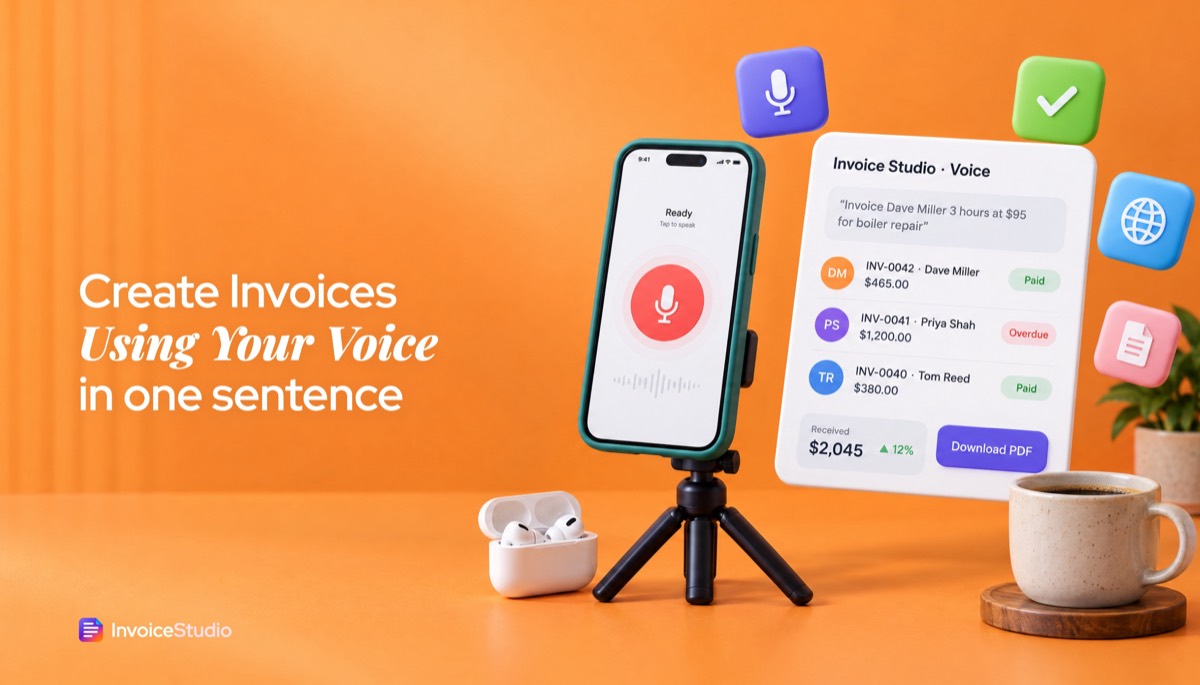
Say "Invoice [client] [qty] [item] at [rate], due in [days], [payment method]". Works in English and Bangla, free.
Say the invoice while the details are fresh, on site or between calls. Same-day invoices get paid sooner and miss fewer extras.
Client, items, quantities, rates, currency, tax, discount, due date and payment method come from one spoken line. The maths is done for you.
The free tool understands English and Bangla in the browser. Signed-in AI plans use Claude plus ElevenLabs in 20 languages, including Hindi, Arabic and Spanish.
Everything lands in an editable preview. Fix a misheard name or number in a click, then download or send.
Say PayPal, Wise, Stripe, bank transfer, bKash or Nagad and it prints under How to pay. Say a bKash number and it becomes the account.
Pick one of 28 designs, add your logo and brand colour, and print on A4 or Letter. No watermark on the PDF.
Allow microphone access, then say: "Invoice [client] [qty] [item] at [rate], due in [days], [payment method]." Prefer typing? Type the same sentence.
Read the client, items, total, tax and due date in the preview. Edit any field the tool misheard and add your logo.
Download the PDF straight away, or create a free account to save it, email it with the PDF attached and track the payment.
Pick one to load it into the tool above, then change anything.
Three hours at $95 plus a $180 valve, due in 7 days, paid by bank transfer. Two lines from one sentence.
£1,450 for the day plus VAT at 20%, net 14. Add your VAT number once in settings.
A logo invoice in Bangla with bKash under How to pay, due in 10 days. Free, no account.
₹45,000 plus GST at 18%, due in 15 days. Add GSTIN and place of supply before sending.
Two days at A$450 plus 10% GST, net 14. Title it a Tax invoice and add your ABN.
Plain answers, worked examples and the rules that apply, all checked against the live product.
A voice invoice generator turns a spoken sentence into a finished invoice. Say the client, quantity, item, price, due date and payment method, and the tool fills every field, calculates the total and gives you an editable PDF. Invoice Studio's free tool works in English and Bangla; AI plans support 20 languages.
A voice invoice generator lets you say an invoice out loud and get a finished, editable invoice back: client, line items, currency, tax, due date and payment method, all filled in. I've sent hundreds of invoices, and the worst ones were always the ones I meant to write "tonight" after a long job. Saying one sentence while you pack up the van or close the laptop fixes that. This guide shows exactly what to say, what the tool hears, five worked examples with real totals, and the checks you should still make before anything goes to a client.
Quick facts first: the free voice invoice generator on this page runs in your browser and understands English and Bangla. Signed-in accounts on plans that include AI use Claude plus ElevenLabs and work in 20 languages, including Bangla, Hindi, Arabic and Spanish.
A voice invoice generator, also sold as voice to invoice software or a voice invoicing app, is a tool that turns spoken words into invoice fields. You talk, speech recognition writes down what you said, and a parser picks out the client name, the amounts, the quantities, the currency, any tax or discount, the due date and how you want to be paid.
That's different from plain dictation. If you dictate an invoice into a Word document, you still have to do the maths, format the table and remember the invoice number. A voice invoice generator goes from speech to invoice in one step: totals calculated, the invoice number set, the payment method printed under "How to pay", and a PDF ready to download. You get an invoice generator from a voice command, not a transcript. If you'd rather type than talk, the AI invoice generator does the same job from a typed sentence.
There are three parts to it:
You tap the mic, say who the invoice is for, what you did and how much it costs, then check the preview and download the PDF. The whole thing takes about a minute the first time and under 30 seconds once you know the pattern.
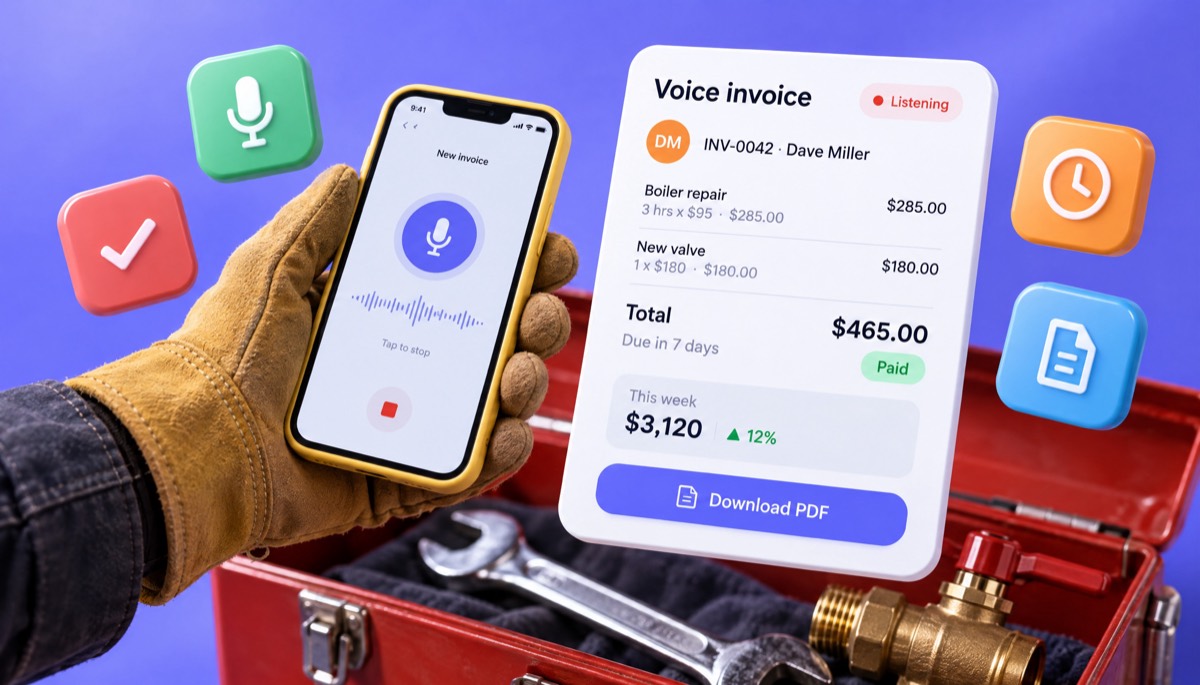
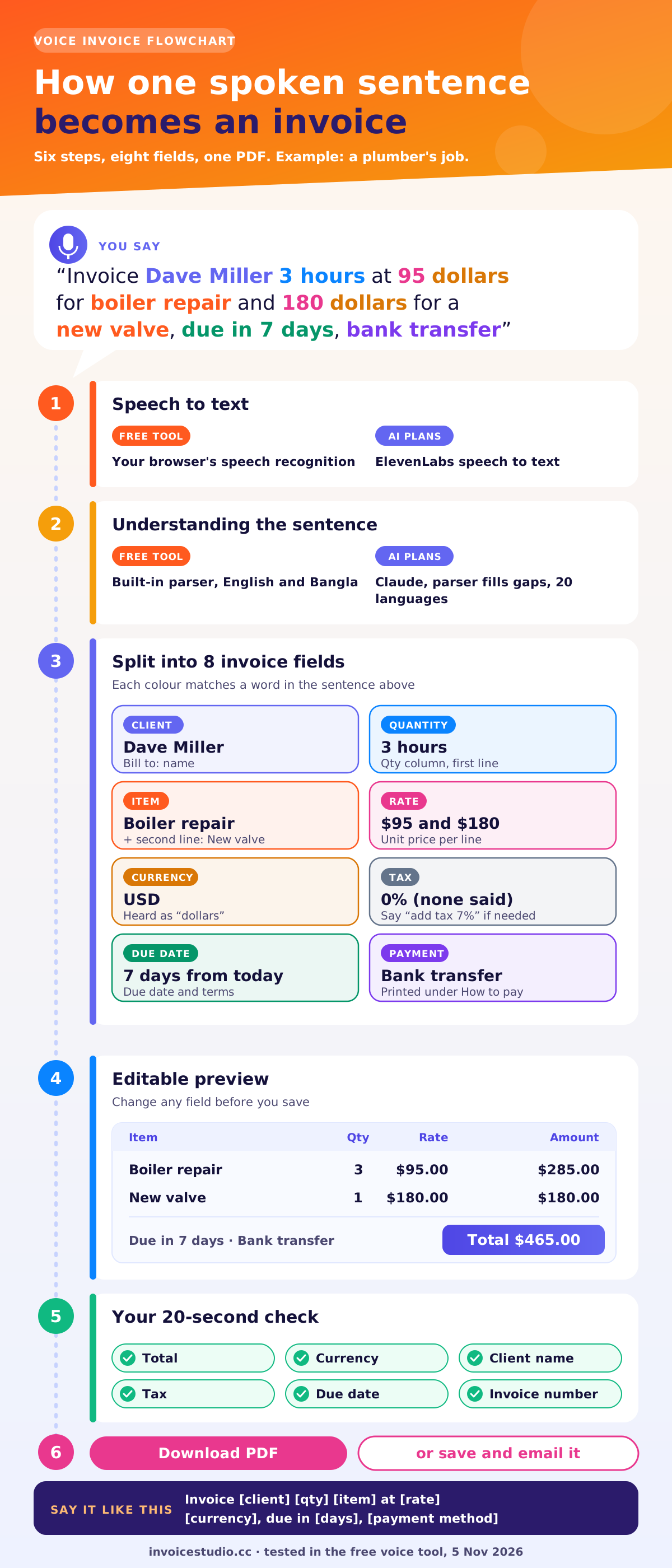
Say the client first, then the quantity, item and price, then the due date and payment method. The formula is: "Invoice [client] [qty] [item] at [rate] [currency], due in [days], [payment method]." Everything after the price is optional, but each extra piece saves you a click later.
Most people get the order wrong when they first create an invoice by talking. They say "So, um, I did the kitchen for Sarah and it was like 800". The parser will usually still find Sarah and 800, but a clean sentence gets a clean invoice. Think of it like reading a line off a receipt.
| What you say | What it fills in |
|---|---|
| "Invoice Dave Miller..." | Client name: Dave Miller |
| "...3 hours at 95 dollars for boiler repair..." | Line item: Boiler Repair, qty 3, rate 95, currency USD |
| "...and 180 dollars for a new valve..." | Second line item: New Valve, qty 1, rate 180 |
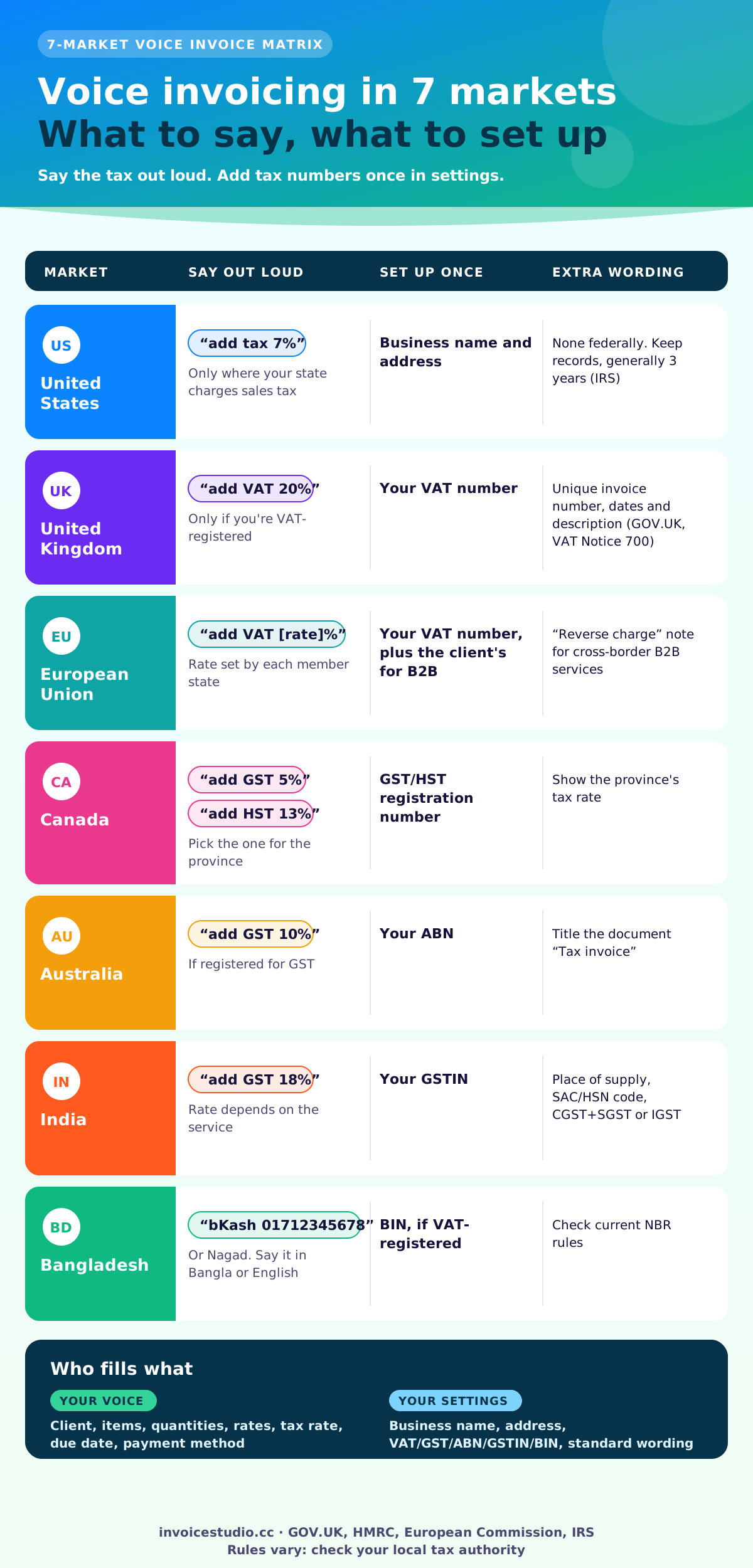
| "...add VAT 20%" or "add GST 18%" | A tax row at that rate on the total |
| "...10% discount" | An invoice discount of 10% |
| "...due in 14 days" or "net 30" | Due date 14 or 30 days from today |
| "...pay with PayPal" or "Wise" or "bKash" | The method printed under How to pay |
Say currencies as words ("dollars", "pounds", "euros", "rupees", "taka") or codes ("AUD", "CAD"). "Dollars" on its own means US dollars, so say "AUD" or "CAD" if you bill in Australian or Canadian dollars.
A few phrasings the parser understands that save you from rewording:
Here are five real-world sentences, each written the way the free tool expects, with the invoice and total they produce. Every one of them is in the examples section on this page, so you can load it into the tool and change the details.
Say: "Invoice Dave Miller 3 hours at 95 dollars for boiler repair and 180 dollars for a new valve, due in 7 days, bank transfer."
You get: Boiler repair 3 x $95 = $285, new valve 1 x $180 = $180. Total $465.00, due in 7 days, bank details under How to pay. US states treat repair labour and parts differently for sales tax, so check your state's rule and add a tax line to the valve if needed.
Say: "Bill Harper Studio 1,450 pounds for wedding photography, add VAT 20%, net 14, pay by bank."
You get: Wedding photography £1,450.00, VAT at 20% £290.00, total £1,740.00, due 14 days from today. Only add VAT if you're VAT-registered. If you are, the invoice also needs your VAT number, which you add once in your business details.
Say: "রহিম আহমেদকে ১৫০০০ টাকার ইনভয়েস বানাও লোগো ডিজাইনের জন্য, বিকাশে পেমেন্ট, ১০ দিনের মধ্যে"
You get: Client রহিম আহমেদ, line item লোগো ডিজাইন ৳15,000, total ৳15,000, due in 10 days, with bKash printed under How to pay. Say your bKash number in the same sentence ("বিকাশে পেমেন্ট 01712345678") and it's printed as the account. This works in the free tool, with no account and no AI plan.
Say: "Invoice Priya Sharma 45,000 rupees for SEO audit, add GST 18%, due in 15 days, bank transfer."
You get: SEO audit ₹45,000, GST at 18% ₹8,100, total ₹53,100. Voice gets you the numbers fast. A GST tax invoice in India still needs your GSTIN, the client's GSTIN if they're registered, the place of supply and the SAC code, and whether it's CGST plus SGST or IGST. The GST invoice format guide lists every field.
Say: "Invoice Coastal Cafe 2 days at 450 AUD for menu photography, add GST 10%, net 14, bank transfer."
You get: Menu photography 2 x A$450 = A$900, GST 10% A$90, total A$990.00. If you're registered for GST in Australia, call the document a "Tax invoice" and include your ABN.
The free tool on this page works in English and Bangla, right in your browser. For a voice invoice in 20 languages, use a signed-in account on a plan that includes AI. It covers Bangla, Hindi, Arabic, Urdu, Spanish and French, because they use ElevenLabs for speech recognition and Claude to read the request.
Here's how the two differ in practice:
| Free voice tool | Signed-in AI plans | |
|---|---|---|
| Languages | English and Bangla | 20 languages, including Bangla, Hindi, Arabic and Spanish |
| Speech recognition | Your browser's built-in recognition | ElevenLabs speech to text |
| Understanding the sentence | Invoice Studio's built-in parser | Claude, with the built-in parser filling gaps |
| Account needed | No | Yes |
| Saved clients | No | Yes, and it matches a name said in another script ("ডেভিড" finds David) |
| Output | Editable invoice and PDF | Editable invoice, PDF, email with PDF attached, payment tracking |
Why does Bangla work in the free tool? Because the parser was built for it: Bangla digits, number words like "পাঁচশো" (500) and "দুই হাজার" (2,000), "টাকা" for BDT and local payment methods like bKash and Nagad. If you invoice in Hindi or Arabic, the free tool's browser recognition may still write down your words, but the parser is tuned for English and Bangla, so use an AI plan for reliable results.
Client names stay as you'd write them. If you say a Bangla name, it's written in Bangla script. If your client expects their name in English, type it into the client field once and save the client.
Voice is fastest for short invoices you create away from a desk, typing a sentence is best in quiet offices, and a filled-in template is still best for long invoices with 15 or more lines. Here's my honest comparison after using all three for client work.
| Method | Best for | Time for a 2-line invoice | Weak spot |
|---|---|---|---|
| Voice invoice generator | Trades on site, freelancers between calls, anyone on a phone | About 30 seconds | Noisy places, unusual product names |
| Typed AI sentence | Offices, open-plan rooms, long descriptions | About 45 seconds | Slower on a phone keyboard |
| Invoice template filled by hand | Invoices with many lines or detailed specs | 3 to 5 minutes | Manual maths and numbering |
| Word or Excel file | One-off invoices if you already have a file | 5 to 10 minutes | Formulas break, no tracking |
The times are from my own use, not a study, so treat them as rough. The bigger win isn't the 4 minutes. It's that the invoice goes out the same day. When I invoiced at the end of the week, I forgot small extras like a parts run or a second revision. When I invoiced on the spot, I didn't.
Voice invoicing is accurate for names, amounts and currencies you say clearly, but you should always read the preview before sending, because speech recognition can mishear similar-sounding numbers and names. Fifteen and fifty are the classic trap. So are "Wise" and "wives".
Run these six checks on every voice-made invoice. It takes 20 seconds:
If the parser can't find a client or an amount, it flags the gap instead of guessing. On an AI voice invoice, Claude is told never to invent an email address or a price, so a gap stays a gap until you fill it.
Accents are rarely the problem. In my use, both browser recognition and ElevenLabs cope well with regional English and Bangla accents for names and amounts. Noise is what breaks it: wind, traffic, a compressor or a site radio. Step into the van or a quiet corner, hold the phone a hand's width from your mouth, and say numbers as separate words. If one client name keeps coming out wrong, type it once and save the client.
Speak a little slower on numbers than on words. Say "one thousand four hundred and fifty" or "fourteen fifty pounds", not a quick "fourteen-fifty-quid-for-the-shoot".
Like any microphone invoice maker, the tool needs microphone permission to hear you, and you can say no and type instead. Your browser asks once per site, and you can turn it off at any time in your browser's site settings.
On privacy, here's exactly what happens:
My rule: don't speak bank account numbers or card details out loud in a public place. Add your bank details once in your business settings and let every invoice print them under How to pay.
A voice invoice is a normal invoice, so the same legal rules apply as for one you type. Voice fills in the client, items and totals. Your business details, tax numbers and invoice wording come from your settings, so set them up once and they appear on every invoice.
Voice handles the numbers. These short lines handle the parts people forget. Paste them into the notes or payment terms field once, and they'll be there on every invoice.
Payment terms note:
Payment is due within 14 days of the invoice date. Please include the invoice number as your payment reference.
Late fee note (check your contract and local law first):
Invoices unpaid after 30 days may incur a late fee of 2% per month on the outstanding balance, as agreed in our terms.
EU reverse charge note:
Reverse charge: VAT to be accounted for by the recipient under Article 196 of Council Directive 2006/112/EC.
Deposit note for trades:
This invoice covers the 50% deposit for the work quoted on [date]. The balance is due on completion.
Email to send with the PDF:
Hi Dave, thanks for today. Your invoice INV-0042 for $465.00 is attached, covering the boiler repair and the new valve. It's due in 7 days, and the bank details are on the invoice under How to pay. Any questions, just reply here.
If the invoice is late, the guide to asking for payment politely has follow-up emails for day 1, day 7 and day 21. For the basics of sending, see how to send an invoice.
People who finish work away from a desk get the most out of it, and tradespeople on the job are the classic case: plumbers, electricians, cleaners, photographers, tutors and drivers. Freelancers who bill several small jobs a week come next, followed by shop owners who'd rather speak in their own language than type in English.
The free voice tool gives you an English or Bangla voice invoice and a PDF without an account. Paid plans start at $3 a month, and plans with AI add 20 languages, saved clients, emailing with the PDF attached, reminders and payment tracking.
The invoice editor behind the voice tool gives you 28 templates, your logo and brand colour, A4 or Letter paper, 14 currencies plus any custom currency, per-line tax and discount, signatures, and payment methods such as Stripe, PayPal, Wise, Payoneer, bKash, Nagad and bank transfer printed on the invoice. Plans run Free, Starter $3 a month, Pro $7, Business $10 and Enterprise $29, with yearly and lifetime options. Compare what each includes on the pricing page, or start with the free invoice generator and add voice later.
Want the bigger picture on AI tools, including whether ChatGPT can make an invoice? Read AI invoice generator: make invoices with your voice or ChatGPT. New to invoicing? Start with how to make an invoice, then browse the rest of the Invoice Studio blog.
InvoiceStudio: create invoices by voice, automate billing, and get paid faster. Tap the mic above and say your next invoice.

Monjur builds Invoice Studio and incorporated MotionTrust Digital in September 2022, where he leads Amazon strategy across the client base. Eight years in e-commerce and marketplace marketing taught him how much time invoices and late payments eat, so every guide here is tested against the real product and current tax rules before it goes live.
InvoiceStudio: create invoices by voice, automate billing, and get paid faster. Say it once, check it, and send a PDF in 28 designs.