Pay for billing, not a back office
Starter is $3 a month and Pro $7, against $23 to $38 for entry accounting plans at regular price. If your accountant keeps the books, that gap is yours to keep.
QuickBooks, Xero and FreshBooks do bookkeeping, bank feeds and payroll. If all you need is to bill clients and get paid, see what a simple invoicing tool covers, and what it doesn't.
Read the four-way table, then build a real invoice below and decide if billing is all you need.
| What you get | InvoiceStudio | QuickBooks Online | Xero | FreshBooks |
|---|---|---|---|---|
| Entry price (regular, monthly) | Free; paid from $3 | Free tier; Simple Start $38 | Early $27 | Lite $23 |
| Plan caps on entry tier | 10 documents a month on Free; unlimited from $3 | Free: 2 invoices a month | Early: 20 invoices and quotes, 5 bills | Lite: 5 billable clients |
| Double-entry general ledger | Plus ($43) and up | |||
| Bank feeds and reconciliation | Bank connection; reconciliation listed on Plus | Plus ($43) and up | ||
| Expenses, bills and receipts | ||||
| Profit and loss, balance sheet | No; sales, tax and ageing reports on Pro | Plus ($43) and up | ||
| Payroll | Add-on, bundles from $88 + $6.50/employee | Add-on via Gusto, $36 + $6/person | Add-on, $40 + $6/user | |
| Online card checkout on the invoice | No; payment methods printed on the invoice | |||
| Invoice designs | 28 designs, your logo, colour and font | Customisable templates | Customisable templates | Customisable templates |
| Create invoices by voice | 20 languages incl. Bangla | Not listed | Not listed | Not listed |
| bKash and Nagad printed as payment methods | Not listed | Not listed | Not listed | |
| Recurring invoices | Pro ($7) and up | |||
| Users | 1 login | 1 on Simple Start; 3 to 25 on higher plans | No per-user fees | Team members $11/month each |
| Accountant access | CSV and PDF export (Pro) | 2 accountants included | Plus and up |
QuickBooks, Xero and FreshBooks columns checked against quickbooks.intuit.com/pricing, quickbooks.intuit.com/payroll/pricing, xero.com/us/pricing-plans and freshbooks.com/pricing on 2026-11-05, US regular prices before promotions. Plans change, so verify on each vendor's page before you decide.
Starter is $3 a month and Pro $7, against $23 to $38 for entry accounting plans at regular price. If your accountant keeps the books, that gap is yours to keep.
28 designs with your logo, brand colour and font, on A4 or Letter. No third-party branding on the PDF.
The free tool understands English and Bangla in the browser. Signed-in plans with AI use Claude plus ElevenLabs in 20 languages.
Print Stripe, PayPal, Wise, Payoneer, bank, bKash, Nagad or cash under How to pay. Record full or partial payments as they land.
CSV export of invoices, tax and payment status on Pro, plus every PDF. Your accountant works from real numbers, not screenshots.
No ledger, bank feeds, expenses or payroll here. When you need those, we'll tell you to buy a suite.
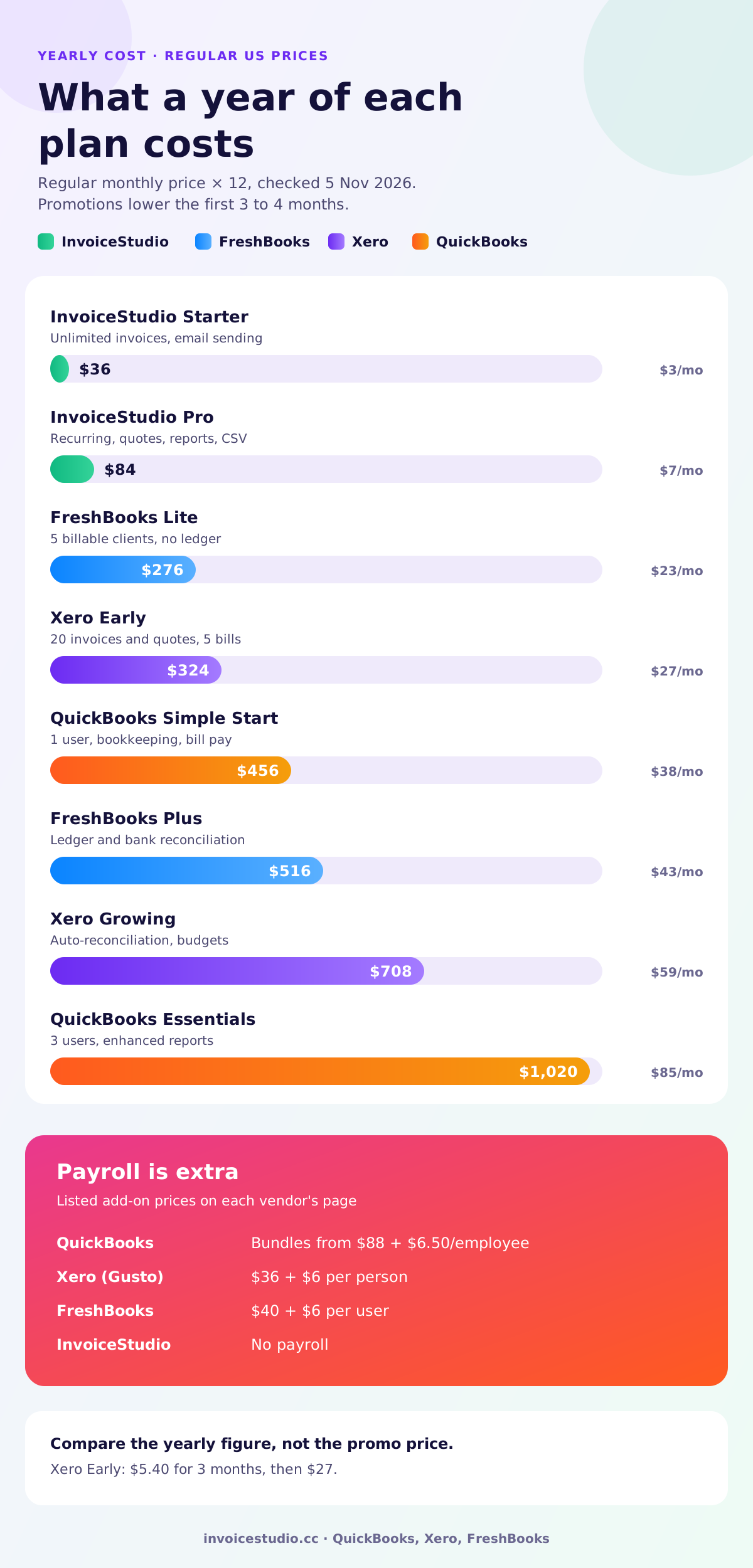
Payroll? Your own bank reconciliation? Your own VAT, GST or sales tax returns? 30+ expenses a month? Lender statements? One yes usually means a suite.
Multiply each regular monthly price by 12. Xero Early at $27 is $324 a year; QuickBooks Simple Start at $38 is $456.
Load an example below, swap in your client and download the PDF. If billing is the whole job, you have your answer.
Pick one to load it into the tool above, then change anything.
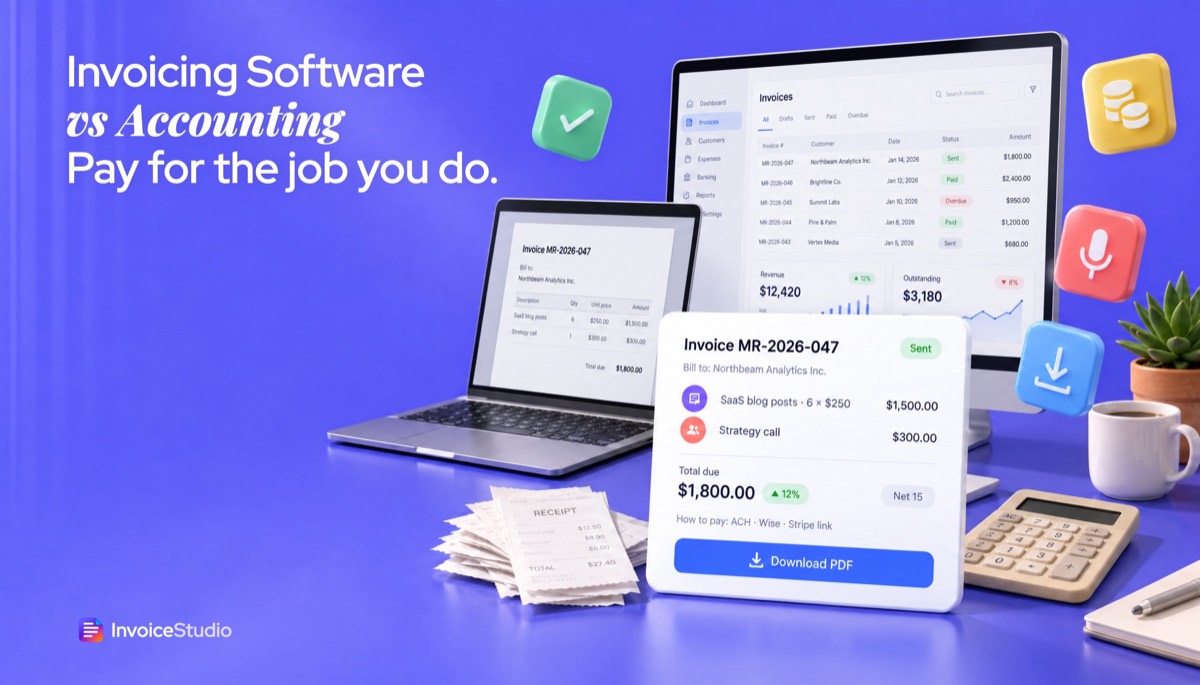
6 blog posts at $250 plus a $300 strategy call, net 15. No staff, no sales tax, so $36 a year beats a $456 suite.
A £3,500 site build plus 2 setup jobs at £350. Not VAT registered. Over £50,000 a year? MTD software is needed for the books.
Wedding coverage ৳45,000 plus a ৳15,000 album, due on receipt by bKash, Nagad or bank transfer.
20 hours at CA$250 plus 13% Ontario HST, GST/HST number shown, Interac e-Transfer or EFT.
A$880 labour plus A$320 parts, 10% GST, the words "Tax invoice" and bank details with BSB.
Plain answers, worked examples and the rules that apply, all checked against the live product.
Invoicing software creates, sends and tracks invoices. Accounting software such as QuickBooks, Xero or FreshBooks also keeps a double-entry ledger, connects to your bank, tracks expenses, produces financial statements and adds payroll. If you have no staff and an accountant keeps your books, invoicing software like InvoiceStudio, from $3 a month, is usually enough.
Invoicing software vs accounting software comes down to one question: do you need to bill clients, or do you need to keep the books? Invoicing software creates, sends and tracks invoices. Accounting software does that too, but it also runs a general ledger, connects to your bank, reconciles transactions, produces a profit and loss statement and balance sheet, and often handles payroll. InvoiceStudio is invoicing software. QuickBooks Online, Xero and FreshBooks are accounting suites. This guide shows where each one fits, what each costs as of 5 November 2026, and how to tell which one your business actually needs.
I've run a small service business on both. For years I paid for a full accounting package and used maybe 15% of it: the invoice screen and the "who owes me money" report. My accountant did the rest from a spreadsheet anyway. Later, with staff and a VAT registration, the suite earned its fee. Most people are in one of those two situations, and the trick is knowing which one is yours.
Invoicing software is a tool for billing: you create an invoice, send it, and record when the client pays. Accounting software is a tool for bookkeeping: it records every money movement in your business, income and expenses, in a double-entry ledger so you can produce financial statements and tax returns.
Here is the plain split.
Every accounting suite includes invoicing. Very few invoicing tools include accounting. That one-way overlap is why people end up paying $38 to $140 a month for a suite when the only screen they open is "New invoice".
If you want a refresher on what the invoice itself must contain, read what an invoice is before you compare tools. The legal fields are the same whichever software prints them.
The key difference is scope. Invoicing software covers the money coming in from clients. Accounting software covers every transaction, in and out, and turns them into the statements your accountant and tax office need. The table shows how that plays out.
| Job | Invoicing software (InvoiceStudio) | Accounting software (QuickBooks, Xero, FreshBooks) |
|---|---|---|
| Create and design invoices | Yes, 28 designs, your logo, colour and font | Yes, customisable templates |
| Quotes, estimates, credit notes | Yes, on Pro ($7) and above | Yes, on most plans |
| Recurring invoices | Yes, on Pro and above | Yes |
| Track paid, partial and overdue invoices | Yes, on every plan | Yes |
| Online card payment button on the invoice | No; payment methods printed under "How to pay" | Yes, through their own payment services |
| Double-entry general ledger | No | Yes (FreshBooks from the Plus plan) |
| Bank feeds and reconciliation | No | Yes, on most plans |
| Expenses, bills and receipt capture | No | Yes |
| Profit and loss, balance sheet | No; sales, tax and ageing reports on Pro | Yes |
| Payroll | No | Paid add-on |
| Voice invoicing | Yes, 20 languages including Bangla | Not listed on their pricing pages |
| Typical starting price | Free; paid from $3 a month | $23 to $38 a month at regular price |
Read the bottom half of that table carefully. Ledger, bank feeds, expenses, financial statements and payroll are real work that InvoiceStudio does not do. If you need them inside one product, an accounting suite is the right purchase, and I'd say so to a friend.
At regular monthly prices, the entry plans are QuickBooks Online Simple Start at $38, Xero Early at $27 and FreshBooks Lite at $23. All three run steep introductory discounts, so the first few months cost much less. I checked each official US pricing page on 5 November 2026.
According to the QuickBooks Online pricing page, there are five tiers:
The page showed 50% off for the first 3 months. Payroll is separate: the QuickBooks Payroll pricing page listed bundles from $88 plus $6.50 per employee at regular price.
The Xero US pricing page lists three plans with no per-user fees:
Xero Payroll, powered by Gusto, was listed at $36 a month plus $6 per employee or contractor. New customers were offered 80% off the base plan for 3 months.
The FreshBooks pricing page lists:
Extra team members were $11 a month each, and payroll was a $40 a month add-on plus $6 per user. The page showed 80% off for the first 4 months.
Prices change often, and these are US prices. UK, Canadian, Australian and Indian pages show different plans and local currency. Check the vendor's page for your country on the day you buy.
Accounting software is stronger whenever the job goes beyond billing: matching bank transactions, tracking what you spend, paying staff, filing tax returns from the same data, or giving your accountant live access to the books. Here is where I'd tell you to buy a suite and not look back.
Invoicing software is enough when you have no employees, a simple bank account, and an accountant (or a spreadsheet) who handles the year-end. That describes most freelancers, solo consultants and small studios in their first few years. In that setup, the suite's extra features sit unused while the bill arrives every month.
Ask yourself these five questions:
Five "no" answers means simple invoicing software is the better buy. Even one "yes" usually means a suite, though some people split the jobs, as I explain below.
What you get from InvoiceStudio in that setup: invoices in 28 designs with your logo, brand colour and font on A4 or Letter; 14 built-in currencies plus custom ones; line items with quantity, unit, per-line discount and tax; tax and fee rows for VAT, GST or sales tax; payment methods printed under "How to pay", from bank transfer to bKash and Nagad; emailing with the PDF attached; one-click reminders; and payment tracking with partial payments and overdue status. Paid plans start at $3 a month, and recurring invoices come with Pro at $7.
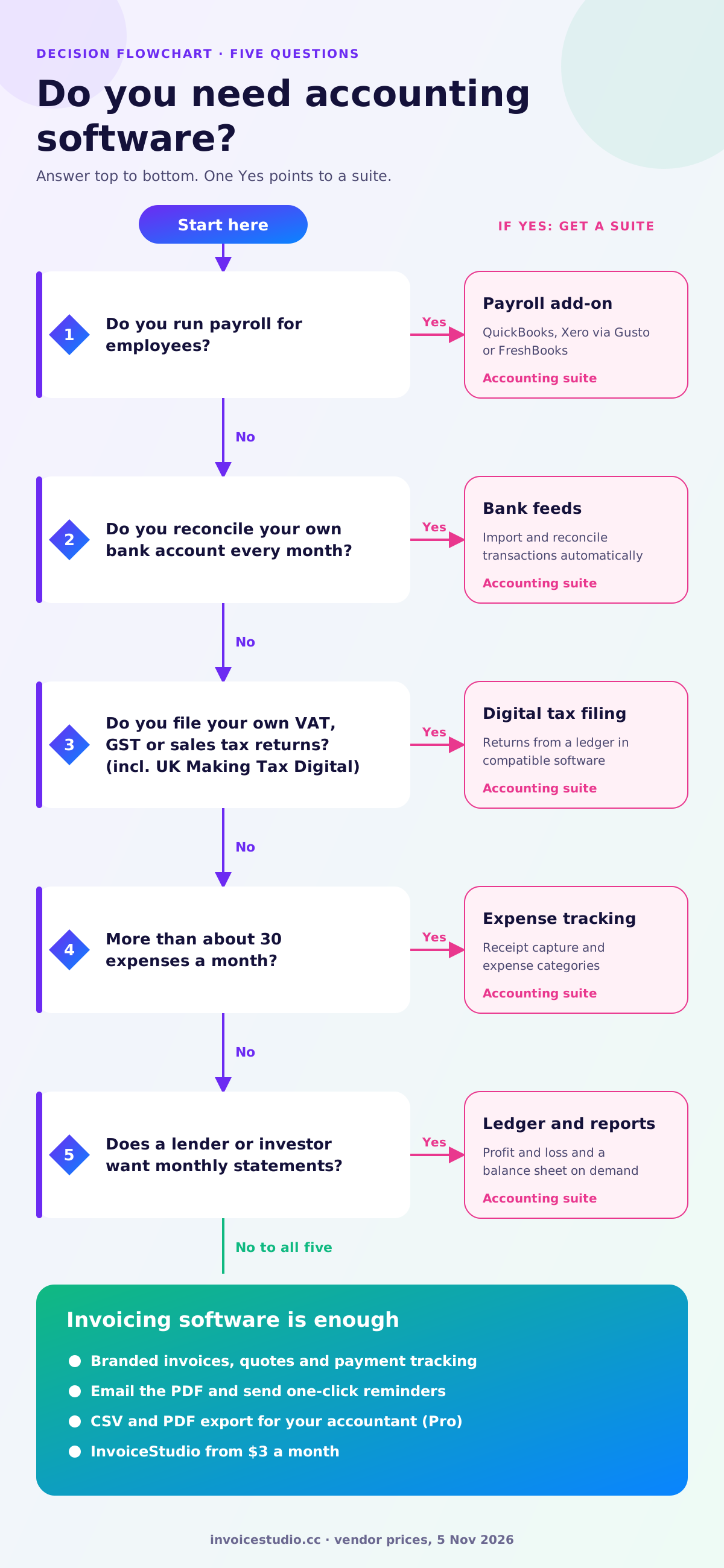
Over 12 months at regular prices, the entry plans cost $456 for QuickBooks Simple Start, $324 for Xero Early and $276 for FreshBooks Lite, against $36 for InvoiceStudio Starter or $84 for Pro. The gap only matters if you don't need the extra features, so here are three real-looking cases.
Maya writes for SaaS companies from Chicago. She sends 8 invoices a month, has no employees, and her accountant prepares her Schedule C from a spreadsheet each spring. A typical invoice: 6 blog posts at $250 plus a $300 strategy call, $1,800 on net 15. She doesn't reconcile her bank account or file sales tax, because her writing services aren't taxed where she works. InvoiceStudio Starter at $36 a year covers everything she does. QuickBooks Simple Start would cost her $456 a year for features she wouldn't open. Saving: $420 a year.
Tom is a sole trader in Bristol billing about £55,000 a year. Since 6 April 2026, Making Tax Digital for Income Tax applies to sole traders and landlords with qualifying income over £50,000, which means keeping digital records and sending quarterly updates through compatible software. InvoiceStudio is not MTD software. Tom's honest answer is an accounting tool that is MTD-compatible. If he likes InvoiceStudio's invoices, he can still make them there and record each one in his books, but that is two tools and some double entry. For him a suite is probably simpler. I'd rather say that than sell him the wrong thing.
A design studio in Austin has 3 employees and 2 contractors. Payroll alone settles it: they need payroll software, and Xero with Gusto payroll would run $59 + $36 + 5 × $6 = $125 a month at regular price, or $1,500 a year. That's a fair price for what it does. They don't need a separate invoicing tool, because the suite's invoices are fine for their clients.
Use regular prices, not the promo price, when you compare. A plan at 80% off for 3 months looks cheap until month 4. Multiply the regular monthly price by 12 and compare that number.
Yes, but only when each tool earns its place. The common pattern is invoicing software for the client-facing side and an accountant who keeps the books from your exports and bank statements. Running two paid subscriptions that overlap is rarely worth it.
Be clear about one thing: InvoiceStudio has no direct connection to QuickBooks, Xero or FreshBooks. What it has is CSV export on Pro and above, with invoice numbers, dates, clients, amounts, tax and payment status. Your accountant can import that or work from it at year-end. If you want every invoice to flow into a ledger automatically, make the invoices in the accounting suite itself.
A setup that works well for many solo businesses:

Your choice of software doesn't change your record-keeping duty. What changes by country is whether tax rules push you toward accounting software that files digitally.
These notes are a starting checklist, not tax advice. Confirm the rules for your situation with your accountant or the tax authority.
You've outgrown invoicing-only software when the work around your invoices takes longer than the invoices themselves. These are the signals I watch for:
None of these is a failure. It's growth. When two or three apply, move to a suite and make your invoices there.
The most common mistake is buying a full accounting suite on day one because it feels "proper", then using only the invoice screen. The second is the opposite: staying on a simple tool after hiring staff and doing payroll by hand.
Choose accounting software if you have payroll, file your own tax returns from digital records, or need a ledger and bank reconciliation. Choose invoicing software if you're a freelancer or small service business whose main job is billing clients and getting paid, with an accountant handling the books.
For a broader view of simple tools, our guide to choosing a free invoice app has a scoring checklist, and the Zoho Invoice comparison covers another free option. If you're leaning toward invoicing software, the quickest test is to make one real invoice. Use the free invoice generator on this page, load one of the examples, swap in your client, and download the PDF. If you need a refresher on the fields, read how to make an invoice first. Plans are on the pricing page: Starter at $3 a month adds unlimited invoices and emailing, and Pro at $7 adds recurring invoices, quotes, reports, CSV export and voice invoicing in 20 languages.
And if the five questions above pointed you to a suite, buy the suite. The right tool is the one that matches the job you actually do every month.

Monjur builds Invoice Studio and incorporated MotionTrust Digital in September 2022, where he leads Amazon strategy across the client base. Eight years in e-commerce and marketplace marketing taught him how much time invoices and late payments eat, so every guide here is tested against the real product and current tax rules before it goes live.
InvoiceStudio: create invoices by voice, automate billing, and get paid faster. Build one real invoice free, and if billing is all you need, keep your accounting budget for your accountant.