How to Send an Invoice: Email, PDF and PayPal Step by Step
Five ways to send an invoice compared, six emails you can paste, when to send, what to print under How to pay, and PayPal's fees on a real $2,400 invoice.
- Written by
- Monjur Hossain
- Published
- Last updated
- Reading time
- 18 min read

To send an invoice, save it as a PDF, attach it to a short email to the person who pays, and put the invoice number, amount and due date in the subject line. Print your payment details under "How to pay", send it the day the work is done, and set a reminder before the due date.
On this page 11 sections
- How to send an invoice: the quick answer
- How to email an invoice as a PDF (invoice email template included)
- What should an invoice email subject line say?
- How to send an invoice on PayPal
- Should you send invoices by WhatsApp, text or post?
- When should you send an invoice?
- How to tell clients how to pay (bank, Wise, PayPal, bKash and more)
- How to confirm the client received your invoice
- What should you do after you send an invoice?
- What are the common mistakes when sending invoices?
- FAQs
To send an invoice, you finish it, save it as a PDF, attach it to a short email with the invoice number, amount and due date in the subject line, and tell the client exactly how to pay. That's how to send an invoice in one sentence, and it works for nearly every freelancer and small business. The rest of this guide covers the parts that decide whether you get paid this week or chase for a month: which channel to use, what the email should say, when to send it, what to print under "How to pay", and what to do once it's gone.
I've sent several hundred invoices, by email, through PayPal, on WhatsApp at 11pm, and once by post to a finance office that refused anything else. Most guides on this come from payment companies, so they push their own payment link and skip the email. Here you get five channels compared, six emails you can paste, a send-timing table, PayPal's published fees worked out on a real $2,400 invoice, and the local payment methods (Wise, Payoneer, bKash, Nagad) that US-centric pages ignore.
How to send an invoice: the quick answer
The fastest reliable way to send an invoice is as a PDF attached to an email, sent to the person who approves payment, on the day the work or milestone is done. Email gives you a dated record, a PDF can't be edited by accident, and the client can forward it to their accounts team in one click.
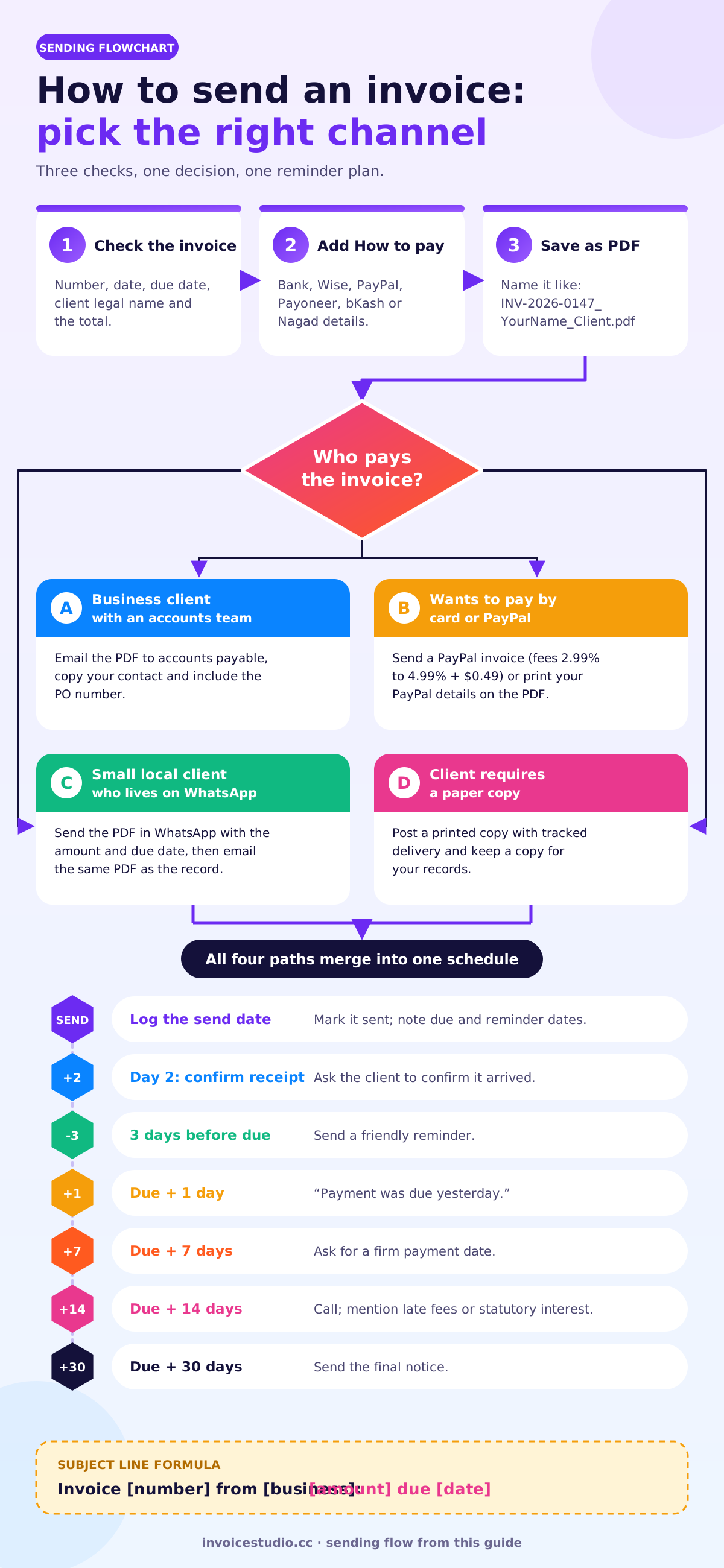
Here are the steps I follow for every invoice:
- Check the invoice. Invoice number, invoice date, due date, client's legal name, line items, tax and the total. If you're not sure what has to be on it, the guide on how to make an invoice has the full checklist.
- Add payment details. Print your bank details, PayPal email, Wise details or mobile wallet number under a clear "How to pay" heading.
- Save it as a PDF. Name the file so it makes sense in someone else's inbox: INV-2026-0147_YourName_ClientName.pdf.
- Write a short email. Subject line with the invoice number, amount and due date. Three or four lines in the body. The PDF attached.
- Send it to the right person. Often that's accounts payable, not your project contact. Copy your contact if it helps.
- Log it. Mark the invoice as sent, put the due date in your calendar and schedule a reminder email in your invoicing app.
If you're working out how to send an invoice to a client for the first time, the channel matters more than you'd think. There are five that people actually use, and they're not equal:
| Channel | Best for | Proof it was sent | Weak spot |
|---|---|---|---|
| Email with PDF attached | Almost everyone, B2B and freelance | Strong: dated email in your sent folder | Can land in spam or the wrong inbox |
| PayPal invoicing | Clients who want to pay by card or PayPal | Strong: PayPal shows sent, viewed and paid | Fees of about 3% to 5% per payment |
| Invoicing app (sends email for you) | Repeat clients, recurring invoices | Strong: app logs send date and status | Free tiers can be limited |
| WhatsApp, Messenger or text | Small local clients, Bangladesh, India, sole traders | Medium: chat history, blue ticks | Easy to lose in a busy chat; finance teams can't file it |
| Post (paper invoice) | Government buyers, older firms, legal requirement | Weak unless you pay for tracked delivery | Slow, costs postage, easy to mislay |
How to email an invoice as a PDF (invoice email template included)
To email an invoice, attach the invoice as a PDF, put the invoice number, amount and due date in the subject line, and keep the body to a greeting, one line about what the invoice covers, the amount and due date, how to pay, and a thank-you. Clients skim invoice emails. The ones understood in five seconds get paid fastest.
A PDF is the right format for nearly every invoice. It looks the same on every phone and laptop, it prints cleanly, and the client can't change the numbers by accident. A Word or Excel file can be edited, the formatting breaks between versions, and some finance teams reject anything that isn't a PDF. If you build your invoice in a free invoice generator with PDF download, you get the file directly and skip the export step.
A few rules for the email itself:
- Attach the PDF, don't just link it. Shared-drive links expire or get blocked by corporate security.
- One invoice per email. When you bundle three invoices into one message, the client pays one and forgets the others.
- Put the amount and due date in the body too. Some people never open the attachment.
- Keep the file under about 1 MB. A 12 MB invoice with a huge logo can bounce off a company mail server.
Sending from Gmail or Outlook. Use your business address, not a shared noreply one, so replies reach you. Drag the PDF into the message, paste the template, and schedule it for the next weekday morning if you're finishing late. A Gmail label such as "Invoices sent" makes copies easy to find later.
Below are six versions of the invoice email template I've used for years. Change the names and numbers and paste them in.
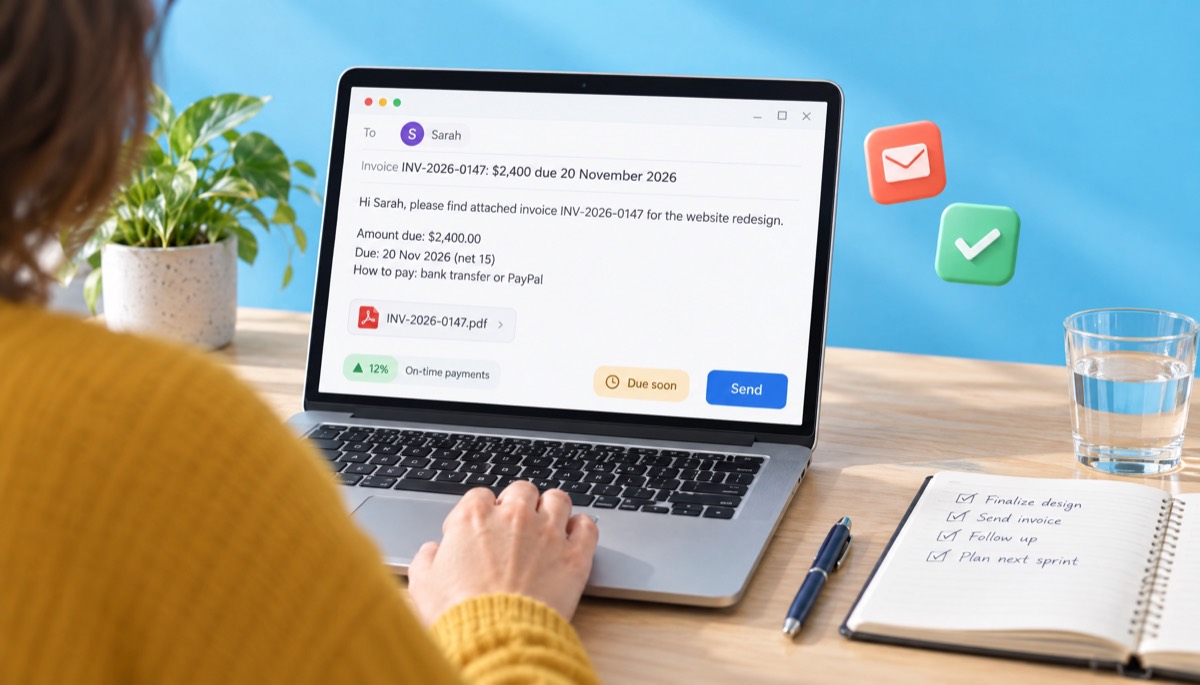
1. Standard invoice email
Subject: Invoice INV-2026-0147 from Rafi Design: $2,400 due 20 November 2026
Hi Sarah,
Please find attached invoice INV-2026-0147 for the website redesign, delivered on 5 November.
Amount due: $2,400.00
Due date: 20 November 2026 (net 15)
How to pay: bank transfer or PayPal, details on the invoice.Thanks again, it was a good project.
Rafi
2. Deposit invoice email
Subject: Deposit invoice INV-2026-0148: $1,200 (50%) to start the project
Hi Daniel,
As agreed in the quote, here's the 50% deposit invoice for the brand identity project. Work starts as soon as it arrives.
Amount due: $1,200.00, due on receipt
The remaining $1,200 will be invoiced on delivery.
3. Monthly retainer email
Subject: November retainer invoice INV-2026-0150: £1,800 due 30 November
Hi Priya,
Attached is the invoice for the November content retainer (8 articles, 2 newsletters). Payment is due by 30 November, same bank details as usual.
If the amount is the same every month, set it up as one of your recurring invoices and this email goes out on its own.
4. Final invoice on project completion
Subject: Final invoice INV-2026-0151: $1,200 balance, due 19 November
Hi Daniel,
The final files are in the folder I shared this morning. Here's the invoice for the remaining 50%, which closes out the project.
Project total: $2,400.00
Deposit paid 10 November: $1,200.00
Balance due: $1,200.00 by 19 November 2026
5. Invoice to an accounts payable team (with a PO)
Subject: Invoice INV-2026-0152, PO 45001982: €3,750 due 5 December 2026
Hello Accounts Payable team,
Please find attached invoice INV-2026-0152 against purchase order 45001982 for consulting services in October 2026.
Supplier: Rafi Design Ltd
Amount: €3,750.00 (VAT reverse charge)
Terms: net 30, due 5 December 2026
Bank: IBAN and BIC on the invoiceProject contact: Maria Lopez (copied). Please confirm receipt.
6. Corrected or resent invoice
Subject: Corrected invoice INV-2026-0153 (replaces INV-2026-0149): $950
Hi Tom,
I sent invoice INV-2026-0149 with the wrong hourly rate on line 2. Please ignore it and use the attached INV-2026-0153 instead. The new total is $950.00, still due 25 November.
Never edit and resend an invoice under the same number once it has gone out. Issue a credit note or a corrected invoice with a new number and say clearly which one it replaces. Our guide to invoice numbering explains why auditors care about this.
What should an invoice email subject line say?
An invoice email subject line should say four things: that it's an invoice, the invoice number, the amount, and the due date. "Invoice INV-2026-0147: $2,400 due 20 November" is boring, and that's the point. It's searchable, it can't be mistaken for spam, and the client knows what they owe before they open it.
Subject lines like "Hi!", "Quick one" or "Here you go" are the reason invoices disappear. Finance teams search their inbox by invoice number or supplier name, so put both in. Here's a set you can copy:
| Situation | Subject line to copy |
|---|---|
| Standard invoice | Invoice INV-0147 from [Your Business]: $2,400 due 20 Nov 2026 |
| Deposit | Deposit invoice INV-0148: $1,200 (50%) to start [Project] |
| Monthly retainer | [Month] retainer invoice INV-0150: £1,800 due 30 Nov |
| Final balance | Final invoice INV-0151: $1,200 balance for [Project] |
| Against a PO | Invoice INV-0152, PO 45001982: €3,750 due 5 Dec |
| Corrected invoice | Corrected invoice INV-0153 (replaces INV-0149) |
| Friendly reminder | Reminder: invoice INV-0147 ($2,400) due Friday |
| Overdue | Overdue: invoice INV-0147, $2,400, due 20 Nov |
Keep it under 70 characters so a phone doesn't cut off the amount.
How to send an invoice on PayPal
To send an invoice on PayPal, log in to a PayPal business account, open Invoicing, create a new invoice with the client's email address, line items, tax and due date, then click Send. PayPal emails the client a link where they can pay by PayPal, card or, in the US, bank transfer, and they don't need a PayPal account to do it.
The step-by-step on the desktop version, based on PayPal's own invoicing page:
- Log in to your PayPal business account.
- Open Invoicing (it sits under Pay & Get Paid on most accounts, though PayPal moves menus around), then click Create invoice.
- Add the client's email, line items, tax, discount, invoice number and due date.
- Click Send. If you don't have the client's email, PayPal can make a shareable link or a QR code instead.
- Track it as sent, viewed or paid, and set automatic reminders if you want.
What PayPal invoicing costs on a $2,400 invoice
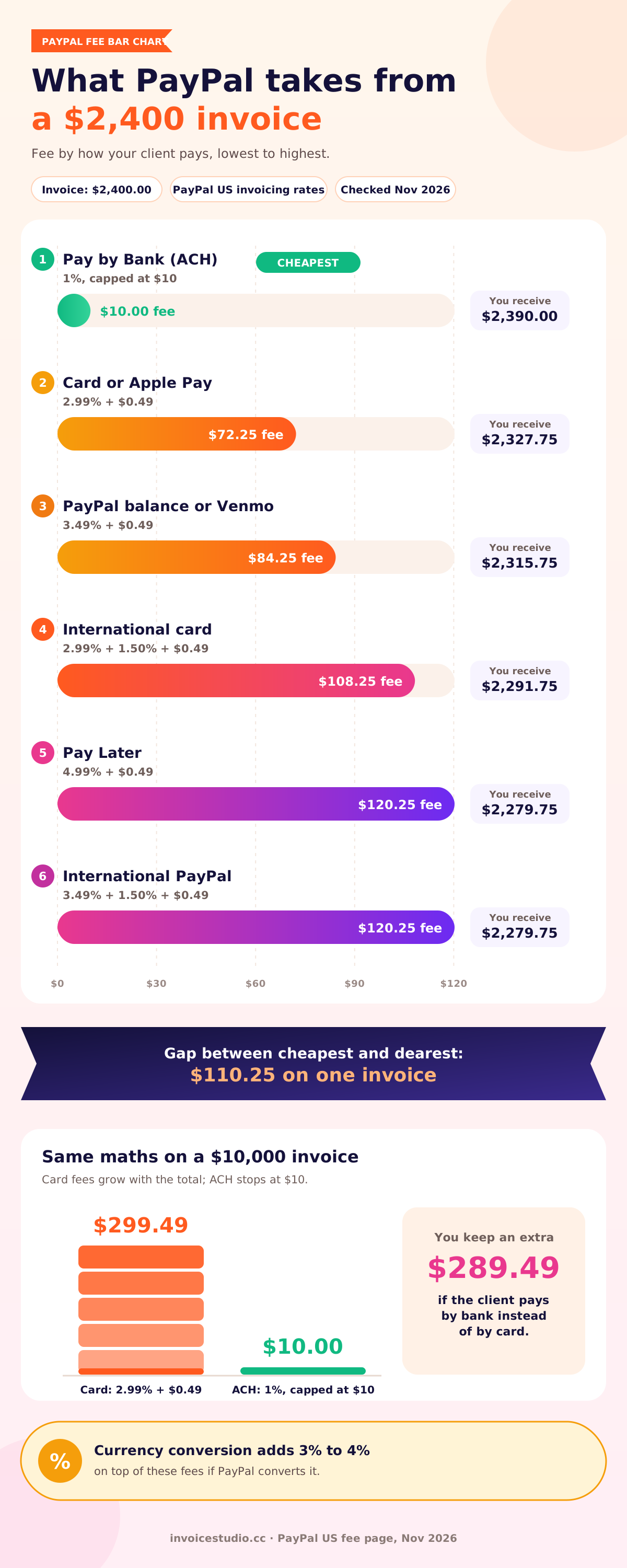
PayPal doesn't charge to send an invoice, but it takes a fee from each payment you receive, and that fee depends on how the client pays. These are the US rates from PayPal's published fee page, checked in November 2026, worked out on a $2,400 invoice:
| How the client pays | Published rate | Fee on $2,400 | You receive |
|---|---|---|---|
| Pay by Bank (ACH) | 1%, capped at $10 | $10.00 | $2,390.00 |
| Debit or credit card, Apple Pay | 2.99% + $0.49 | $72.25 | $2,327.75 |
| PayPal balance or Venmo | 3.49% + $0.49 | $84.25 | $2,315.75 |
| Card from an international client | 2.99% + 1.50% + $0.49 | $108.25 | $2,291.75 |
| Pay Later | 4.99% + $0.49 | $120.25 | $2,279.75 |
| PayPal from an international client | 3.49% + 1.50% + $0.49 | $120.25 | $2,279.75 |
Look at the gap. On the same $2,400 invoice, the difference between the cheapest and most expensive way to get paid is $110.25. If you invoice $2,400 a month and most clients pay by PayPal balance, that's around $1,000 a year in fees. And if PayPal converts the money into another currency for you, it adds a currency conversion spread on top, listed at 3% to 4% on the same page.
My take: PayPal invoicing is worth it when the client insists on paying by card or PayPal, or when you're new and need the trust that comes with a familiar name. For a regular client paying $2,400 a month, ask for a bank transfer and save the fee. If you add a fee line to cover it, check your local rules first, because card surcharges are restricted in some countries and US states.
Can you use Invoice Studio with PayPal?
Yes, but not as a PayPal invoice. Invoice Studio prints your PayPal details, such as your PayPal email or PayPal.me link, under "How to pay" on the PDF and emails that PDF to the client. It doesn't connect to PayPal's invoicing system, so there's no PayPal "Pay now" button, and the payment won't be marked as paid automatically. You record the payment yourself when it arrives. Want PayPal's payment page and status tracking? Send from PayPal. Want your own design and several payment options on one invoice? Send the PDF and list PayPal as one option.
Should you send invoices by WhatsApp, text or post?
You can send an invoice by WhatsApp, text or post, and in some markets it's normal, but you should still send a PDF by email as the official copy. A chat message proves the client saw something; an email with a PDF attached is the record your accountant, the tax office or a court will want to see.
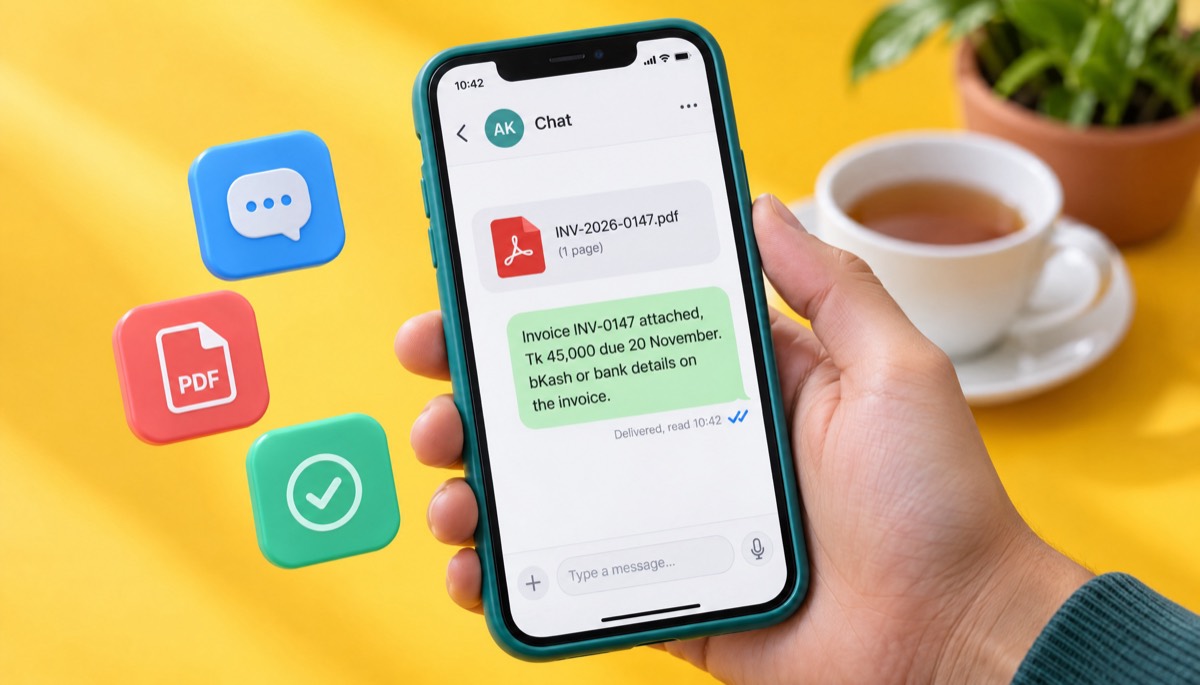
WhatsApp and Messenger. In Bangladesh, India, Pakistan, much of Africa and Latin America, a lot of small business runs on WhatsApp. If that's where your client lives, send the PDF there. Don't send a screenshot. A screenshot can't be filed, the numbers are hard to read on some phones, and it looks less professional. Send the PDF itself, then a one-line message: "Invoice INV-0147 attached, ৳45,000 due 20 November, bKash or bank details on the invoice." Then email the same PDF so it exists outside the chat.
Text message. Fine for a reminder, poor for the invoice itself. SMS doesn't carry PDFs well.
Accounting software. If your bookkeeping lives in QuickBooks or Xero, you can send the invoice from there by email in the same way. The rules in this guide still apply: PDF attached, clear subject line, right recipient.
Post. Some government buyers, older firms and certain legal processes still want a paper invoice. Print it from the same PDF, keep a copy, and use tracked delivery if the amount matters.
When should you send an invoice?
You should send an invoice as soon as the work, delivery or milestone it covers is done, ideally the same day. Every day you wait is a day added to your payment terms, because net 15 or net 30 usually counts from the invoice date, not the date you finished.
Here's a simple example. You finish a job on 1 November and invoice on net 30. Send it on 1 November and it's due 1 December. Leave it until you "get round to admin" on 15 November and it's due 15 December, which in practice means January once the holidays hit. Our net 30 payment terms guide has the full date maths. Here's when to send an invoice for each common type of work:
| Type of work | When to send the invoice | Typical terms |
|---|---|---|
| One-off project under about $1,000 | On delivery, same day | Due on receipt or net 7 |
| Larger project with a new client | Deposit invoice before work starts, balance on delivery | Deposit on receipt, balance net 14 |
| Milestone project | At each signed-off milestone | Net 14 or net 15 per milestone |
| Monthly retainer | 1st of the month (in advance) or last working day (in arrears) | Net 7 to net 30 |
| Hourly or ongoing work | Every week or every two weeks, not monthly | Net 7 or net 14 |
| Physical goods | With the goods or on dispatch | Due on receipt to net 30 |
| Corporate client with a payment run | A few days before their invoice cut-off date | Their terms, often net 30 to net 60 |
Two details most guides skip. Ask large clients when their payment run happens: many pay suppliers once or twice a month, and an invoice that misses the cut-off waits a full cycle. And send on a weekday morning. An invoice sent at 9am on a Tuesday sits at the top of the inbox; one sent at 6pm on a Friday is buried by Monday.
Before or after the work? For new clients and anything over a few hundred dollars, I invoice a deposit before starting, usually 30% to 50%. For trusted clients, I invoice after delivery. Invoicing in advance is normal for retainers and bookings. If the client needs a document to approve the spend before a real invoice exists, send a quote or a proforma invoice first.
How to tell clients how to pay (bank, Wise, PayPal, bKash and more)
Tell clients how to pay by printing every accepted payment method, with complete details, under a clear "How to pay" heading on the invoice, and repeat the main one in your email. If a client has to reply to ask for your bank details, you've just added two or three days to your payment.
The right set of payment methods on an invoice depends on where you and the client are. Here's what to print for each:
| Method | What to print on the invoice | Best for | Cost to you |
|---|---|---|---|
| Domestic bank transfer | Account name, bank, account number plus routing number (US ACH), sort code (UK), IBAN and BIC (EU), IFSC (India) or routing number (Bangladesh) | Local B2B clients, larger invoices | Usually free or a small flat fee |
| International wire (SWIFT) | Account name, IBAN or account number, SWIFT/BIC, bank address | Large cross-border invoices | Flat sending and receiving fees, plus intermediary bank charges |
| Wise | Your Wise account details in the client's currency (for example USD, GBP or EUR details) | Freelancers with clients abroad | Low, shown upfront when you convert |
| PayPal | PayPal email or PayPal.me link | Clients who want card or PayPal | About 3% to 5% plus a fixed fee |
| Payoneer | Your Payoneer receiving account details or payment request | Marketplace and cross-border freelancers | Varies by method; check your account |
| Stripe or card link | A payment link you've made in your own Stripe or card account | Clients who must pay by card | Card processing fee |
| bKash or Nagad | Account type (merchant or personal) and number | Local clients in Bangladesh paying in taka | Depends on account type and transaction |
| Cash | "Cash accepted on collection" and ask for a signed receipt | Local trade, small jobs | None, but harder to record |
Now the question people ask on Reddit all the time: is bank transfer cheaper than card for big invoices? Almost always, yes. Card and PayPal fees are a percentage, so they grow with the invoice. A US ACH payment through PayPal is capped at $10, and a direct domestic bank transfer is often free. On a $10,000 invoice, a 2.99% card fee is $299.49; the ACH fee is still $10. For anything above roughly $500, steer clients toward bank transfer and keep card or PayPal as a backup.
Country notes
- US: Print ACH details (routing and account number). Some small clients prefer Zelle; if you accept it, print the email or phone number linked to your business bank account. Keep invoices and payment records for at least three years, longer in some cases, per the IRS record-keeping guidance.
- UK: Sort code and account number cover most clients. gov.uk's invoicing guidance lists what your invoice must show, and VAT-registered businesses have extra rules; see our VAT invoice requirements post.
- EU: IBAN and BIC. Cross-border B2B services often need the client's VAT number and reverse-charge wording. E-invoicing is spreading too: Belgium has required structured B2B e-invoices, usually sent over the Peppol network, since January 2026, and other countries are following, so check whether a PDF email is still enough for your clients.
- Canada and Australia: Print your domestic bank details (Canadian transit and institution numbers, Australian BSB and account number) and your GST/HST number (Canada) or ABN (Australia) where they apply. Rules vary, so check with the CRA or ATO.
- India: Domestic clients pay by NEFT, IMPS or UPI. Keep your bank's proof of inward payment for foreign clients.
- Bangladesh: bKash and Nagad suit local clients paying in taka. Foreign clients usually pay through Payoneer, Wise or a direct bank remittance to your account.
Invoicing in a different currency. Invoice in the currency you agreed in the quote, print the currency code next to the total (USD 2,400.00, not just $2,400, since several countries use the dollar sign), and say who pays transfer fees: "All bank charges to be paid by the sender" is a common line. Invoice Studio supports 14 currencies plus any custom currency, so you can bill a UK client in GBP and a US client in USD from the same account.
How to confirm the client received your invoice
The simplest way to confirm the client received your invoice is to ask in the email ("please confirm receipt") and follow up within two working days if you hear nothing. Read receipts and open tracking help, but a one-line human reply is the only confirmation that also tells you the invoice is with the person who pays.
Here's the confirmation note I send when there's no reply after two days:
Hi Sarah, just checking invoice INV-2026-0147 ($2,400, due 20 November) reached you and is with the right person for payment. Happy to resend it or send it to your accounts team directly if that's easier.
It catches the three problems behind most delayed first payments: spam, the wrong inbox, or a missing purchase order number. With bigger companies, also ask whether you need to be set up as a supplier first. Many won't pay until they have a tax form (such as a W-9 in the US) and bank details on file.
What should you do after you send an invoice?
After you send an invoice, mark it as sent, put the due date and a reminder date in your calendar or invoicing app, and follow a fixed reminder schedule so you never have to decide whether it's "too soon" to chase. Most late payments aren't refusals; they're forgotten invoices.
This is the invoice reminder schedule I use. It's polite and predictable, and clients get used to it:
| When | What to send | Tone |
|---|---|---|
| Day 0 | Invoice email with PDF | Friendly, clear |
| Day 2 (if no reply) | "Just confirming you received it" | Light |
| 3 days before due | Friendly reminder with amount and due date | Helpful |
| Due date + 1 day | "Payment was due yesterday", PDF attached again | Direct, still polite |
| Due date + 7 days | Second reminder, ask for a payment date | Firm |
| Due date + 14 days | Phone call, then written notice of late fees or statutory interest if your terms allow | Formal |
| Due date + 30 days | Final notice before a collection agency or small claims | Formal, factual |
A friendly pre-due reminder you can copy:
Subject: Reminder: invoice INV-2026-0147 ($2,400) due Friday
Hi Sarah, a quick reminder that invoice INV-2026-0147 for $2,400 is due this Friday, 20 November. I've attached it again in case it's handy. Thanks!
For the harder messages after the due date, our guide on how to ask for payment politely has a full set of overdue emails. Know your rights too. In the UK, if no payment date is agreed, a business payment is late 30 days after the client gets the invoice, and you can claim statutory interest plus a fixed sum, as explained on gov.uk's late payment page. In the EU, the Late Payment Directive generally limits B2B terms to 60 days unless expressly agreed, and allows a minimum €40 recovery fee; see Your Europe's late payment rules. In the US it's down to your contract and state law.
When the money arrives, record it straight away, partial payments included. If they send remittance advice with the payment, match it to your invoice number; our post on remittance advice explains what that document is.
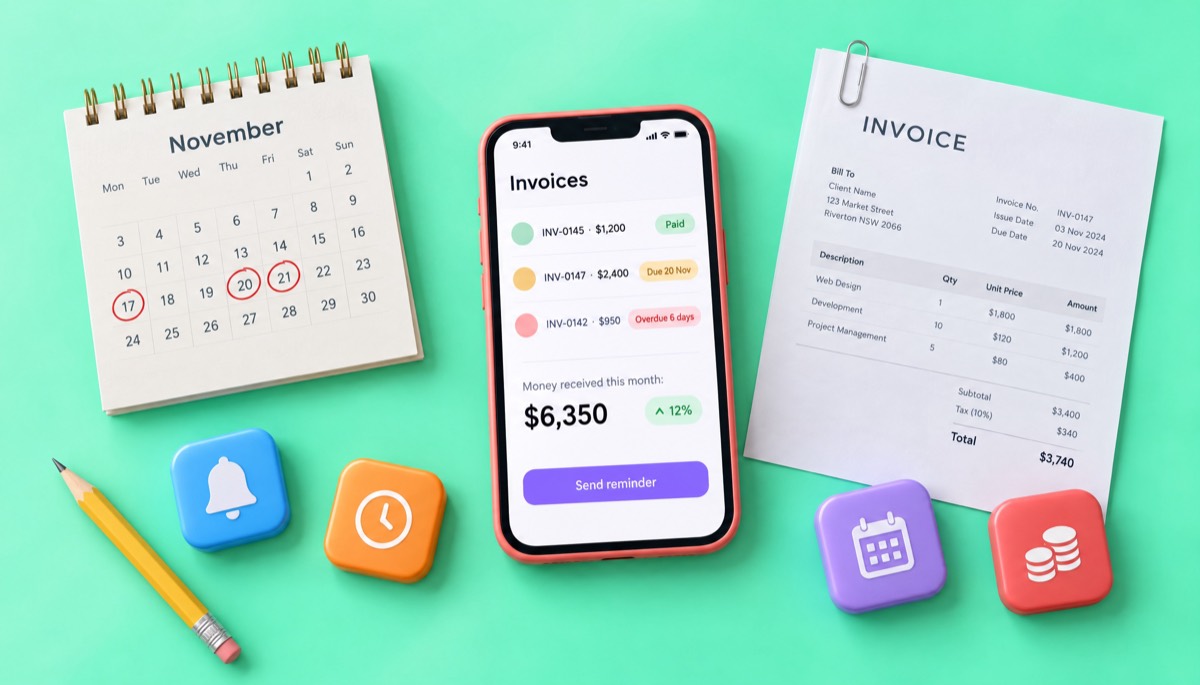
This is where online invoicing earns its keep. Invoice Studio emails the invoice with the PDF attached, sends reminders, marks invoices as overdue when the due date passes, records partial or full payments, and shows the money you've received on a dashboard. If you're still comparing tools, our free invoice app guide lists what to look for.
What are the common mistakes when sending invoices?
The most common mistakes when sending invoices are sending them late, sending them to the wrong person, leaving out how to pay, and writing a vague email with no amount or due date. Every one of them adds days or weeks to your payment, and every one is easy to fix.
Check these before you hit send:
- Waiting to invoice. Batching at month end moves your payment date back by up to four weeks.
- Sending it to your project contact only. Ask who pays, and send it to them with your contact copied.
- No purchase order number. Without it, many finance teams reject the invoice silently.
- Missing payment details. "Bank details on request" costs you a round of emails. Print them.
- Wrong client name. Use the legal entity name from the contract or PO, not the brand name.
- Editable files. Send a PDF, not a .docx or .xlsx.
- Resending under the same number. Issue a corrected invoice or credit note.
- Unclear currency. "$" could be US, Canadian, Australian or Singapore dollars. Write USD, CAD, AUD.
- No follow-up plan. No reminder date means a forgotten invoice.
- Trusting unexpected "new bank details" emails. Invoice fraud is common, so confirm any change by phone.
Keep a copy of every invoice and payment. Tax offices expect records kept for years: three or more in many US cases, five or six in the UK, Canada and Australia. Check your country's rule.
If you want to get this right without building anything from scratch, pick one of the 44 invoice templates, add your logo, currency and "How to pay" details once, and every invoice you send after that will already have the parts clients need. Then send the PDF the day the work is done, with the number, amount and due date in the subject line, and set your first reminder before you close the email.
Frequently asked questions
Should I send an invoice as a PDF?
When should I send an invoice?
How do I send an invoice through PayPal?
Should I invoice before or after the work?
How do I invoice in a different currency?
Is it cheaper to take bank transfer than card for big invoices?
Monjur builds Invoice Studio and incorporated MotionTrust Digital in September 2022, where he leads Amazon strategy across the client base. Eight years in e-commerce and marketplace marketing taught him how much time invoices and late payments eat, so every guide here is tested against the real product and current tax rules before it goes live.
More guides by Monjur