Bill the way you work
Hours, a fixed project fee, per word or a monthly retainer all fit as line items. Quantity times rate is worked out for you, down to £0.12 a word.
This invoice generator for freelancers bills by the hour, the project, the word or the month. Add a 50% deposit and your PayPal, Wise or Payoneer details, then send a branded PDF.
Pick how you bill, fill in the lines, check the live preview and download the PDF.
Hours, a fixed project fee, per word or a monthly retainer all fit as line items. Quantity times rate is worked out for you, down to £0.12 a word.
Invoice 50% upfront on one invoice and the balance on the next. Partial payments are tracked, so you always know what's still owed.
Bill in USD, GBP, EUR, CAD, AUD, INR, BDT and more. Add a reverse charge note and the client's PO number in seconds.
Print PayPal, Wise, Payoneer, bank, Stripe, bKash or Nagad under How to pay. Clients pay faster when they don't have to ask.
Pick one of 28 designs, add your logo and brand colour, and sign it. Your invoice matches your portfolio instead of a spreadsheet.
Say "32 hours at 85 dollars for Trailhead" and the invoice is built. Signed-in AI plans understand 20 languages, including Bangla.
Your name or trading name, email and tax number if you have one. Then the client's company, contact, address and any PO number.
One line per deliverable: hours times rate, the project fee, words times rate or the retainer. Add tax, discounts and the payment terms.
Choose a design, check the live preview and download the PDF. With an account, email it with the PDF attached and track the payment.
Pick one to load it into the tool above, then change anything.
One deposit line, due on receipt, with the balance promised on launch. Creative design, PayPal and bank details in the notes.
32 hours at $85 plus a $48 pass-through server cost, with the client's PO number and a timesheet. Net 14 by ACH or Wise.
6,000 words at £0.12 plus four sets of meta descriptions at £15. Not VAT registered, with the statutory late-payment line.
A £1,600 explainer plus two extra revision hours at £45. Reverse charge note, paid by Payoneer or Wise.
C$1,500 a month plus 13% Ontario HST, GST/HST number shown, billed on the 1st and due on receipt.
Plain answers, worked examples and the rules that apply, all checked against the live product.
An invoice generator for freelancers lets you bill hourly, per project, per word or on retainer, add a deposit, tax and your PayPal, Wise or bank details, then download a PDF. Invoice Studio does this free with 28 designs and 14 currencies, and adds numbering, payment tracking and recurring invoices when you sign in.
An invoice generator for freelancers turns the work you did into a clean, numbered PDF that tells the client what they owe, when it's due and exactly how to pay. The tool above does that for hourly work, fixed project fees, per-word writing and monthly retainers. You fill in the lines, the totals are worked out for you, and you download the PDF with no watermark.
I've invoiced hundreds of clients as a freelancer, from $90 logo tweaks to five-figure retainers, and most of the money I lost early on came from the invoice, not the work. Vague line items, no deposit, Net 30 to a client who paid at day 58. This guide fixes that. You'll get five worked examples you can load into the tool, a billing-model comparison, payment terms that actually work, copy-paste wording, and tax notes for the US, UK, EU, Canada, Australia, India and Bangladesh.
An invoice generator for freelancers is a tool that builds a professional invoice from your details, your client's details and a list of work, then calculates the totals and exports a PDF. The freelance part matters because your invoices look different from a shop's: hours, milestones, deposits, revision rounds and clients in other countries.
A generic generator gives you a product table and a total. A freelancer needs more than that:
Invoice Studio covers all of these. The free tool on this page builds the PDF; a free account adds saved clients, automatic numbering and payment tracking.
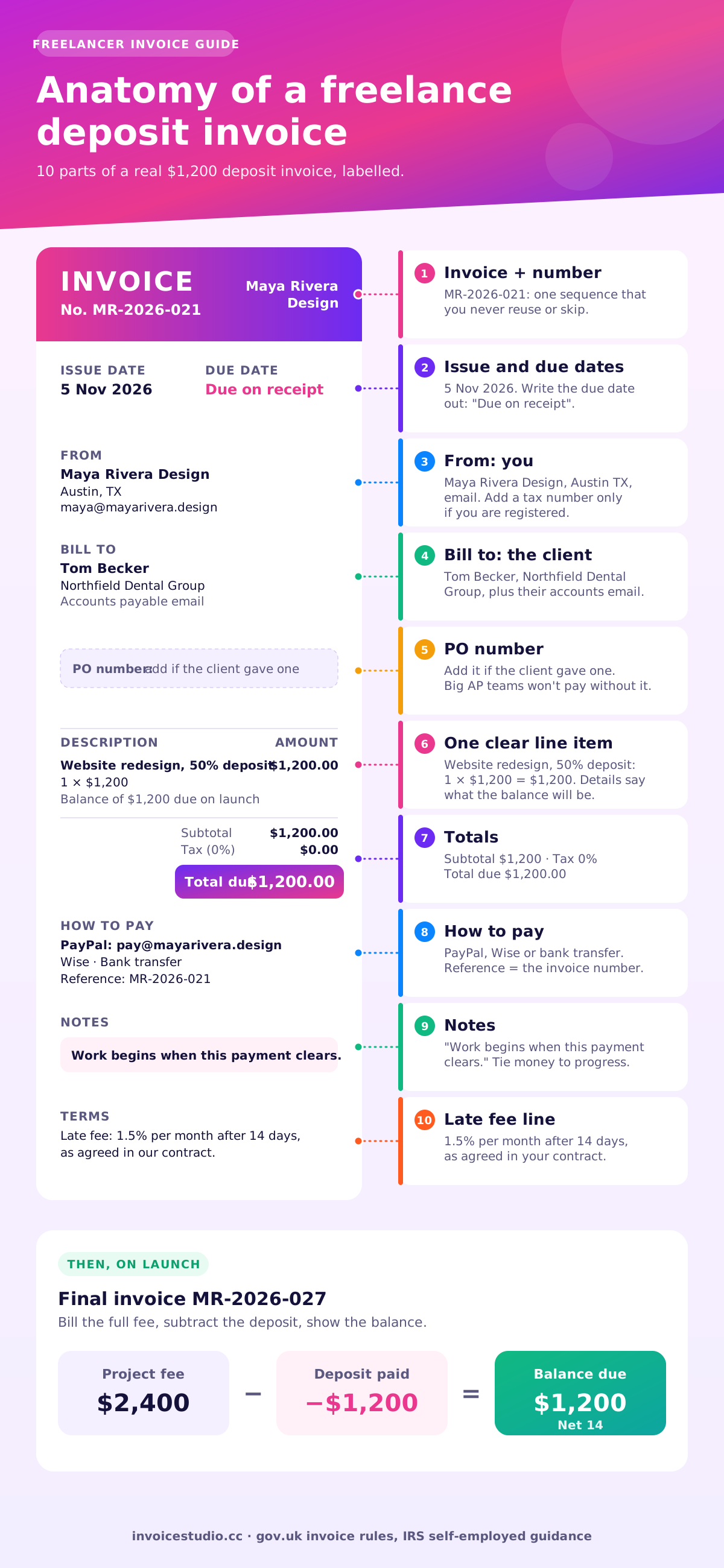
A freelance invoice, like any self-employed invoice, should include the word "Invoice", a unique number, the issue date, your name and contact details, the client's name and address, a description of each piece of work, quantities and rates, the total due, the due date and how to pay. Add your tax number and the tax amount only if you're registered for VAT, GST or sales tax.
Here's the checklist I run before every invoice goes out:
The UK government's list of what an invoice must include is a good legal baseline even if you're elsewhere, because most countries ask for a similar core. For a deeper walk through each field, see how to make an invoice or our invoice format samples.
Send an hourly invoice when the scope is unclear, per project when the deliverable is well defined, per word for writing and translation, and on retainer for ongoing monthly work. The invoice changes in one place only: the line items.
| Billing model | Best for | How the line reads | Example total | Watch out for |
|---|---|---|---|---|
| Hourly | Development, consulting, open-ended fixes | 32 hours × $85 | $2,720 | Attach a timesheet or the client will ask |
| Fixed project | Websites, logos, videos with a clear brief | Website redesign, 1 × $2,400 | $2,400 | Scope creep: price extra rounds separately |
| Deposit + balance | Any project over about $1,000 with a new client | 50% deposit, 1 × $1,200 | $1,200 now, $1,200 later | Show the deposit paid on the final invoice |
| Per word | Copywriting, translation, editing | 6,000 words × £0.12 | £720 | Agree whether it's source or final word count |
| Monthly retainer | Social media, maintenance, ongoing support | November retainer, 1 × C$1,500 | C$1,500 + tax | State what's included and what's billed extra |
My opinion after years of doing this: fixed project fees with a deposit make the most money for the least arguing. Clients love a known number, and you stop being punished for working fast. Keep hourly (or a day rate for on-site and workshop days) for the extras, and say so on the quote.
To create an invoice for freelance work, agree the price and terms, create the invoice with a unique number and clear line items, add how to pay, send it as a PDF with the number in the subject line, then track it until it's paid. Here's how that works in the tool above.
Prefer talking to typing? The voice invoice generator builds the same invoice from a sentence like "32 hours at 85 dollars for Trailhead Outfitters, Net 14". The free parser works in English and Bangla in your browser; signed-in AI plans use Claude plus ElevenLabs in 20 languages. To type a sentence instead, try the AI invoice software for freelancers.
The fastest way to learn what a good freelance invoice looks like is to open one. Each example below is in the Examples section of this page, so press "Load this example" and the tool fills with these exact numbers.
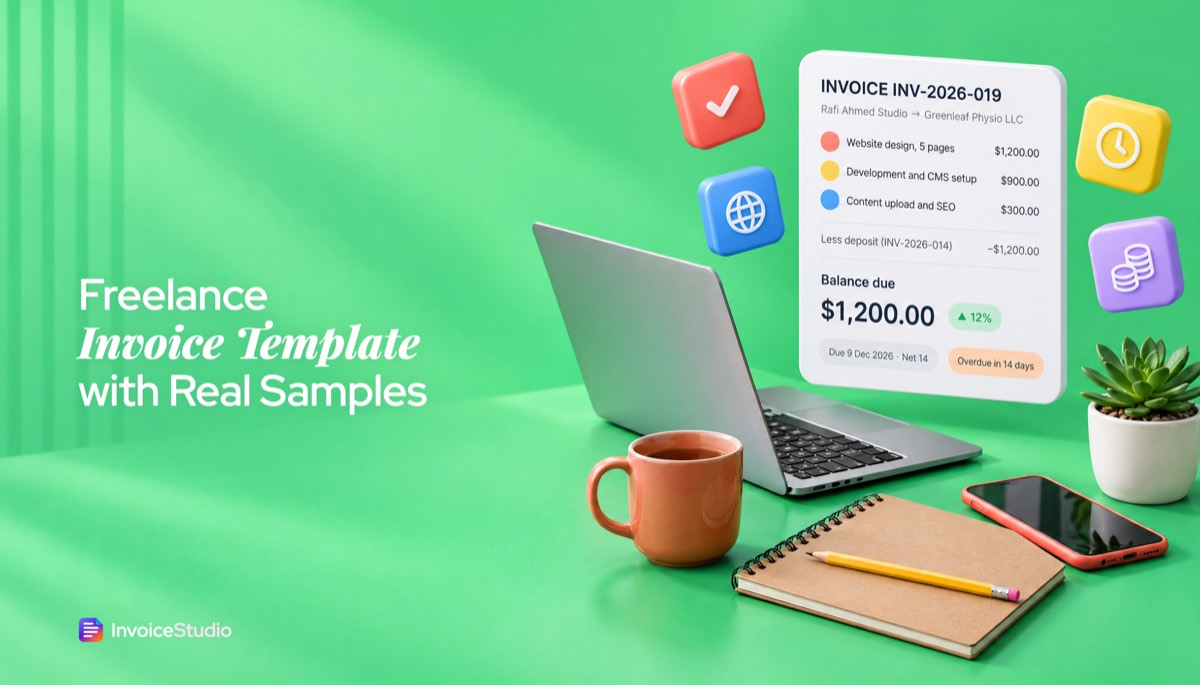
Maya is redesigning a dental group's website for $2,400. It's a new client, so she won't start until half is paid.
Design: Creative, because a designer's invoice is part of the portfolio.
Daniel builds Shopify apps and bills monthly against a statement of work.
Design: Midnight, a dark layout that suits a technical brand. The PO number is the most important line here: without it, a corporate AP team will park the invoice.
Hannah writes four 1,500-word articles a month for a fintech company.
Design: Elegant, calm and editorial. Her notes cite the statutory late-payment law, which in my experience gets a 30-day term respected.
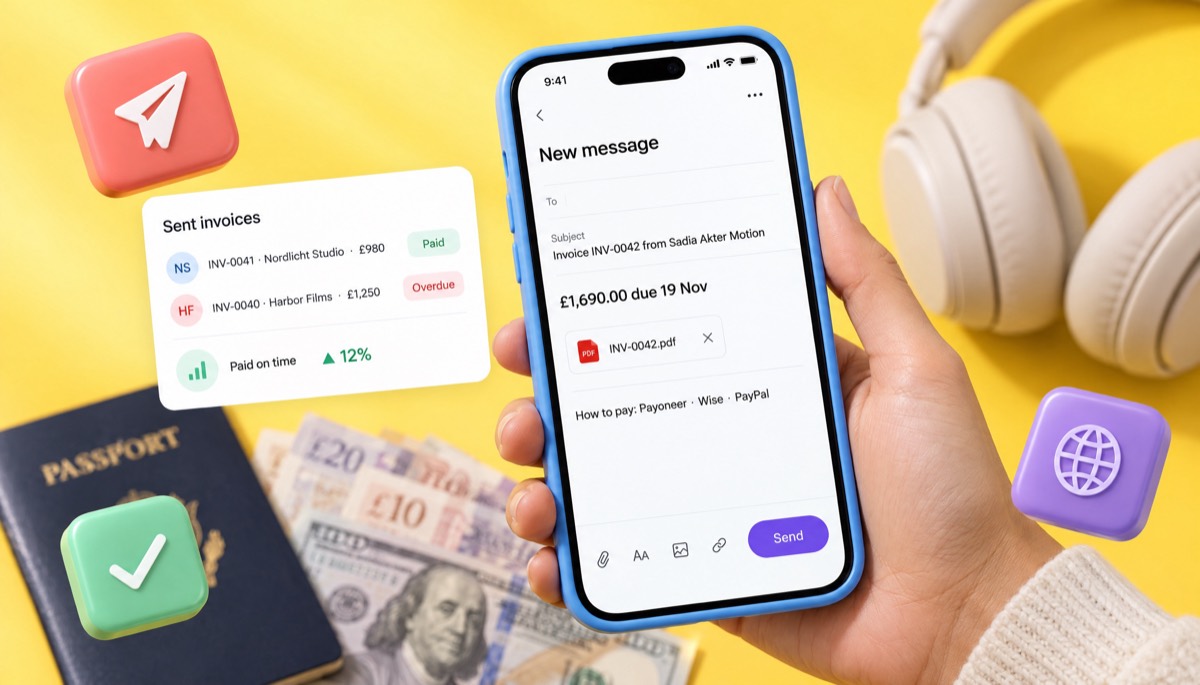
Sadia animates explainer videos for UK health startups and bills in pounds because that's what her client budgets in.
Design: Wave. Notice the extra revision line: the quote included two rounds, so the third is billed, with the approval date written down.
Leah manages a bakery's social channels for a flat monthly fee. She passed the small supplier threshold, so she charges HST.
Design: Split, with the big total panel a small business owner can read in a second. Retainers like this are where recurring invoices save the most time.
Send two invoices: a deposit invoice before work starts, and a final invoice on delivery that lists the full fee, subtracts the deposit already paid and shows the balance due. Each gets its own invoice number.
Using Maya's $2,400 site:
| Invoice | When | Lines | Due |
|---|---|---|---|
| MR-2026-021 | Contract signed | Website redesign, 50% deposit: $1,200 | $1,200, on receipt |
| MR-2026-027 | Site launched | Website redesign: $2,400; less deposit paid on MR-2026-021: −$1,200 | $1,200, Net 14 |
In an Invoice Studio account, you can also issue one invoice for $2,400 and record the $1,200 as a partial payment; the invoice then shows the balance and moves to paid when the rest arrives. Either way works. I prefer two invoices for new clients, because the deposit invoice is short and gets paid the same day.
How much to ask for: 50% is standard for design and development. Writers often take 30% to 50%. On jobs over about $5,000, split it into thirds: start, midpoint and delivery.
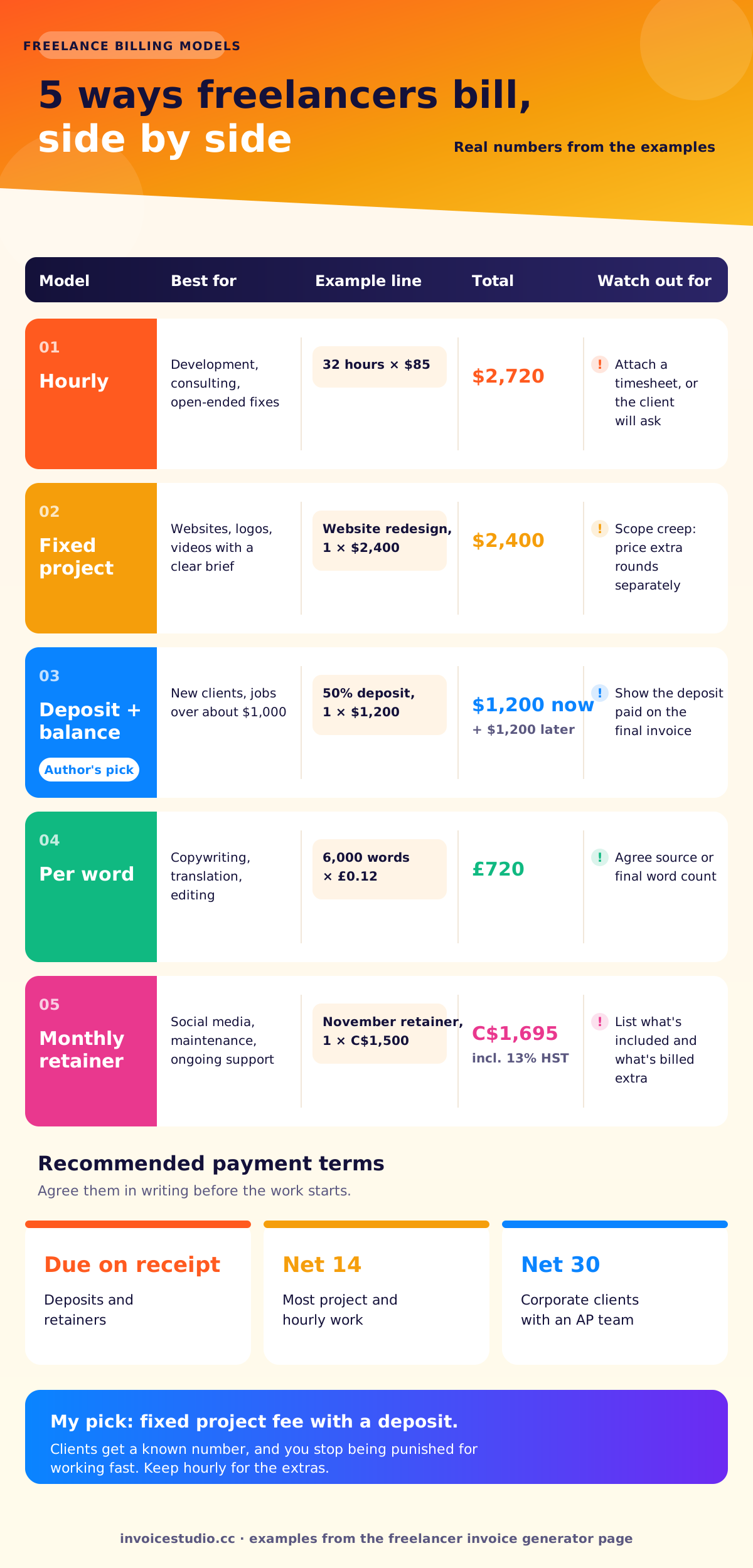
Most freelancers should use Net 14 or due on receipt, agreed in writing before the work starts. Net 30 is normal for large companies with monthly payment runs, so accept it there, but don't offer it to a small client who would happily pay in a week.
Some laws set terms for you. Under New York City's Freelance Isn't Free Act, contracts worth $800 or more must be in writing, and if no payment date was agreed, you must be paid within 30 days of finishing the work. In the UK, the late commercial payments rules let you claim interest at 8% above the Bank of England base rate plus fixed compensation of £40, £70 or £100, depending on the debt. That applies to business clients, not consumers.
A late fee only works if the client agreed to it. Put it in the contract, then repeat it on the invoice.
The Notes box on your invoice and the email that carries it do most of the work of getting paid. Here's wording I've used for years. Swap in your details and paste.
Deposit invoice: 50% of the $2,400 project fee. Work begins when this payment clears. The balance of $1,200 will be invoiced on launch, payable within 14 days.
Payment due by 19 November 2026 (Net 14). Please use invoice number 2026-021 as the payment reference.
Bank transfer: Maya Rivera Design, Account 12345678, Routing 111000025. PayPal: pay@mayarivera.design. Wise: maya@mayarivera.design.
As agreed in our contract, balances unpaid 14 days after the due date incur a late fee of 1.5% per month.
The agreed fee includes two revision rounds. Additional rounds are billed at $45 per hour, approved by email before work starts.
Subject: Invoice 2026-021 from Maya Rivera Design, $1,200 due on receipt
Hi Tom,
Great to be starting on the new Northfield site. Attached is the 50% deposit invoice for $1,200. As soon as it clears I'll send the first homepage concepts, which I expect to have ready within five working days.
Payment details are at the bottom of the invoice. Let me know if your team needs a W-9.
Thanks, Maya
Tie the payment to the next exciting thing ("as soon as it clears I'll send the concepts"). It works better than any reminder. If a due date does pass, how to ask for payment politely has follow-up emails for day 1, day 7 and day 21, and Invoice Studio's invoice reminders send a reminder email with the PDF in one click.
Freelancers charge VAT, GST or sales tax only once they're registered or required to register, which usually depends on turnover and where the client is. Below the threshold, you invoice without tax and often add a line saying so. These are the rules as of 2026; check your tax authority, because thresholds and rates change.
To get paid by a foreign client, invoice in the currency you agreed, include both full addresses and any VAT number, and list a payment method that works in both countries, such as Wise, Payoneer, PayPal or an international bank transfer. Fees vary a lot between these, so compare before you list one. Work won through Upwork or Fiverr is billed by the platform, so you only need your own invoices for direct clients. US companies paying a freelancer abroad will usually ask for Form W-8BEN instead of a W-9.
| Method | Good for | What to put on the invoice |
|---|---|---|
| Wise | Clients who pay by bank transfer in GBP, EUR, USD or AUD | Your local account details for that currency, or your Wise email |
| Payoneer | Freelancers in Bangladesh, India and other countries where PayPal receiving is limited | Your Payoneer receiving account or email |
| PayPal | Small, fast payments from individuals and startups | Your PayPal email; mention who pays the fee |
| International bank transfer | Large corporate clients | Account name, IBAN or account number, SWIFT/BIC, bank address |
| bKash or Nagad | Local clients in Bangladesh | Your bKash or Nagad number and account type |
All of these print under "How to pay" on your Invoice Studio invoice. One honest note: Invoice Studio doesn't take card payments on the invoice itself. You list the methods, the client pays through them, and you record the payment. For a full freelance invoice for foreign clients, with reverse charge and SWIFT wording, the international invoice generator and multi-currency invoicing pages go further.
A free invoice generator is the fastest way to send a correct invoice today, a Word or Excel template works if you invoice twice a year, and freelancer invoicing software makes sense once you have repeat clients and need to know who has paid. Invoice Studio gives you the first and the third in one place.
So what makes the best invoice generator for freelancers? In my experience, three things: maths you never have to check, payment details on the page and a record of who has paid.
A template's weak spot is the maths and the memory. Formulas break when you add a row, numbers get reused, and nothing tells you an invoice is 20 days overdue. If you still like templates, our guide to invoice templates for Word and Excel shows how to keep them reliable, and the free invoice templates page has all 28 designs. For a wider look at the options, see the free invoice app guide.
When should you switch? My rule: once you have three repeat clients or a retainer. That's when automatic numbering, saved clients, partial payments and recurring invoices start saving you an hour a month.
The most common freelance invoicing mistakes are vague line items, missing payment details, no deposit, terms that were never agreed and invoices sent to the wrong person. Each one adds days or weeks to getting paid.
Want more designs to start from? The invoice template gallery shows every layout, and the free invoice generator is there whenever you need a quick one-off. Other freelancer and agency guides live on the Invoice Studio blog, including the freelance invoice template guide. Consultants should also look at the consulting invoice template, and tradespeople at the contractor invoice generator.
Your invoice is the last thing a client sees from you on a project, and the only part that pays your rent. Use the generator above to send your next one in two minutes: clear lines, a due date, payment details and a design that matches your work. When you're ready, the paid plans start at $3 a month for emailing invoices and reminders.

Monjur builds Invoice Studio and incorporated MotionTrust Digital in September 2022, where he leads Amazon strategy across the client base. Eight years in e-commerce and marketplace marketing taught him how much time invoices and late payments eat, so every guide here is tested against the real product and current tax rules before it goes live.
InvoiceStudio: create invoices by voice, automate billing, and get paid faster. Build your next deposit, hourly or retainer invoice free, then save your clients so the one after takes seconds.