No duplicate or skipped numbers
Each document type gets its own series, so the next invoice is always the next number. No more copying a tab and forgetting to change INV-0041.
Spreadsheets are free and flexible, and for a few invoices a month they're fine. See where they break, how many minutes each invoice really takes, then build one in software and compare.
Read the side-by-side table, then make your next invoice here and time it against your spreadsheet.
| What you get | InvoiceStudio | Excel / Google Sheets |
|---|---|---|
| Price | Free for 10 documents a month; unlimited from $3 | Free (Google Sheets, Excel for the web) |
| Automatic invoice numbering | Typed by hand or a formula | |
| Totals, tax and discounts calculated | Your formulas | |
| Layout freedom | 28 designs, your logo, colour and font | Any layout you can build |
| One-click PDF, A4 or Letter | Save as PDF; check page breaks | |
| Email with the PDF attached | Starter ($3) and up | Attach by hand |
| Payment tracking and overdue status | A register you build | |
| Payment reminders | One-click emails | |
| Recurring invoices | Pro ($7) and up | Copy the tab |
| Custom pricing formulas | ||
| Several people editing one file | One login per account | |
| No invoice limit at $0 | ||
| Create invoices by voice | 20 languages on Pro | |
| Quotes, credit notes, POs, delivery notes | Pro ($7) and up | Separate templates |
Spreadsheet column describes standard Excel and Google Sheets features as of 2026-11-05; macros, add-ons and Apps Script can add more. InvoiceStudio limits are its current plan defaults. Verify on microsoft.com and google.com before you decide.
Each document type gets its own series, so the next invoice is always the next number. No more copying a tab and forgetting to change INV-0041.
Line maths, per-line discount and tax, shipping and VAT or GST rows are calculated for you. There's no SUM range to fall outside.
One click gives you a PDF on A4 or Letter with no watermark, even on Free. The layout holds however many lines you add.
Record full or partial payments, and invoices turn overdue after the due date. The dashboard shows money received without a register sheet.
The dashboard lists invoices that need a nudge, and you send a reminder from your own mailbox in one click. Automatic schedules aren't live yet.
On Pro, recurring invoices go out weekly, monthly, quarterly or yearly. Quotes turn into invoices in one click.
Export your client list from Excel or Google Sheets as CSV. Note your last invoice number, for example INV-0187.
Import the CSV on Pro or add clients by hand, continue numbering at INV-0188, and add your logo, colour and payment methods once.
Let open spreadsheet invoices get paid as they are. Create every new invoice in InvoiceStudio and keep the old PDFs as records.
Pick one to load it into the tool above, then change anything.
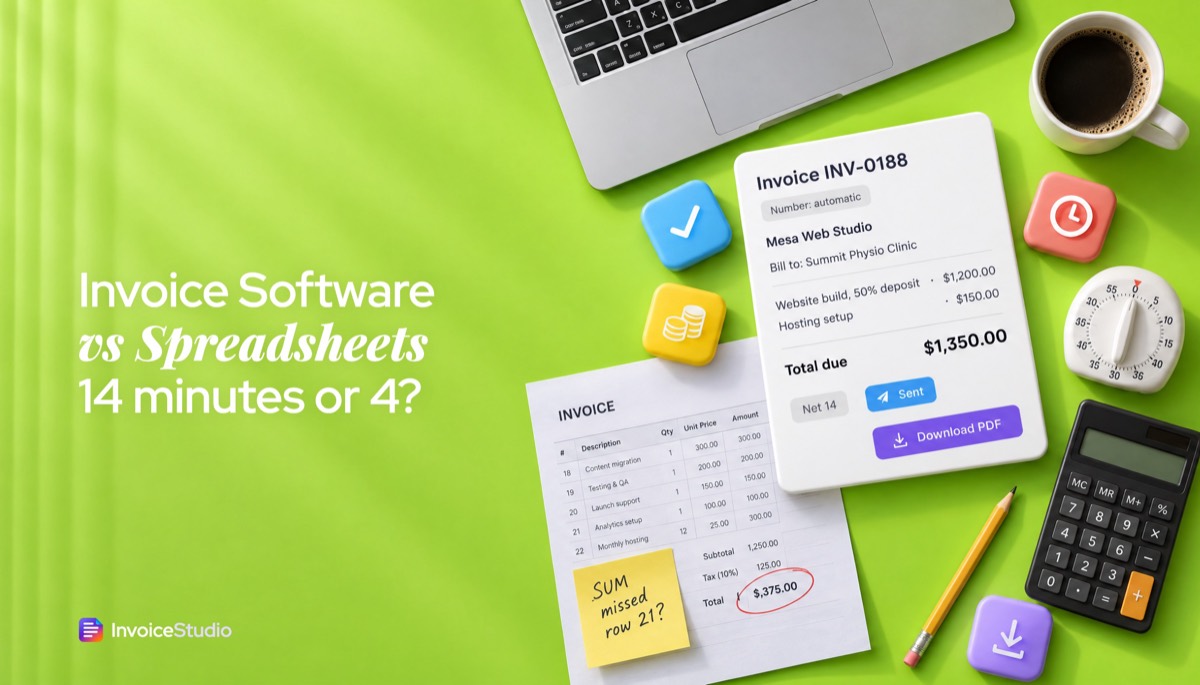
Half of a $2,400 site build plus $150 hosting setup. The deposit maths is done for you, numbered INV-0188.
20 visits at £45 plus £60 supplies, VAT at 20%, VAT number shown and the statutory late-payment line.
A C$3,200 package plus 8 second-shooter hours at C$75, Ontario HST at 13%, due in 7 days.
80 development hours at $35 plus 10 QA hours at $30, paid by Payoneer or Wise.
₹60,000 consultation plus 3 site visits at ₹5,000, GST 18% split as CGST and SGST, both GSTINs shown.
Plain answers, worked examples and the rules that apply, all checked against the live product.
Invoice software beats a spreadsheet once you send about ten or more invoices a month, because it numbers invoices, calculates totals, makes the PDF, emails it and tracks payment for you. A spreadsheet is free, flexible and fine for a few invoices a month, but numbering errors, broken formulas and forgotten follow-ups grow with volume.
Invoice software vs spreadsheet is a fair fight for longer than most software companies admit. An Excel or Google Sheets invoice costs nothing, looks however you want, and works fine for a handful of clients. It starts to cost you once you send more than about ten invoices a month: numbers get skipped, a formula breaks when you add a row, PDFs need fixing before they print, and "who still owes me?" lives in your head. InvoiceStudio handles the numbering, totals, PDF, email and payment status for you, from free or $3 a month.
I ran my own invoicing from a spreadsheet for years before I moved. This page is the comparison I'd want if I were deciding again: what spreadsheets genuinely do better, where they break, a time-per-invoice worked example, the formulas you need if you stay, a switch plan, and country notes for the US, UK, EU, Canada, Australia, India and Bangladesh.
Use a spreadsheet if you send a few invoices a month, your clients rarely pay late, and you enjoy building your own layout. Use invoice software once you're sending ten or more invoices a month, chasing late payments, or billing the same clients every month, because that's when manual numbering, copying and tracking start eating real hours.
Both tools make a valid invoice. An invoice is a document with the right fields: a unique number, both parties' details, the date, a description, the amounts and any tax. Excel can produce that. The difference is everything around the invoice: making the next one, sending it, knowing whether it was paid, and finding it again in two years when the tax office asks.
Here's a rough rule from my own experience:
Spreadsheets win on price, flexibility and control. You already have one, you can design any layout, and you can bend the formulas to price work in ways no invoicing app expects. I'd rather say that plainly than pretend software is better at everything.
If those points describe you and you send a few invoices a month, keep the spreadsheet. The rest of this page will still help you make it safer.
Spreadsheet invoicing breaks in six predictable places: invoice numbers, formulas, PDF export, payment tracking, reminders and file versions. None of them is a problem on invoice two. All of them are a problem on invoice two hundred.
An invoice number has to be unique, and in many countries it has to follow a sequence. In a spreadsheet, the number is whatever you type. You duplicate last month's tab, forget to change INV-0041 to INV-0042, and now two clients have the same number. Or you skip from 0042 to 0044 because you deleted a draft. A skipped number isn't fraud, but it's the kind of gap an auditor asks about, and the EU VAT invoicing rules ask for a sequential number that uniquely identifies each invoice.
Invoice software numbers each document type for you. Invoices, quotes and credit notes each get their own series, so the next invoice is always the next number. If you want a format with a year or client prefix, our invoice number format guide has examples.
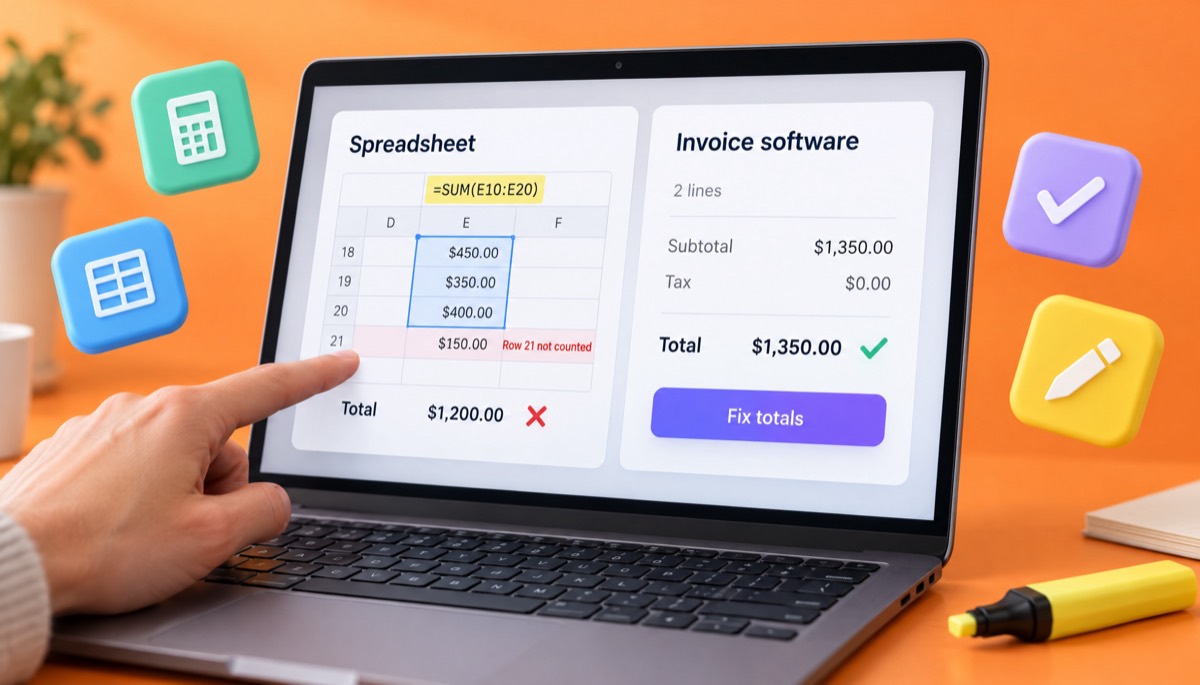
Most spreadsheet invoices use a total formula like =SUM(E10:E20). Add a 12th line item at row 21 and the total ignores it. Type a price over a formula cell and that line stops calculating. Round tax on the total instead of per line and you'll be a cent or two off what the client's system expects. These mistakes are common enough that researchers study them: Ray Panko's spreadsheet research site collects audits of real business spreadsheets and their error rates, and the European Spreadsheet Risks Interest Group keeps a list of spreadsheet horror stories where one bad cell cost real money.
Here's a real-shaped example. A $2,400 website project billed as a 50% deposit plus a $150 hosting setup should total $1,350 on the first invoice. If the deposit cell reads =B10*50% and someone types 2400 into B11 instead of B10, the invoice says $150. Clients rarely flag an invoice that's too low.
In invoice software, the line maths, per-line discount and tax, invoice discount, shipping and "Tax & fees" rows such as VAT or a processing fee are calculated for you, and you can't overtype a total by accident.
Clients want a PDF, not a .xlsx link. Both Excel and Google Sheets can save or download a sheet as a PDF, but the result depends on your print area, page breaks, scaling and margins. Add four line items and the totals block spills onto page two. Switch from A4 to US Letter for an American client and the logo shifts. You end up checking every PDF before it goes out.
Invoice software generates the PDF from the invoice itself, on A4 or Letter, with the layout held in place however many lines you add. In InvoiceStudio it's one click, with no watermark even on the Free plan.
A spreadsheet invoice doesn't know whether it's been paid. To answer "who owes me money?" you need a second sheet: an invoice register with the number, client, amount, due date, amount paid and status. Then you need to update it every time money lands, including partial payments. Most people keep it up for two months, then rely on memory.
That's how invoices slip: nobody noticed it was 40 days overdue. Invoice software records full or partial payments against each invoice, moves the status from sent to partial to paid, marks it overdue after the due date, and shows money received on a dashboard. In InvoiceStudio, payment tracking is on every plan, including Free.
A spreadsheet will never remind you that an invoice is late, and it will never remind your client. You have to notice, open your email, find the PDF, and write something polite. If you're busy, that step waits a week. Then another.
InvoiceStudio lists the invoices that need a reminder on the dashboard, and you send one in a single click from your own mailbox. To be precise about what's live: reminders are one click each, not an automatic schedule. Fully automatic reminder schedules are on the way but not available today. For wording that works, see how to ask for payment politely, and the invoice reminders page has a free reminder email writer.
After a year of spreadsheet invoicing you usually have one of two set-ups. Either it's one workbook with 140 tabs, or it's a folder of files called "Invoice_Acme_FINAL_v2.xlsx". Both work until you need every invoice for one client or a quarter's VAT total. Invoice software keeps every document in one list, searchable by client, number and status, with reports by period and CSV export on Pro.
Invoice software automates the repeat work around an invoice; a spreadsheet gives you a blank, flexible grid. The table below compares standard Excel and Google Sheets features with InvoiceStudio's current plans as of 5 November 2026. Add-ons, macros and Apps Script can add more to a spreadsheet if you're willing to build and maintain them.
| Task | Excel or Google Sheets | InvoiceStudio |
|---|---|---|
| Cost | Free (Google Sheets, Excel for the web); desktop Excel via Microsoft 365 | Free for 10 documents a month; unlimited from $3 a month |
| Invoice numbering | Typed by hand or built with a formula | Automatic, a separate series per document type |
| Totals, tax and discounts | Your formulas; easy to break when rows change | Calculated per line and per invoice |
| Layout | Anything you can build | 28 designs with your logo, colour and font |
| Save or download as PDF; check print area and page breaks | One click, A4 or Letter, no watermark | |
| Emailing the invoice | Attach the PDF yourself | Sent from your own mailbox with the PDF attached (Starter and up) |
| Payment tracking | A register sheet you build and update | Partial and full payments, overdue status, dashboard |
| Reminders | Manual emails | One-click reminder emails; automatic schedules not live yet |
| Recurring invoices | Copy the tab every month | Weekly, monthly, quarterly or yearly (Pro, $7) |
| Quotes, credit notes, POs, delivery notes | Separate templates you maintain | Same designs, quote to invoice in one click (Pro) |
| Custom pricing formulas | Yes, any formula | Quantity, unit, rate, discount and tax per line |
| Several people editing | Yes, shared files | One login per account today |
| Reports | Pivot tables you build | Dashboard on every plan; reports and CSV export on Pro |
| Create an invoice by voice | No | Yes, 20 languages on Pro; English and Bangla in the free browser tool |
The spreadsheet is stronger wherever you need freedom: layout, formulas, shared editing, no cost at any volume. InvoiceStudio is stronger wherever you need repetition done right: numbers, totals, PDFs, emails and payment status.
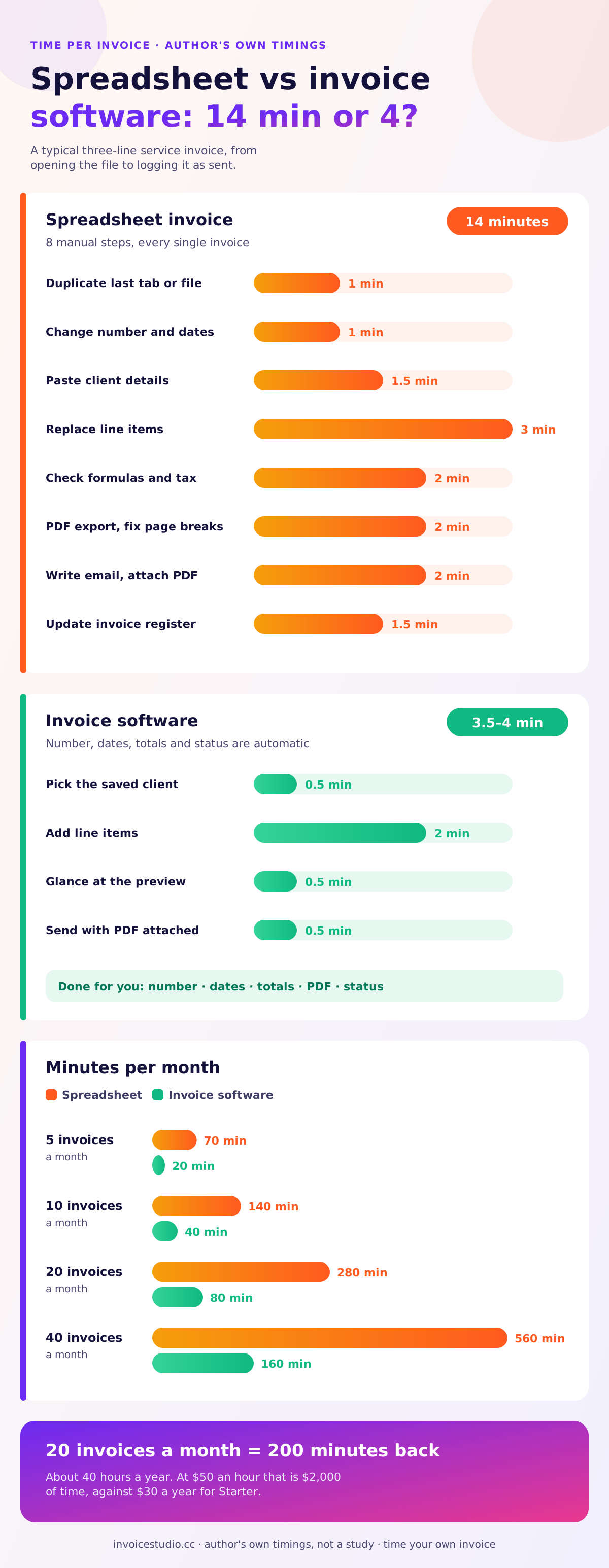
In my own timings, a spreadsheet invoice takes about 14 minutes from "open the file" to "logged as sent", and an invoice software invoice takes about 4. These are my numbers for a typical three-line service invoice, not a study, so time your own next invoice and compare.
Here's where the spreadsheet minutes go:
In InvoiceStudio, you pick the saved client (30 seconds), add the line items (2 minutes), glance at the preview (30 seconds) and send it with the PDF attached (30 seconds). The number, dates, totals and status are already done. Call it 3.5 to 4 minutes.
Now do the maths for 20 invoices a month. The spreadsheet is 20 × 14 = 280 minutes, or 4 hours 40 minutes. Software is 20 × 4 = 80 minutes. That's 200 minutes back every month, or about 40 hours a year. If you bill $50 an hour, that's $2,000 of time against $30 a year for Starter or $70 for Pro on yearly billing. At 3 invoices a month, the saving is about 30 minutes a month, and I'd understand if you didn't bother.
The bigger cost isn't the minutes. It's the invoice you forgot to send and the payment you forgot to chase.
If you stay with a spreadsheet, use formulas that survive new rows and round money correctly. These work in both Excel and Google Sheets. Adjust the cell references to your layout.
Lock every formula cell (protect the sheet and leave only input cells editable), keep one master template you never type into, and save each sent invoice as a PDF in a folder named by year. Those three habits remove most spreadsheet invoicing errors.
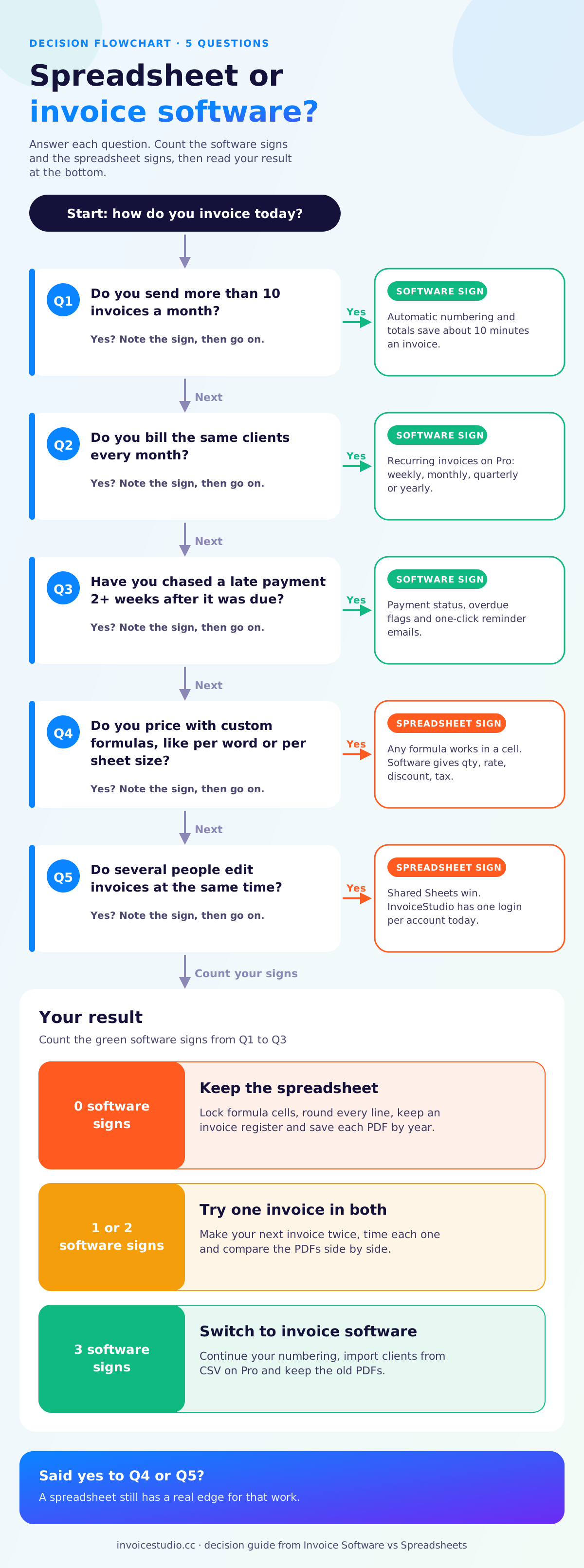
Switch when the spreadsheet costs you more in time or missed money than software costs in fees. In practice that's when you tick two or more of these signs.
Zero or one tick: keep the spreadsheet and use the formulas above. Two or three: try one real invoice in software and compare. Four or more: the spreadsheet is probably costing you money already.
You move in five steps: export your client list, bring it in, continue your numbering, record what's still unpaid, and set up your look once. For 30 clients, plan on about 45 minutes.
Then keep the old workbook and a folder of its PDFs. Those are your records for past invoices, and a tax office will want the original documents, not re-created ones.

If you bill retainers, this is the step that saves the most time. On Pro you set up recurring invoices weekly, monthly, quarterly or yearly, choose when they stop, and optionally email them automatically. No more copying last month's tab.
Tax authorities don't care whether an invoice came from Excel or software. They care that it has the right fields and that you keep it for long enough. Here's the short version for the places I hear from most.
These rules change and depend on your situation, so confirm them with your accountant or local authority. Our guide on how to make an invoice lists the core fields in one place.
The most common spreadsheet invoicing mistake is typing over a formula. The next most common are duplicate numbers and sending the editable file instead of a PDF.
Make your next invoice twice: once in your spreadsheet and once in the generator on this page. Time both, download both PDFs, and put them side by side. It costs nothing and takes about five minutes.
Start with the free invoice generator. Load one of the examples above, replace the client and line items with your own, and pick a design. If you're also weighing other invoicing apps, our Zoho Invoice comparison and guide to choosing a free invoice app use the same fair approach. If the software version is faster and cleaner, a free account saves your clients and numbering, and plans on the pricing page start at $3 a month for unlimited invoices and email sending.
And if your spreadsheet still wins, because you need a custom pricing formula or three people editing one file, keep it. A well-built spreadsheet beats software you don't use.

Monjur builds Invoice Studio and incorporated MotionTrust Digital in September 2022, where he leads Amazon strategy across the client base. Eight years in e-commerce and marketplace marketing taught him how much time invoices and late payments eat, so every guide here is tested against the real product and current tax rules before it goes live.
InvoiceStudio: create invoices by voice, automate billing, and get paid faster. Build one real invoice free, put it next to your spreadsheet version, and switch only if it's quicker and cleaner for you.