Bill in the client's currency
Pick USD, EUR, GBP, AUD, CAD, AED, SGD, JPY and six more; Pro plans and above can add custom ones. Symbols and decimals are formatted correctly, so ¥250,000 never shows as ¥250,000.00.
Use this free international invoice generator to bill a client abroad in their currency, add the right reverse charge or export wording, and print SWIFT, Wise or Payoneer details. Download the PDF free.
Choose the client's currency, add both full addresses and tax numbers, list the work, then print how they can pay you across borders.
Pick USD, EUR, GBP, AUD, CAD, AED, SGD, JPY and six more; Pro plans and above can add custom ones. Symbols and decimals are formatted correctly, so ¥250,000 never shows as ¥250,000.00.
Add the reverse charge line, an export under LUT note or a zero-rated statement in the notes. Show both VAT or tax numbers, which is what EU and UK finance teams check first.
Print SWIFT/BIC and IBAN, Wise, Payoneer, PayPal or crypto under How to pay. A client in Berlin should never have to email you asking how to send euros.
Multi-line addresses keep the country, postcode and tax ID on separate lines. That small detail stops invoices bouncing back from overseas procurement teams.
Choose one of 28 designs, add your logo, brand colour and signature. A client who has never met you judges you on the PDF, so make it look like a real firm sent it.
The free tool understands English and Bangla in the browser. Signed-in AI plans use Claude plus ElevenLabs in 20 languages, so you can say the invoice and check the draft.
Pick the currency you agreed in the contract. Add both full addresses with the country, and both VAT, GST or tax IDs where you have them.
One line per deliverable or block of hours. Leave tax at 0% for reverse charge or zero-rated exports, and add the exact wording in the notes.
Print SWIFT and IBAN, Wise, Payoneer or PayPal under How to pay, say who covers bank charges, then download the PDF or email it from your account.
Pick one to load it into the tool above, then change anything.
A $1,800 app design plus 12 handoff hours at $40. W-8BEN on file, export of services note, paid by Payoneer or Wise.
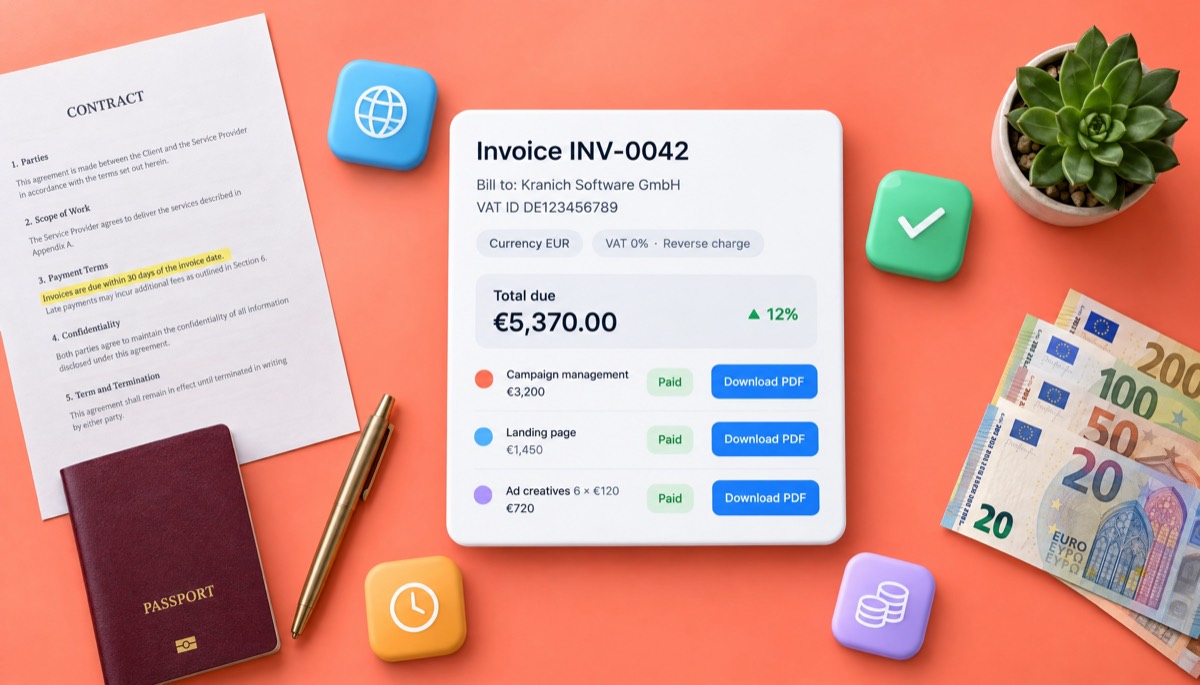
Campaign management, a landing page and six ad creatives in EUR. Both VAT numbers shown, 0% VAT and the reverse charge line.
40 hours at A$95 plus a A$900 workshop for a Brisbane firm. LUT wording, GSTIN and the client's ABN, paid by SWIFT.
Three bag designs at $650 and print-ready files. Zero-rated export of services, paid by Wise or PayPal.
A two-week sprint and hosting handover in AED. Reverse charge note for UAE VAT, SWIFT with IBAN and bank charges set to OUR.
Plain answers, worked examples and the rules that apply, all checked against the live product.
An international invoice generator creates an invoice for a client in another country: in their currency, with both full addresses and tax IDs, the right tax wording (such as reverse charge or export of services) and cross-border payment details like SWIFT, IBAN, Wise or Payoneer. Invoice Studio does this free with 14 currencies and a PDF download.
An international invoice generator builds an invoice for a client in another country: in the currency you agreed, with both full addresses and tax numbers, the right tax wording and payment details that work across borders. The tool above works as an invoice generator for overseas clients and does all of that. Pick the client's currency from 14 options, list the work, add a reverse charge or export note, print your SWIFT, Wise or Payoneer details and download the PDF free.
I've billed clients in nine countries. My first German invoice came back for a missing VAT number, and a US payment arrived $38 short after two intermediary banks took a cut. This guide covers what the top results skip: five worked examples you can load into the tool, a currency decision table, copy-paste wording for reverse charge and export invoices, a payment method comparison and country notes for the US, UK, EU, Canada, Australia, India, Bangladesh, Pakistan and the UAE.
An international invoice is a bill for goods or services you supply to a customer in another country. It has every field a domestic invoice has, plus four more: the currency, both parties' tax IDs, the tax treatment (usually 0% with a reverse charge or export note) and payment details a foreign bank or app can use.
If you ship physical goods, customs also needs a commercial invoice with HS codes and Incoterms; see proforma invoice vs commercial invoice. This page focuses on services, which is how most freelancers and small agencies bill abroad: a freelance invoice for foreign clients, an agency retainer in euros or an export of services invoice from India.
Three things change when your client is overseas:
An international invoice should include the word "Invoice", a unique number, the issue and due dates, your legal name, full address with country and tax ID, the client's legal name, full address and VAT or tax ID, a clear description of each service, quantities and rates, the currency, the tax treatment, the total and how to pay. If any one of these is missing, an overseas finance team will usually send it back rather than guess.
Here's the checklist I run before any cross-border invoice goes out:
Put the country on its own line in both addresses. Overseas AP systems often read addresses line by line.
Invoice in the currency your contract names. If you haven't agreed one yet, billing in the client's currency usually gets you paid faster, while billing in your own currency protects you from exchange-rate swings. Whichever you pick, use one currency per invoice and say so in writing.
Here's how the three common choices compare:
| Invoice currency | Who carries FX risk | Speed of payment | Best for |
|---|---|---|---|
| Client's currency (e.g. EUR to a Berlin client) | You | Fastest: a routine domestic payment for them | Agencies and freelancers with Wise or Payoneer local accounts |
| Your currency (e.g. GBP from Manchester) | The client | Slower: they need an international transfer | Large projects where a 5% FX swing would hurt |
| A third currency, usually USD | Shared | Medium | Clients in countries with volatile or restricted currencies |
My rule: under about $5,000, I bill in the client's currency. Over that, or on a 60-day term, I bill in mine or add an exchange rate clause (wording below).
That makes it an invoice generator for USD, GBP and EUR clients alike. Invoice Studio has 14 built-in currencies: USD, GBP, EUR, BDT, INR, CAD, AUD, AED, SAR, SGD, MYR, PKR, JPY and CHF. Each formats correctly, so a yen invoice shows ¥250,000 with no decimals, and on Pro plans and above you can add a custom currency, such as NZD or USDT, with its own symbol. If you bill clients in several currencies every month, the multi-currency invoicing page goes deeper on currency per client and reporting.
To create an invoice with an international invoice generator, confirm the currency and tax treatment, add both parties' full details, list the work, set tax to 0% with the right wording where it applies, add payment details and bank-charge terms, then send the PDF. The whole thing takes about three minutes in the generator above.
Here are three of the five examples you can load into the tool from the cards on this page, with arithmetic that adds up.
Nusrat runs a one-person UI studio in Dhaka. Her client is a software company in Portland, Oregon.
| Line | Qty | Rate | Amount |
|---|---|---|---|
| Mobile app UI design, onboarding and dashboard (18 screens) | 1 | $1,800 | $1,800 |
| Design system handoff, 1-15 October | 12 h | $40 | $480 |
| Total due (Net 14) | $2,280 |
No sales tax applies. The key extra is a tax form: the client wanted a W-8BEN before paying, so the notes say it's on file. Payment goes to Payoneer or Wise USD account details, so the client pays a domestic ACH transfer instead of a wire.
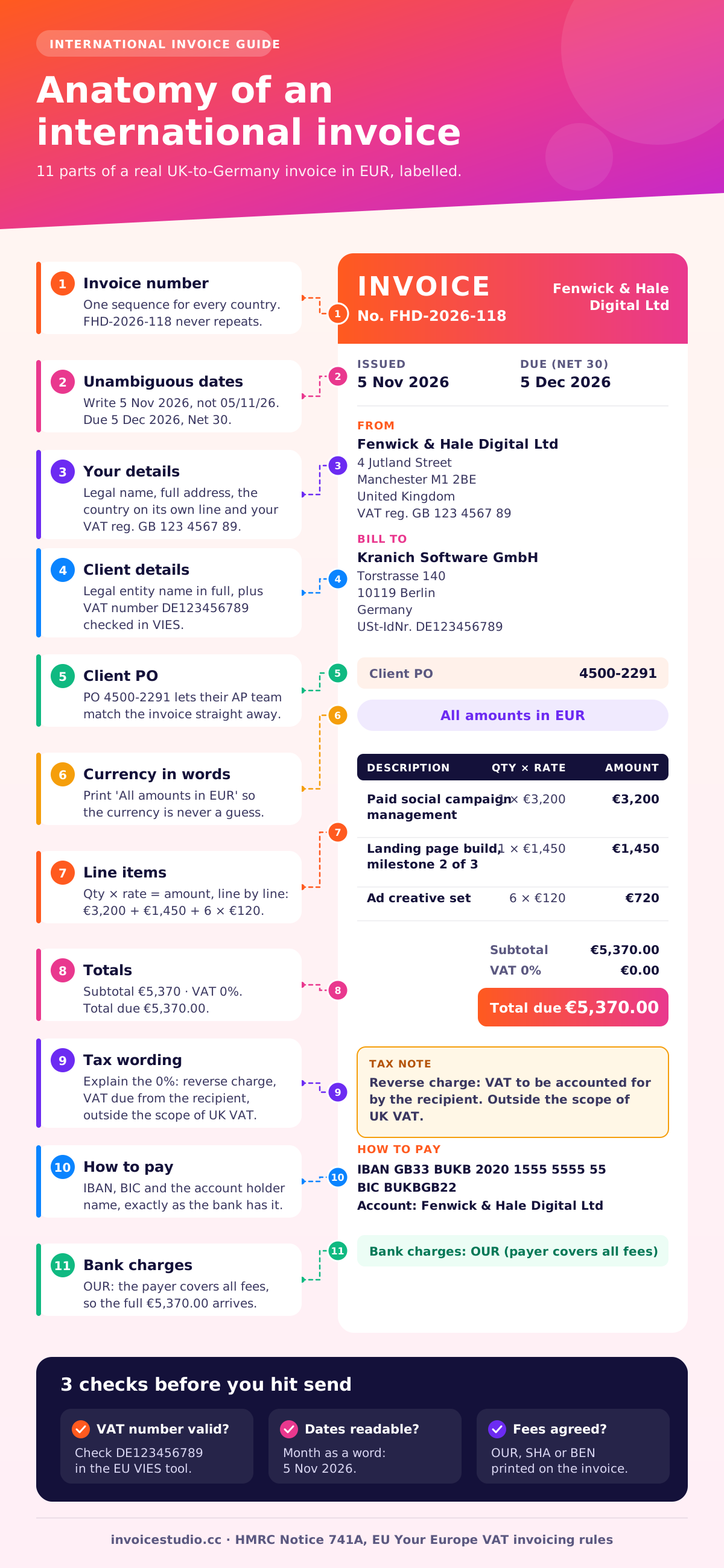
Fenwick & Hale is a VAT-registered marketing agency in Manchester. The client is a Berlin software company with a German VAT number.
| Line | Qty | Rate | Amount |
|---|---|---|---|
| Paid social campaign management, October | 1 | €3,200 | €3,200 |
| Landing page build, milestone 2 of 3 | 1 | €1,450 | €1,450 |
| Ad creative set | 6 | €120 | €720 |
| VAT | 0% | €0 | |
| Total due (Net 30) | €5,370 |
Under the general B2B rule, the supply happens where the customer belongs, so it's outside the scope of UK VAT. The German client accounts for VAT through the reverse charge. The invoice shows both VAT numbers, the words "Reverse charge" and the client's PO. Payment is by IBAN and BIC, which Kranich's bank can pay by SWIFT.
Ananya is a GST-registered consultant in Bengaluru. Her client is a logistics company in Brisbane.
| Line | Qty | Rate | Amount |
|---|---|---|---|
| Supply-chain process review, October | 40 h | A$95 | A$3,800 |
| Remote workshop facilitation | 1 | A$900 | A$900 |
| IGST | 0% (export under LUT) | A$0 | |
| Total due (Net 15) | A$4,700 |
Export of services is zero-rated under Indian GST. Because Ananya filed a Letter of Undertaking (LUT) for the year, she invoices without IGST and prints the mandatory export wording, her GSTIN and the LUT reference. She also adds the purpose code to her bank details so the inward remittance is classified correctly. For the full Indian layout, see the GST invoice format guide.
The other two examples, a Montreal designer billing a Seattle coffee brand in USD and a Lahore developer billing a Dubai real estate firm in AED, are in the use case cards. Click "Load this example" and the tool fills in every field.
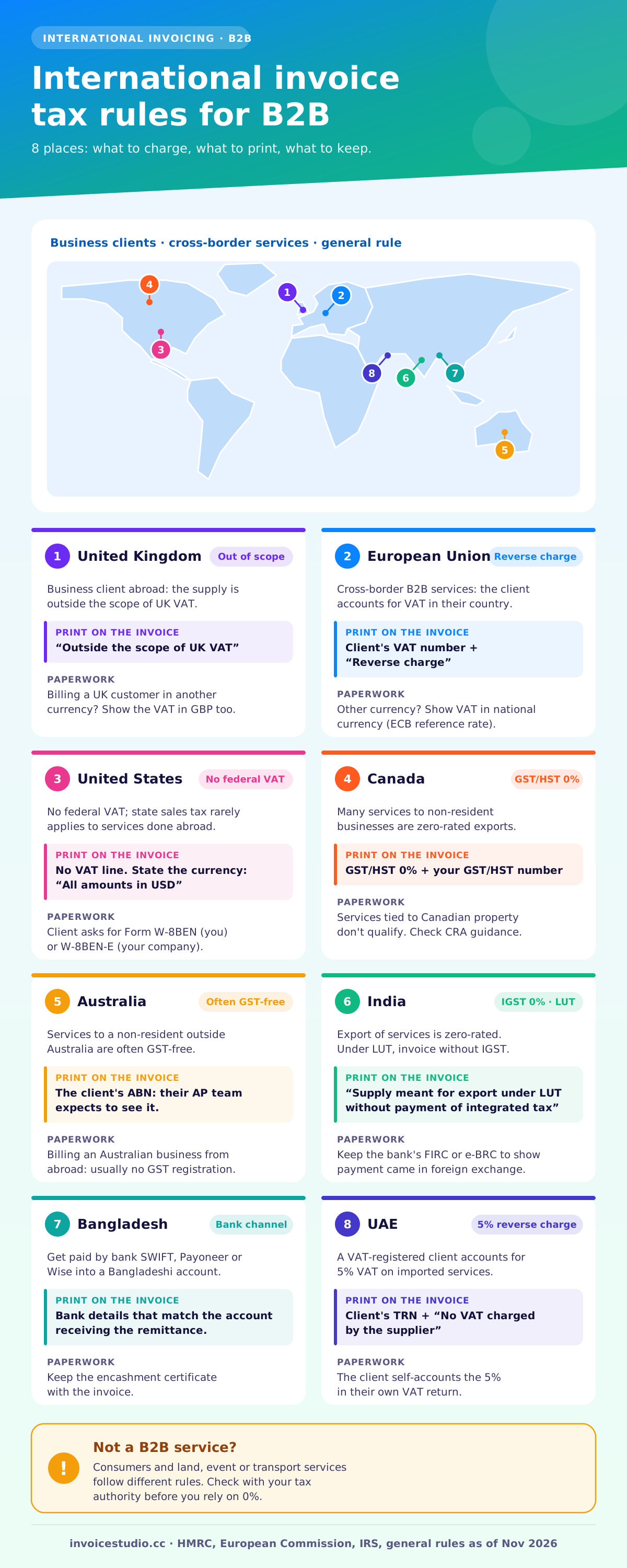
For business clients abroad, usually not. Most countries treat services sold to a foreign business as outside the scope of their VAT or GST, or zero-rated as an export, and the customer accounts for any tax in their own country through the reverse charge. You still have to explain the 0% on the invoice.
Two exceptions catch people out: sales to consumers (digital services to EU consumers can mean VAT in the buyer's country) and specific services such as land, events and transport, which have their own rules. If either applies, talk to an accountant first.
For B2B services, the general rule puts the place of supply where the customer belongs. Sell to a business outside the UK and the supply is outside the scope of UK VAT; HMRC's Notice 741A sets out the rules and the exceptions. If you're VAT registered and invoice a UK customer in a foreign currency, HMRC requires the VAT amount in sterling too; VAT Notice 700 covers this, and HMRC publishes monthly exchange rates you can use. More detail is in the UK VAT invoice guide.
Cross-border B2B services within the EU generally fall under the reverse charge. The invoice must carry the customer's VAT number and the mention "Reverse charge", as summarised on the European Commission's VAT invoicing rules page. If you issue an invoice in a currency other than the member state's own, the VAT amount must also be shown in the national currency. Many businesses use the European Central Bank reference rates for that conversion; check which rate your country accepts.
There's no federal VAT, and state sales tax rarely applies to services you perform for a foreign buyer. The paperwork that matters is the tax form. A US company paying a foreign freelancer will usually ask for Form W-8BEN (or W-8BEN-E for a company) instead of a W-9. It certifies you're not a US person. Send it with your first invoice and payments tend to move without questions.
Many services supplied to non-resident businesses are zero-rated exports for GST/HST, so you charge 0% but keep your GST/HST number on the invoice. Some services, such as those related to Canadian property, don't qualify. Check the CRA's guidance on exported services before you rely on the zero rate.
Services supplied to a non-resident who isn't in Australia are often GST-free. If you're on the other side, a foreign supplier billing an Australian business, you generally don't register for Australian GST for B2B services; the reverse charge applies only in limited cases. Show the client's ABN on the invoice either way, because their AP team expects it.
Export of services is zero-rated. You either export under a Letter of Undertaking without paying IGST, or pay IGST and claim a refund. Under LUT, the invoice must say "Supply meant for export under Letter of Undertaking without payment of integrated tax". For the supply to count as an export, payment generally has to arrive in convertible foreign exchange, so keep the bank's FIRC or e-BRC records.
Freelancers and IT firms exporting services should get paid through a formal banking channel (a bank SWIFT transfer, Payoneer or Wise into a Bangladeshi bank account) so the inward remittance is recorded. Ask your bank for the encashment certificate, keep it with the invoice, and check the current income tax treatment for IT-enabled services with the NBR or a tax adviser, as it has changed several times.
A Pakistani developer billing a Dubai company charges no Pakistani sales tax on most exported IT services, though provincial rules differ, so check with your provincial revenue authority. On the UAE side, a VAT-registered customer accounts for the 5% VAT on imported services under the reverse charge. The invoice should show the client's TRN and say no VAT was charged by the supplier.
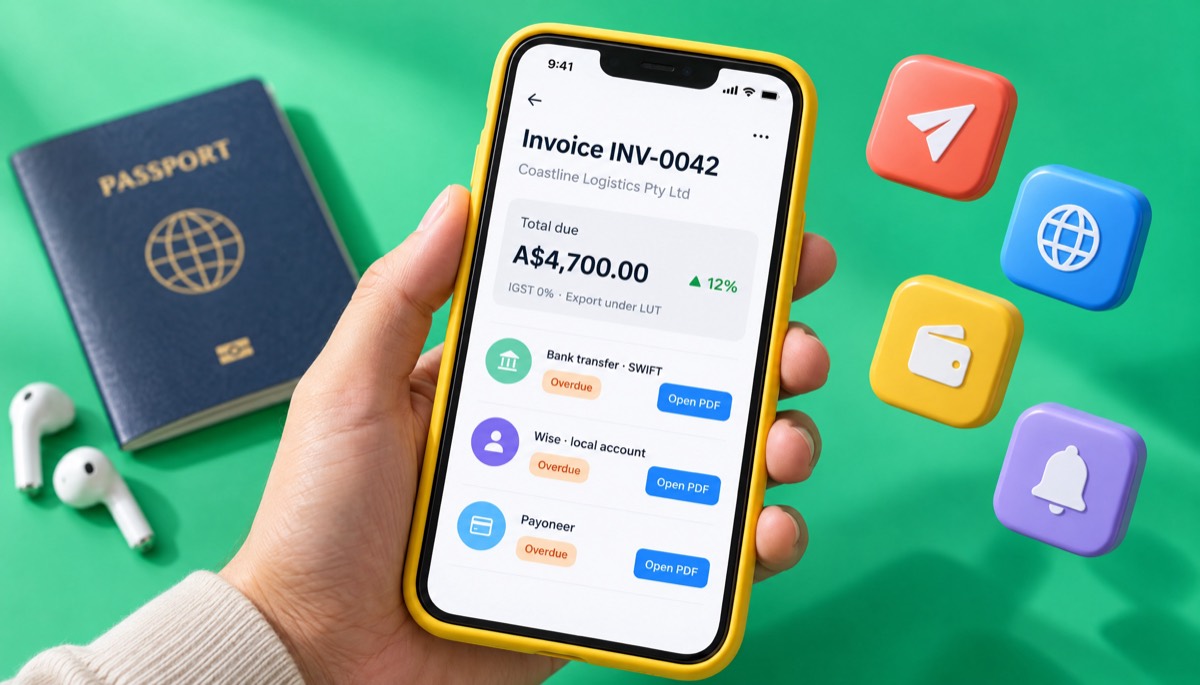
International clients usually pay by SWIFT bank transfer, a local transfer into your Wise or Payoneer account, PayPal, or a card payment link. The cheapest option for both sides is almost always a local-currency account, because the client pays a domestic transfer and you convert on your terms.
| Method | What to print on the invoice | Speed | Watch out for |
|---|---|---|---|
| SWIFT bank transfer | Bank name and address, SWIFT/BIC, IBAN or account number, account holder | 1-5 business days | Intermediary bank deductions; state OUR, SHA or BEN |
| Wise local account details | Local details for the client's currency (IBAN in EUR, sort code in GBP, ACH in USD) | Often same day | Client pays a domestic transfer, so check it matches the currency invoiced |
| Payoneer | Receiving account details or your Payoneer email for a payment request | 1-3 business days | Popular in Bangladesh, Pakistan and India; check withdrawal fees |
| PayPal | Your PayPal email | Instant | Cross-border and conversion fees can be high on large invoices |
| Card via Stripe link | A Stripe payment link | Instant | Processing fees; add them as a "Tax & fees" row only where surcharging is legal |
| Crypto (e.g. USDT) | Wallet address and network | Minutes | Only if the client agrees in writing; check local rules on receiving crypto |
Fees change often, so check each provider's current pricing page before you pick a default. Invoice Studio supports Stripe, PayPal, Wise, crypto, bank, card, Payoneer, bKash, Nagad and cash as named payment methods, and the details print on the PDF exactly as you type them. There's no online card checkout inside Invoice Studio itself, so a card option means adding your own Stripe link.
OUR, SHA and BEN are the three SWIFT charge codes. OUR means the payer covers all fees and you receive the full amount. SHA splits them: each side pays its own bank. BEN means you, the beneficiary, pay everything. If you don't say, most banks default to SHA, and an intermediary bank can still take $15 to $40 out of the middle. Write "Bank charges: OUR" if the client agreed to it.
Paste the line that matches your situation into the notes field of the generator. Adjust the names and numbers, and keep the wording short: AP teams scan for specific phrases.
EU or UK reverse charge VAT, B2B (supplier outside the customer's country):
Reverse charge: services supplied to a business customer in [country]. VAT to be accounted for by the recipient. Customer VAT number: [number].
UK supplier to a non-UK business:
Outside the scope of UK VAT: place of supply is the customer's country under the general B2B rule.
India, export of services under LUT:
Supply meant for export under Letter of Undertaking without payment of integrated tax. LUT ARN: [number], valid for FY 2026-27.
Canada, zero-rated export:
Zero-rated export of services to a non-resident. GST/HST charged at 0%. GST/HST no. [number].
Foreign freelancer to a US company:
Services performed outside the United States. Form W-8BEN provided on [date].
Currency and bank charges:
All amounts are in [currency]. Please pay the full invoice amount; bank charges are for the payer's account (OUR). Quote invoice number [number] as the payment reference.
Exchange rate clause (for long projects or long payment terms):
This invoice is payable in [currency]. If the exchange rate between [currency] and [your currency] moves more than 5% between the invoice date and the payment date, the parties will adjust the balance using the [ECB / HMRC] reference rate on the payment date.
Showing VAT in local currency (VAT-registered, invoice in foreign currency):
VAT amount in GBP: £[amount], converted at [rate] (HMRC monthly rate for [month]).
For follow-ups, the invoice reminders page has polite and firm templates, and the net 30 guide covers how to set due dates.
The most common international invoicing mistakes are a missing client VAT number, charging domestic VAT on a reverse charge supply, an ambiguous currency symbol and payment details that only work domestically. Each one either delays payment or creates a tax problem you'll have to fix later with a credit note.
Send the invoice as a PDF by email to the accounts payable address, not just your project contact, with the invoice number and amount in the subject line. Then follow up on a schedule: a friendly note three days before the due date, another on the day, and a firmer one a week after.
A free Invoice Studio account saves each overseas client with their currency, address and VAT number. Paid plans from $3 a month email the PDF from the app and send one-click reminders. Looking for an invoice generator with multiple languages? The free voice and AI tools understand English and Bangla in your browser, and signed-in plans with AI use Claude plus ElevenLabs in 20 languages, so you can describe the job in the language you think in. Dictate it with the voice invoice generator. Billing one niche? The freelancer invoice generator and consulting invoice template have examples built for those jobs, and the invoice templates page previews all 28 designs, any of which works as an invoice template for international clients. Want a plain start? Open the free invoice generator, compare plans on the pricing page, or read more guides on the Invoice Studio blog.
Tax rules for cross-border services change and depend on your situation: whether the client is a business or a consumer, what you supply and where you're registered. This guide reflects the general rules as of November 2026. Check with your tax authority or an accountant before relying on a 0% rate.

Monjur builds Invoice Studio and incorporated MotionTrust Digital in September 2022, where he leads Amazon strategy across the client base. Eight years in e-commerce and marketplace marketing taught him how much time invoices and late payments eat, so every guide here is tested against the real product and current tax rules before it goes live.
InvoiceStudio: create invoices by voice, automate billing, and get paid faster. Bill your next overseas client in their currency, with the right tax wording and payment details, then save them so the next invoice takes seconds.