An invoice in two minutes
Pick a saved customer, add items from your price list and download the PDF. No setup wizard, no chart of accounts, no training.
Invoicing software for small business, without the accounting suite: send a quote, turn it into a branded invoice with the right tax, and see who has paid. InvoiceStudio: create invoices by voice, automate billing, and get paid faster.
Load a real small business invoice below, swap in your customer and prices, then download the PDF.
Pick a saved customer, add items from your price list and download the PDF. No setup wizard, no chart of accounts, no training.
On Pro and above, send a quote or estimate first, then turn it into an invoice when the customer says yes. The numbers carry over, so nothing gets retyped.
Set sales tax, VAT or GST per line, add discounts and shipping, and add fee rows for card processing. The totals are worked out for you.
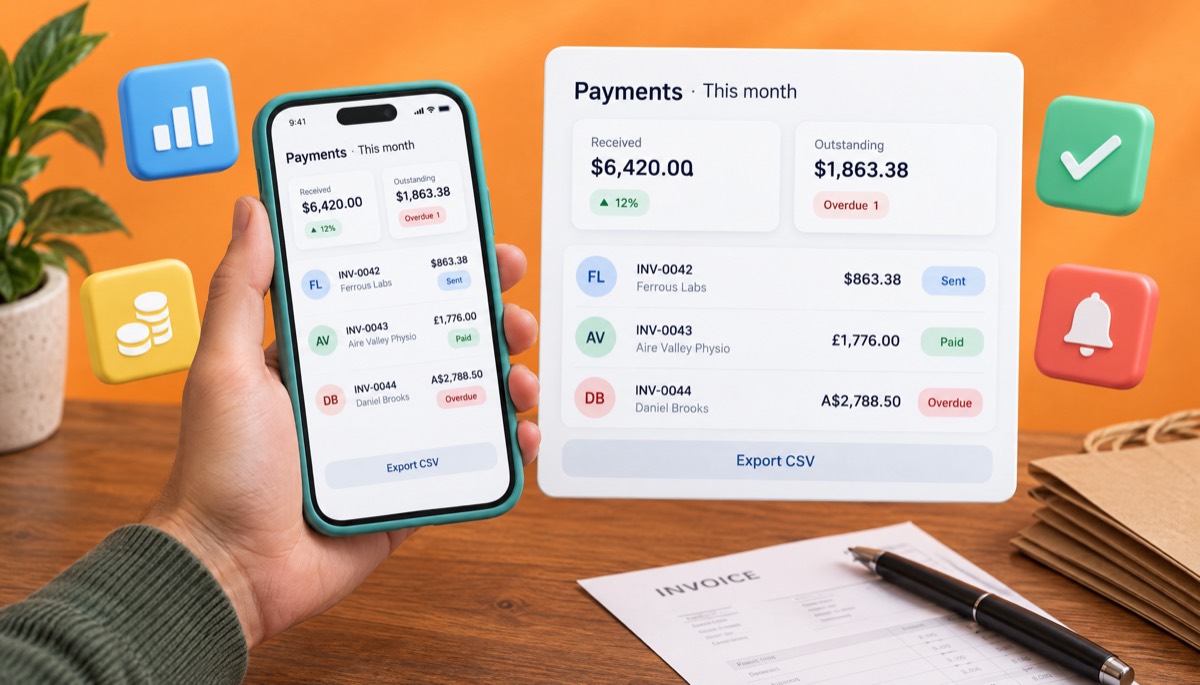
Record full or partial payments, spot overdue invoices at a glance and check money received on the dashboard. Export a CSV for your accountant.
Email the invoice with the PDF attached and send a reminder when it is late. Recurring invoices handle the customers you bill every month.
Start free. Paid plans run from $3 to $29 a month, with yearly and lifetime options, so you are not paying accounting-suite prices just to send invoices.
Enter your business name, address, tax number and logo, and choose a template and brand colour. Every invoice after this uses them.
Use the customer's legal name and billing email, list each product or service with quantity and price, and set the tax rate for each line.
Set a real due date, print your payment methods under How to pay, and email the PDF. Mark it paid, or part paid, when the money lands.
Pick one to load it into the tool above, then change anything.
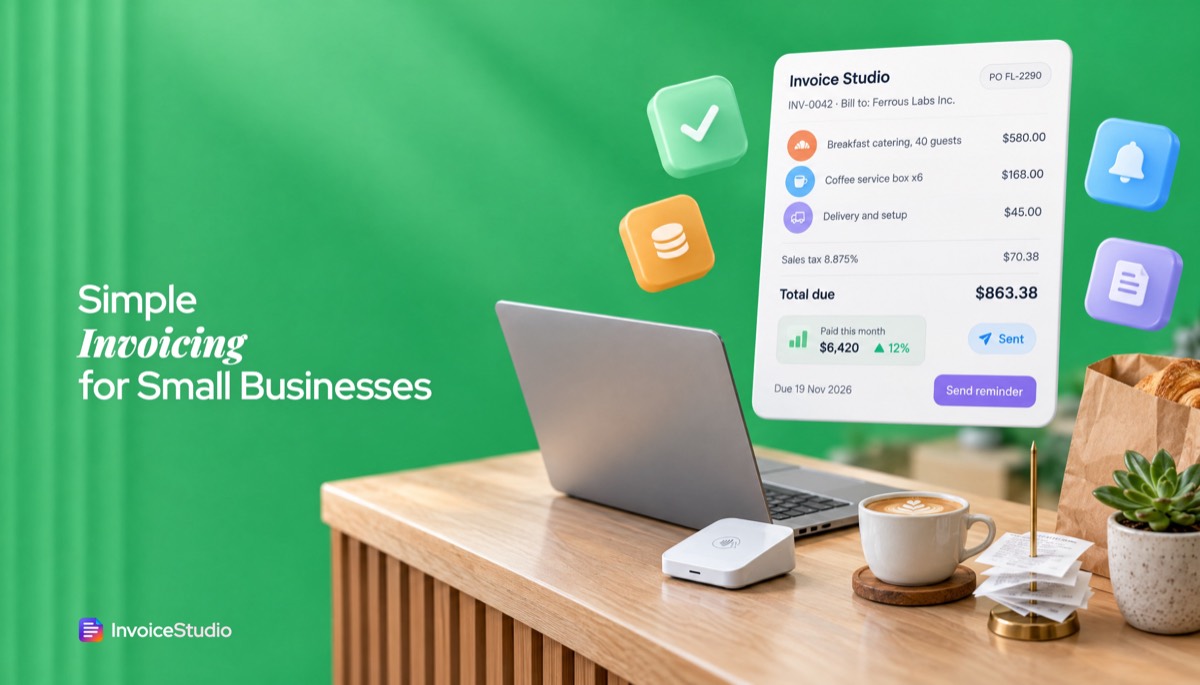
40 breakfast covers at $14.50, six coffee boxes and delivery for an office client, with NYC sales tax at 8.875% and the client's PO number.
20 evening visits at £65 plus a £180 deep clean, with 20% VAT, the VAT number and a statutory late-payment note.
A $1,950 hot water unit, 4.5 hours of labour at $110 and a $90 call-out fee, marked Tax invoice, with the ABN and 10% GST.
An annual maintenance contract for 12 PCs at ₹1,500 each plus router setup, with both GSTINs, the SAC code and 18% GST split 9% + 9%.
30 gift hampers, custom stickers and Dhaka delivery for a corporate client, with the advance noted and bKash and Nagad details printed.
Plain answers, worked examples and the rules that apply, all checked against the live product.
Invoicing software for small business creates quotes and branded invoices, adds sales tax, VAT or GST, emails them as PDFs and tracks which are paid or overdue. InvoiceStudio does this with 28 templates, 14 currencies, recurring invoices, one-click reminders and a payments dashboard. It is free to start, and paid plans begin at $3 a month.
Invoicing software for small business is a tool that turns a sale into a correct, branded invoice, adds the right sales tax, VAT or GST, sends it to your customer and tells you whether you have been paid. The generator above does the invoice part for free. This guide covers the rest: whether you need invoicing or accounting software, what it should cost, five worked invoices from real kinds of small business, the tax notes for seven countries and the exact wording I use to get paid on time.
I have invoiced for a one-person design shop, a family catering business and a cleaning company with 14 staff. The thing that slowed payment was never the price. It was a missing PO number, a total that did not match the quote, or a due date nobody could find.
Invoicing software for small business is an app that creates quotes and invoices, calculates tax, sends them as PDFs and tracks payments, without the full bookkeeping of an accounting package. People also call it invoice software, billing software or invoice management software. Whatever the name, it sits between a Word template and an accounting suite. You get saved customers, a price list, numbered invoices and a list of who owes you what.
A bakery, a plumber, a tutor, a cleaning company or a print shop sends perhaps 10 to 200 invoices a month. They need each one to be right and to go out fast. They rarely need double-entry journals, depreciation schedules or a chart of accounts with 140 lines. Your accountant has those tools already.
Online invoicing software runs in the browser, so you can send an invoice from the van, the counter or the kitchen table, on a phone as easily as on a laptop. Some tools, including InvoiceStudio, also let you create an invoice by voice. The free tool understands English and Bangla; Pro and above add Claude and ElevenLabs in 20 languages. You say "Invoice Daniel Brooks for a hot water unit, 1,950 dollars, plus four and a half hours labour at 110" and the draft is built for you to check.
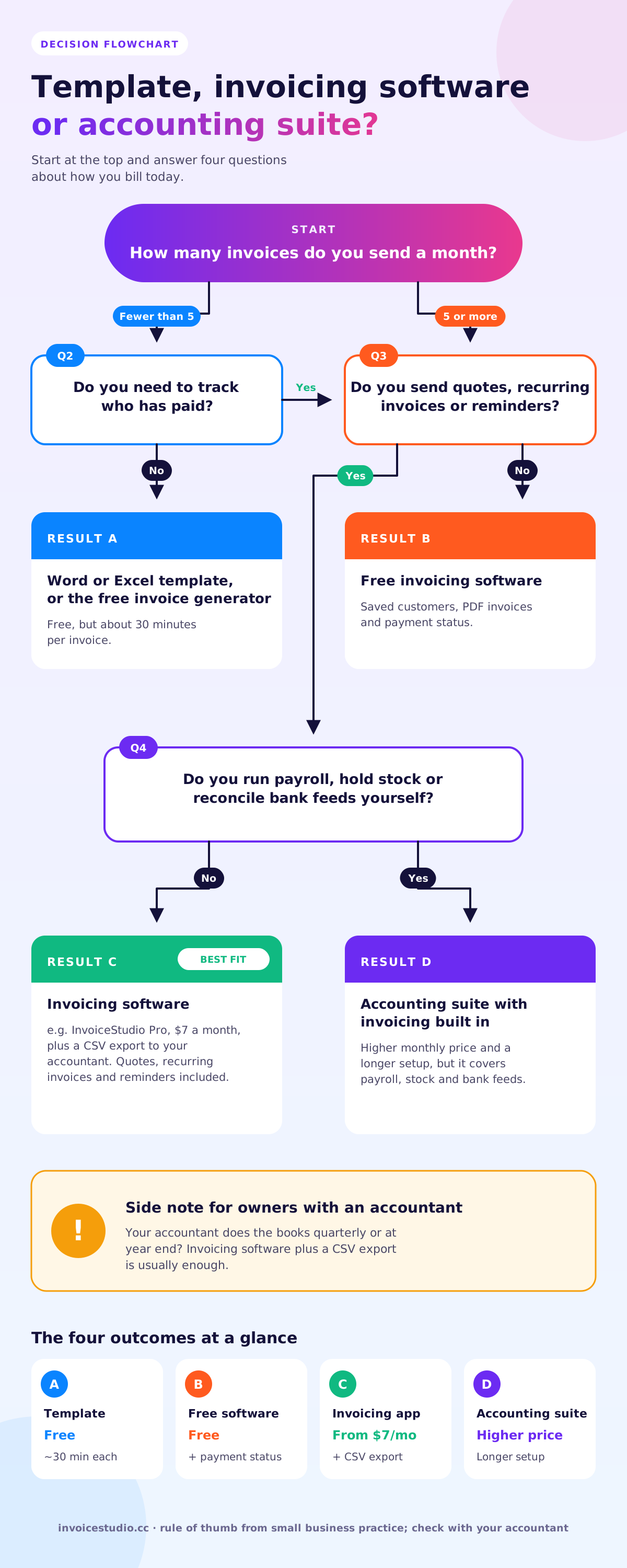
You need invoicing software if your main job is billing customers and chasing payment. You need accounting software when you also have to reconcile bank accounts, run payroll, track stock or file returns yourself. Many small businesses start with the first and add the second, or a bookkeeper, later.
| What you need | Word or Excel template | Invoicing software | Accounting suite |
|---|---|---|---|
| Professional invoice PDF | Yes, if you design it | Yes, 28 templates | Yes |
| Quotes that turn into invoices | Copy and paste | One click | Yes |
| Tax per line and correct totals | Your own formulas | Automatic | Automatic |
| Who has paid, who is overdue | A separate spreadsheet | Dashboard | Dashboard |
| Recurring invoices and reminders | No | Yes | Yes |
| Bank feeds, ledger, payroll | No | No | Yes |
| Typical cost | Free | Free to about $30 a month | Monthly subscription, usually higher |
| Time to first invoice | 30 to 60 minutes | About 5 minutes | An afternoon of setup |
My rule of thumb: if your accountant does your books at year end or each quarter, invoicing software plus a CSV export is enough. If you pay staff through the system, hold stock or have a loan to report on, look at an accounting suite. I would not pay for bank feeds just to send 20 invoices a month.
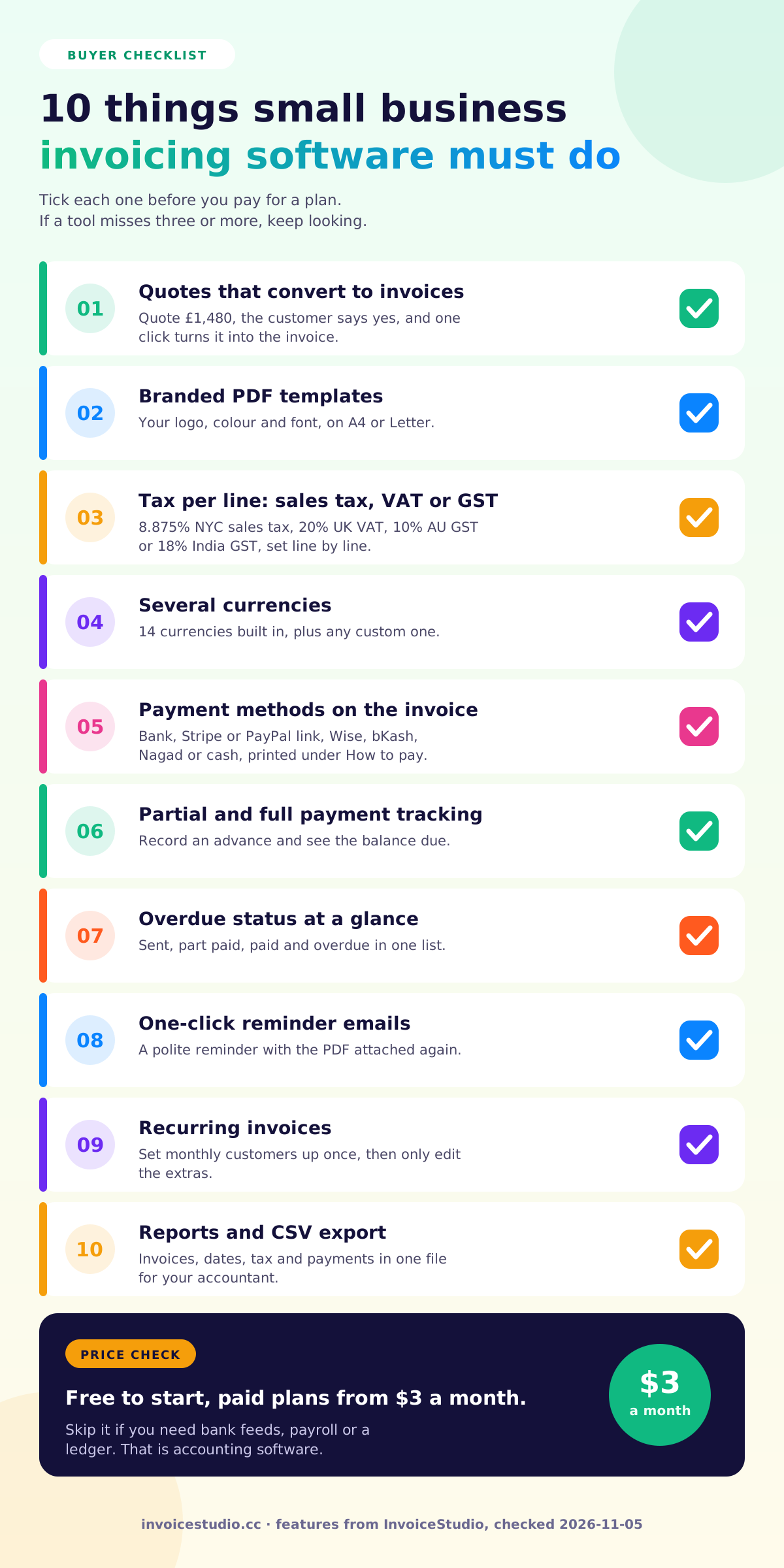
Good small business invoicing software should do eight things well: quotes, branded invoices, tax per line, several currencies, payment methods on the invoice, payment tracking, reminders and export. Everything else is a bonus. Here is what each means in practice.
Features I would not pay extra for at the start: complex user permissions, inventory modules you will not use, and "AI insights" dashboards. Features worth paying a few dollars for: saved customers, recurring invoices and payment tracking, because they save time every single week.
Invoicing software for a small business costs between nothing and about $30 a month for most invoicing-only tools, while accounting suites with invoicing built in usually cost more. Affordable invoicing software with a real free plan exists, and billing software for small business use rarely needs to cost more than a few dollars a month. The real cost is often in payment fees, not the software. Here is InvoiceStudio's pricing, plus the other costs.
| Plan | Price | Good for |
|---|---|---|
| Free | $0 | Trying it out: 10 documents and 10 saved customers a month, PDF download |
| Starter | $3 a month | A sole trader sending invoices every week: unlimited invoices, emailing and reminders |
| Pro | $7 a month | Quotes and estimates, recurring invoices, reports, CSV export and AI voice |
| Business | $10 a month | Everything in Pro, for a small team billing many customers |
| Enterprise | $29 a month | Higher volume and the full feature set |
Yearly and lifetime options, and the exact plan limits, are on the pricing page. Two other costs matter more than the subscription.
The US Small Business Administration's guide to managing your finances makes the same point: steady cash flow keeps a small business alive, and prompt invoicing drives it.
You can set up invoicing for a small business in about 30 minutes: add your business details, build a short price list, save your top customers, choose payment terms and send a test invoice to yourself. Do it once properly and every invoice after takes two minutes.
Start your numbering somewhere sensible, such as INV-2026-001, and never reuse a number. Tax authorities in the UK, EU and India expect a unique, sequential invoice number.
Below are the five examples loaded in the tool above, with the maths written out. Each one shows a rule that trips up small businesses in that country. Click an example in the tool to load it, then change the names and prices.
Hudson Street Bakery in Brooklyn caters a breakfast for 40 people at an office in Manhattan. The lines are 40 covers at $14.50 ($580), six coffee boxes at $28 ($168) and delivery at $45. The subtotal is $793. New York City's combined sales tax rate is 8.875%, which adds $70.38, for a total of $863.38.
Two details make this invoice get paid quickly. The client's PO number, FL-2290, sits in the notes, because a company of that size will not pay without it. And the invoice goes to ap@ferrouslabs.com, the accounts payable inbox, not to the office manager who placed the order. Sales tax rules for food and catering differ by state, so check yours.
Brightwash Cleaning bills a physio clinic for 20 evening visits at £65 (£1,300) and a one-off deep clean at £180. The subtotal is £1,480. VAT at 20% is £296, so the total is £1,776. Because Brightwash is VAT registered, the invoice shows its VAT number and the VAT amount, as GOV.UK's rules on what an invoice must include require.
This is a perfect recurring invoice. Set it up once for the 1st of the month and only edit it when there is an extra job like the deep clean.
Coastline Plumbing replaces a hot water unit: the unit at $1,950, 4.5 hours of labour at $110 ($495) and a $90 call-out fee. The subtotal is $2,535, GST at 10% is $253.50, and the total is $2,788.50. In Australia a GST-registered business must issue a "tax invoice" when asked, so the words Tax invoice and the ABN appear on it. I would always print them anyway.
Sharma Tech Solutions in Pune bills a dental clinic for an annual maintenance contract on 12 PCs at ₹1,500 each (₹18,000) and router setup at ₹2,500. The subtotal is ₹20,500 and GST at 18% is ₹3,690, for ₹24,190. Both businesses are in Maharashtra, so the GST is split into CGST 9% (₹1,845) and SGST 9% (₹1,845). If the clinic were in Karnataka, it would be IGST 18% instead. Both GSTINs, the SAC code and the place of supply go on the invoice. The full rules are in our GST invoice format guide.
Shonar Tori Gifts in Dhanmondi supplies 30 corporate gift hampers at ৳1,850 (৳55,500), 30 custom stickers at ৳60 (৳1,800) and delivery at ৳1,200, for ৳58,500. The client paid a ৳25,000 advance, so the note says so and the balance of ৳33,500 is due on delivery. bKash and Nagad merchant numbers are printed under How to pay, and the note asks the client to email the transaction ID, which makes matching the payment far easier.
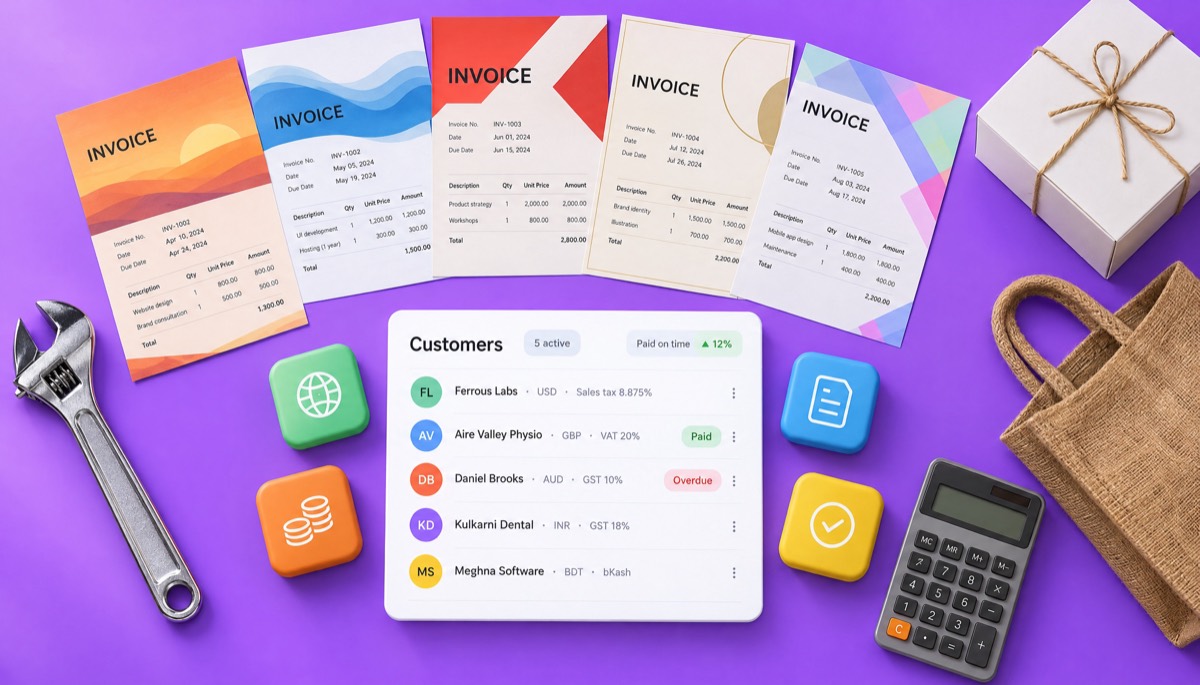
Every small business invoice should include your business name and address, the customer's name, a unique invoice number, the date, a description of what you sold, the amounts and the total due. Tax-registered businesses must add their tax number and the tax amount. The rest depends on where you trade.
Tax rules change. Treat this list as a starting point and confirm the current rate and required fields with your tax authority or accountant before you rely on them.
You get paid faster by putting a real due date on the invoice, making payment easy and following up on a schedule. Wording matters. Here is what I paste into invoices and emails, word for word.
Thank you for your business. Payment is due by 20 November 2026. Please pay by bank transfer using the details below and quote invoice INV-2026-041 as the reference. Questions about this invoice? Email accounts@yourbusiness.com and we will reply the same day.
Hi Priya, please find attached invoice HSB-2026-0412 for $863.38 for the breakfast catering on 4 November. It is due on 19 November. You can pay by ACH or with the card link in this email. Thanks again for the order.
Hi Hannah, a quick reminder that invoice BW-1187 for £1,776 is due on Friday 14 November. If it is already on its way, thank you and please ignore this. The PDF is attached again for convenience.
Hi Daniel, invoice CP-00894 for $2,788.50 was due on 12 November and is now 7 days overdue. Could you let me know when payment will be made? Bank details are on the attached invoice. If there is a problem with the work or the invoice, tell me and I will sort it out.
Hi Meera, invoice STS/26-27/0158 for ₹24,190 is now 30 days overdue. Please arrange payment by 20 December. After that date, we will pause the maintenance contract until the account is settled. I would much rather keep working together, so please call me if anything is holding this up.
For a longer set of templates by tone and stage, read how to send an invoice. And keep reminders polite. Most late payers are disorganised, not dishonest.
The most common invoicing mistakes are vague line items, missing tax details, no real due date, sending the invoice to the wrong person and waiting too long to send it. Each one adds days to your payment time. Here are the ones I see most.
The best invoicing software is the one that fits how you bill. Choose by asking five questions: how many invoices you send, how your customers pay, which taxes you charge, who else needs the data and what you can spend. Your answers usually point to one clear option.
If you work in a trade, the contractor invoice generator has examples with labour, materials and deposits. If you are weighing several free apps, our free invoice app guide compares what to look for. FreshBooks, Wave and QuickBooks lean toward bookkeeping as well as invoicing, so check their current pricing pages against what you actually need. And if you are currently on Zoho Invoice and want to compare, see the Zoho Invoice alternative page.
InvoiceStudio is invoicing software, not an accounting system. It is built for small businesses that want fast, correct invoices and a clear view of who has paid. Being clear about the limits saves you a wasted afternoon.
What it does today: 28 templates with your logo, colour and font; quotes, estimates, credit notes, purchase orders and delivery notes; 14 currencies plus custom ones; tax, discounts, shipping and fee rows; payment methods printed on the invoice; your signature and your customer's; recurring invoices; emailing with the PDF attached and reminders; partial and full payment tracking with overdue status; reports and CSV export or import; and voice invoicing in 20 languages, including Bangla. Emailing and reminders start on Starter; quotes, recurring invoices, reports, CSV and the 20-language AI voice start on Pro.
What it does not do: there is no accounting ledger, no bank feeds, no payroll and no online card checkout. A client portal is on the early access list, not live. Customers pay you directly using the methods you print on the invoice.
For most shops, trades and local services, that is the right trade-off. Start with a generator that needs no signup, browse the 28 invoice templates, or read how to make an invoice and the rest of the InvoiceStudio blog.

Monjur builds Invoice Studio and incorporated MotionTrust Digital in September 2022, where he leads Amazon strategy across the client base. Eight years in e-commerce and marketplace marketing taught him how much time invoices and late payments eat, so every guide here is tested against the real product and current tax rules before it goes live.
InvoiceStudio: create invoices by voice, automate billing, and get paid faster. Load an example above, change the customer and the prices, and download the PDF. Create a free account for saved customers and payment tracking, and move to Starter at $3 a month when you want to email invoices and reminders.