Totals you can trust
The planned API uses the same calculation engine as the web app. It returns subtotal, tax lines and total, so your code can compare before sending.
Our invoice API for developers is a planned REST endpoint that turns a JSON invoice into a branded PDF with checked totals. It is not live yet: join the list for first keys and a say in the spec. InvoiceStudio: create invoices by voice, automate billing, and get paid faster.
Leave your work email for first API keys. Below it, load an example to see the PDF the planned endpoint would return.
The planned API uses the same calculation engine as the web app. It returns subtotal, tax lines and total, so your code can compare before sending.
The plan is to pick one of 28 templates by name and set your logo and brand colour. No HTML to PDF pipeline to maintain.
Per-line tax and discount, invoice discount, shipping and fee rows are built in. Quotes, estimates and credit notes use the same payload.
The draft payload goes to the list before it is frozen. Tell us your volume and stack and we design around it.
Early access developers get keys before the public launch, in the order they joined. We tell you plainly what changed from this preview.
Until the API is live, CSV import, recurring invoices and PDF download already cover a few hundred invoices a month.
Enter your work email in the form. Add your use case and monthly invoice volume so we can prioritise test keys.
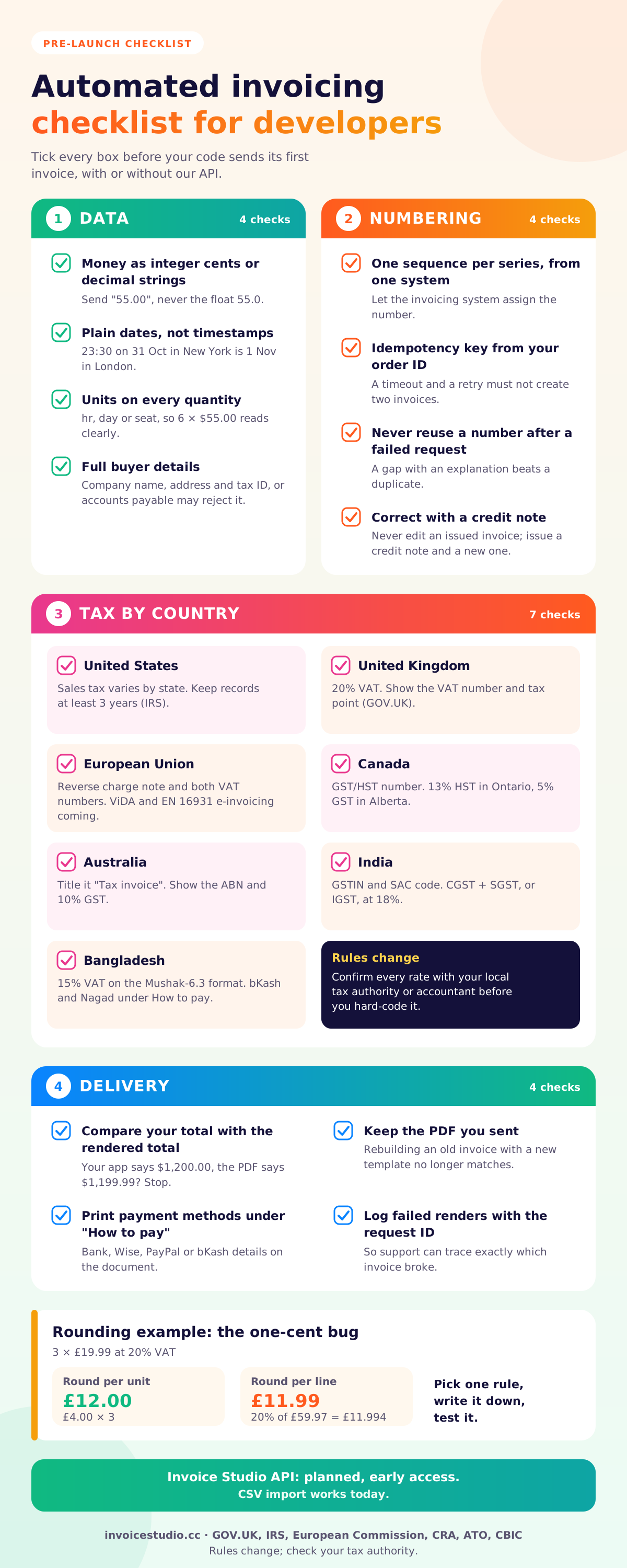
Store money as decimals, dates as plain dates, and keep units and the buyer's tax ID. Then switching to the API is a small change.
Export billable rows from your system, import them into Invoice Studio, check totals on screen and email each PDF.
Pick one to load it into the tool above, then change anything.
One deposit line with the quote breakdown in the notes, created when the client approves the quote. The final invoice credits the deposit.
£1,500 licence plus £300 VAT, with the VAT number and a sequential number on every renewal.
Ten sprint days at €640 plus a €400 handover, 0% VAT, both VAT numbers and the Article 196 note.
30 hours at CA$150 plus 13% HST for a dental group in Toronto, paid by Interac e-Transfer.
₹85,000 module from Bengaluru to Mumbai with 18% IGST, both GSTINs, SAC code and place of supply.
Plain answers, worked examples and the rules that apply, all checked against the live product.
An invoice API for developers takes invoice data as JSON and returns a finished invoice, usually a PDF, so your app can bill without manual work. Invoice Studio's public API is not live yet; a JSON to PDF endpoint is planned and in early access. Today you can use CSV import, 28 templates, recurring invoices and PDF download.
An invoice API for developers takes structured invoice data, usually JSON, and returns a finished invoice, usually a PDF, so your app can bill customers without anyone opening an editor. Invoice Studio's public API is not live yet. It is in early access, and the form above puts you on the list. This page shows the planned JSON to PDF endpoint as a design preview, labelled draft and subject to change, so you can tell us whether it fits your stack before we freeze it.
What works today is the web app: 28 invoice templates, your logo and brand colour, PDF download, CSV import and export, recurring invoices and emailing with the PDF attached. I have wired invoice generation into client projects more than once, and the bugs were never in the PDF part. They were in rounding, numbering and tax lines. Most of this guide is about getting those right, whichever tool you end up using.
The API is not live yet. There is no public REST invoice API, no API key and no invoice webhook you can call today, and anyone who tells you otherwise is wrong. The invoice generator API is planned, and developers on the early access list will get the first keys and a say in the request format.
Here is the honest split. "Today" means it works in Invoice Studio right now. "Planned" means it is on the roadmap, not available, and may change.
| What you need | Today in Invoice Studio | Planned with the API |
|---|---|---|
| Create an invoice | Web editor, voice input, or the free generator on this page | POST a JSON payload |
| Bulk invoices | CSV import into your account | One request per invoice, or a batch call |
| Get the PDF | Download or print from the editor | PDF returned in the response |
| Design | 28 templates, logo, brand colour, font, A4 or Letter | The same templates, picked by name in the payload |
| Tax and discounts | Per-line tax and discount, invoice discount, shipping, "Tax & fees" rows | The same calculation engine, totals returned so you can check them |
| Send to the client | Email with the PDF attached | Optional send flag, not decided yet |
| Payment status | Record full or partial payments; overdue status on the dashboard | Read status by invoice ID (under discussion) |
| Export data | Reports and CSV export | JSON read endpoints (under discussion) |
| Card checkout | Not available | Not planned for the first release |
If you need to generate 10,000 invoices a month from your backend next week, we are not ready for you yet. If you need clean invoices for a few hundred customers a month, the CSV import already gets you most of the way.
An invoice generation API is a web service that accepts invoice fields (seller, buyer, line items, tax, currency, dates) and returns a rendered invoice document, usually a PDF. You call it from your own code. This is programmatic invoicing: invoices are created by events such as a completed order, a monthly billing run or a signed contract, rather than by a person typing.
The term covers three quite different products, and the SERP mixes them up:
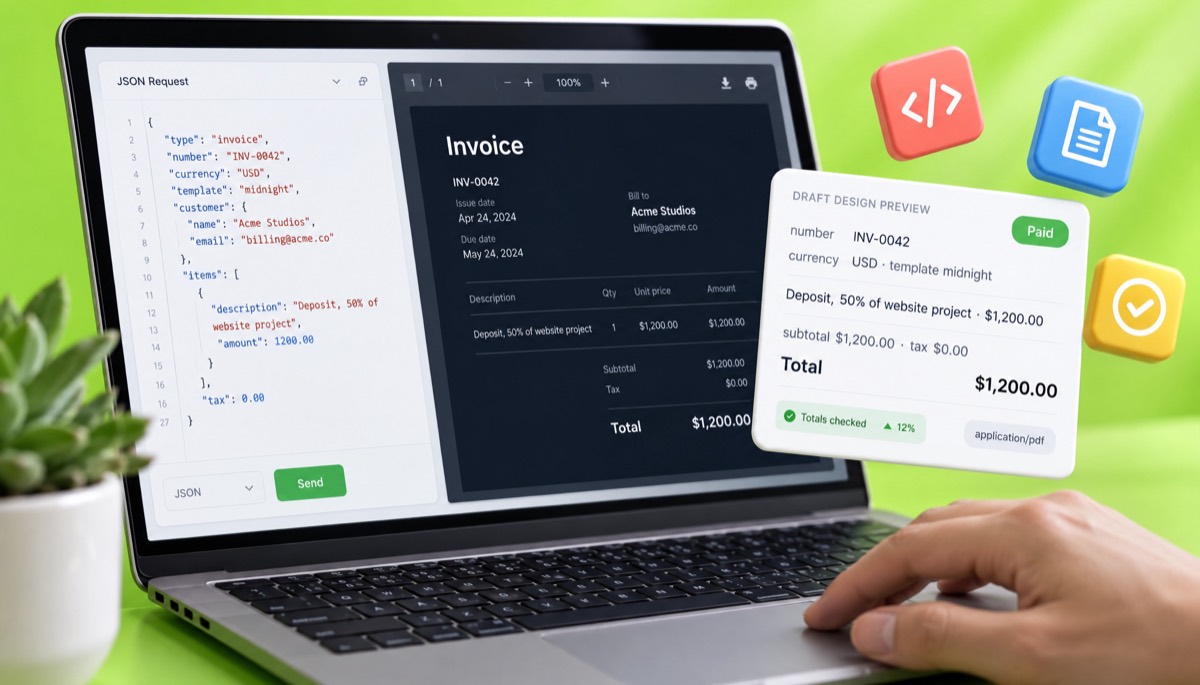
The plan is one main endpoint, an invoice PDF API: you send an invoice as JSON, Invoice Studio calculates the totals with the same engine as the web app, and you get back the PDF plus the totals it calculated. Everything below is a draft, subject to change, and shared so you can push back before we build it.
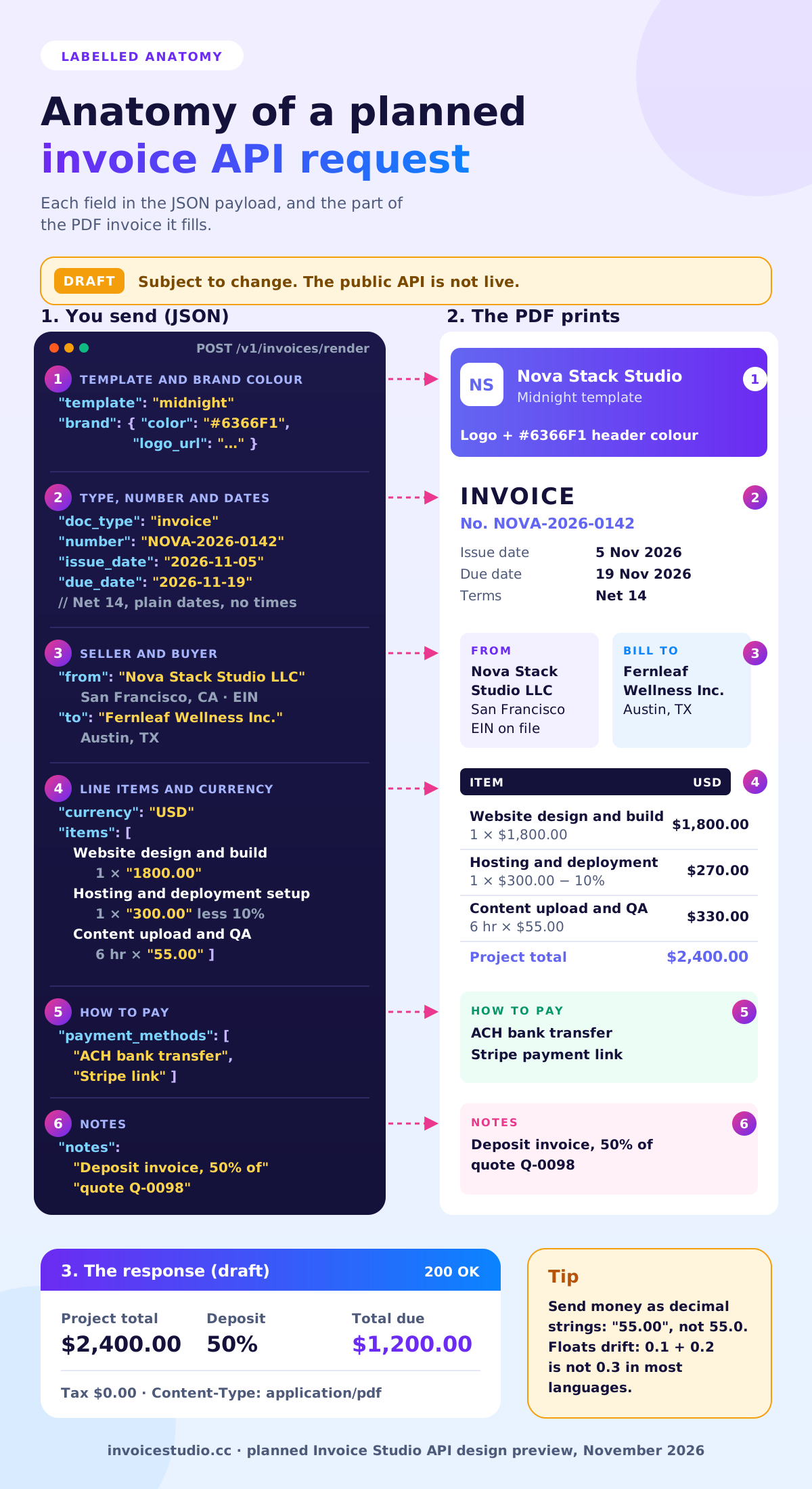
This is the payload shape we are designing around. Field names follow what the web app already stores, so nothing here is invented for marketing. The template field also makes it an invoice template API: you pick any of the 28 designs by name.
| Field | Type | Example | Notes |
|---|---|---|---|
| doc_type | string | "invoice" | Also quote, estimate, credit_note, purchase_order, delivery_note |
| number | string | "NOVA-2026-0142" | Optional; leave it out and your next number is used |
| issue_date, due_date | string | "2026-11-05", "2026-11-19" | ISO 8601 dates, no times, so time zones cannot move them |
| currency | string | "USD" | Three-letter code; 14 built in plus custom currencies |
| template | string | "midnight" | Any of the 28 templates by name |
| brand | object | { "color": "#6366F1", "logo_url": "…" } | Overrides the account defaults |
| paper | string | "Letter" | A4 or Letter |
| from, to | object | { "name", "company", "address", "email", "tax_id" } | Seller and buyer; tax_id prints VAT, GSTIN, ABN or EIN |
| items[] | array | { "description", "quantity": 6, "unit": "hr", "rate": "55.00", "tax_pct": 0, "discount_pct": 0 } | Money as strings, never floats |
| discount, shipping, fees[] | mixed | { "label": "Processing fee", "pct": 2.9 } | Invoice-level adjustments, in the same order as the editor |
| payment_methods[] | array | { "type": "wise", "details": "…" } | Printed under "How to pay" |
| payment_terms, notes | string | "Net 14" | Free text, printed as sent |
Draft, subject to change. No endpoint is live. Do not build production code against these field names yet; join the list and we will send the final spec, published as an OpenAPI document, before keys go out.
The planned response returns the totals as well as the file. That way your code can compare our total with yours and refuse to send the invoice if they differ by even one cent. Errors would come back in the problem details format from RFC 9457, with the failing field named, for example "items[2].rate must be a decimal string".
One design choice we have not settled: whether to return the PDF bytes directly or a download link. Links that expire after an hour are the most common complaint I hear about PDF APIs, because a customer clicks an old email and gets an error. Our current leaning is to return the bytes and keep the invoice in your account, so nothing expires. If you need hosted links, say so on the form.
A good invoice payload includes everything a tax authority expects on the document plus enough detail for the API to check the maths. Here is a real-shaped example: a $2,400 website project billed by a small US dev studio, with 50% due upfront.
| Line | Qty | Rate | Discount | Line total |
|---|---|---|---|---|
| Website design and build, 5 pages | 1 | $1,800.00 | 0% | $1,800.00 |
| Hosting and deployment setup | 1 | $300.00 | 10% | $270.00 |
| Content upload and QA | 6 hr | $55.00 | 0% | $330.00 |
| Project total | $2,400.00 | |||
| Deposit invoice, 50% upfront | $1,200.00 | |||
In the payload, the cleanest way to bill the deposit is one line, "Deposit, 50% of website project (quote Q-0098)", at $1,200.00, with the full breakdown in the notes. Then the final invoice lists all three lines and a negative line for the deposit already paid. Your accountant will thank you, because each invoice stands on its own.
Two things that payload gets right:
Rounding is the bug that reaches customers. Take a UK invoice with 3 items at £19.99 and 20% VAT. Round VAT per unit and you get £4.00 × 3 = £12.00. Round per line and you get 20% of £59.97 = £11.994, so £11.99. Same invoice, one penny apart. Neither is wrong, but your code and your invoice tool must use the same rule. Pick one with your accountant, write it down, and test it with awkward prices like £19.99 and quantities like 3 or 7.
Use an invoice API when you want invoice logic and design handled for you; use a PDF library or an HTML to PDF invoice pipeline when you already have the logic and want full control of the file.
| Approach | Best for | You handle | Watch out for |
|---|---|---|---|
| Invoicing app API (Invoice Studio, planned) | Apps that need correct totals, numbering and branded PDFs | Sending the data | Not live yet; field names may change |
| Template to PDF service | Teams with their own billing logic | All calculations, numbering, tax | Totals rendered as sent, even if wrong |
| Billing platform invoices endpoint | Card payments and subscriptions | Fitting your invoice into their model | Harder to brand; built around their checkout |
| HTML to PDF (headless Chrome) | Full layout control, low volume | Everything, plus page breaks and fonts | Long tables split badly across pages |
| PDF library in your language | High volume, fixed layout | Everything, drawn by coordinates | Design changes need a developer |
| Invoice Studio web app + CSV import (today) | Up to a few hundred invoices a month | Exporting a CSV from your system | A manual step each billing run |
My opinion: if you are under 200 invoices a month, do not build a PDF pipeline. Export a CSV from your database, import it, check the totals on screen, and send. You will spend an afternoon instead of a sprint, and when the API launches you swap the CSV step for a request.
An invoice API must keep numbers sequential and unique, print the tax details the buyer's country requires, and store money in the invoice currency without silent conversion. Get these three right and the PDF is the easy part.
Numbers should come from one sequence per series, issued by one system. If your app and a person in the web editor can both create invoices, let the invoicing system assign the number, and pass your own order ID as a reference instead. Never reuse a number after a failed request; a gap with an explanation is better than a duplicate. Our invoice number format guide covers prefixes and yearly resets, and you can test formats with the free invoice generator.
Do not edit an issued invoice through an API. Issue a credit note against it and a new invoice. That keeps your audit trail clean, and in many VAT countries it is the expected way to correct a mistake. See credit memo vs credit note for the wording.
Rules vary and change, so treat these as a checklist and confirm with your local tax authority or accountant.
Send amounts in the invoice currency and let the document show that currency only. If you convert, do it in your system, record the rate and date, and put "Converted at 1 USD = 0.79 GBP on 5 Nov 2026" in the notes. The multi-currency invoicing page has worked examples for GBP, EUR, INR and AUD.
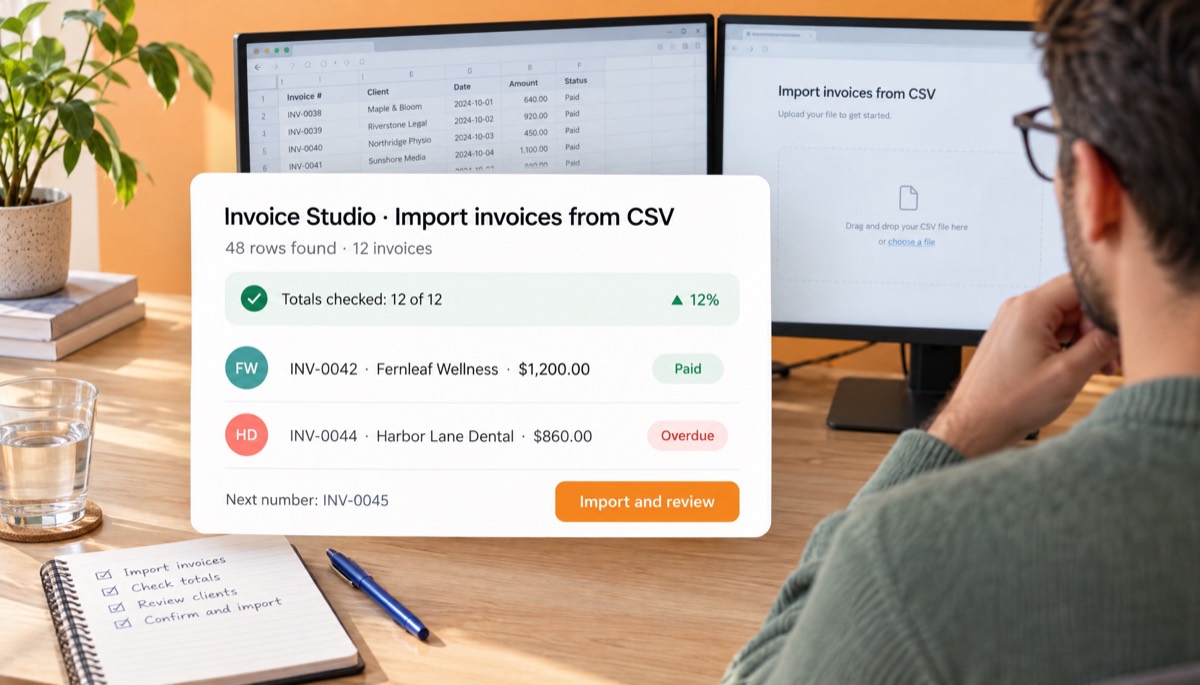
Quite a lot. Before the API launches, you can export from your system and CSV import invoices into your account, repeat fixed bills automatically, and create one-off invoices by voice. Here is how to do it now.
If you sell invoicing to your own customers under your brand, that is a different need. Read the white-label invoicing page, and if your clients want a login to see their invoices, the client portal page. Both are also early access.
The common mistakes are about money and identity, not layout: floats for currency, duplicate numbers on retries, dates shifted by time zones and PDFs that cannot be reproduced later. I have made at least four of these myself.
Automated invoices still need human wording. Clients read the note and the email, not your JSON. These are the lines I use, ready to drop into the notes field or your email template.
Deposit invoice: 50% of the website project in quote Q-0098 ($2,400.00). The balance of $1,200.00 will be invoiced on launch. Payment due within 14 days by bank transfer or card link.
Usage invoice for 1 to 31 October 2026: 18,400 API calls at the rate in your order form. A full usage report is attached as CSV. Questions to billing@yourcompany.com, quoting the invoice number.
Reverse charge: customer to account for VAT under Article 196 of Council Directive 2006/112/EC. Supplier VAT number DE123456789, customer VAT number FR12345678901.
Hi Priya, your invoice NOVA-2026-0142 for $1,200.00 is attached as a PDF. It is due on 19 November 2026. Payment details are under "How to pay" on the invoice. This email was sent automatically when your project deposit was approved; reply to it and a real person will answer.
Hi Priya, invoice NOVA-2026-0142 went out with the wrong tax rate. I have issued credit note CN-0019 to cancel it in full and a corrected invoice, NOVA-2026-0143, both attached. Please pay the corrected one only. Sorry for the extra step.
Always say an email was automatic and give a human reply path. Clients forgive a robot; they do not forgive a no-reply address on a bill. More sending tips in how to send an invoice.
We have not set API pricing or a launch date, and we will not guess here. What we can say is how we are deciding: early access developers will test the endpoint, tell us their monthly volume, and get keys before anyone else.
For reference, the web app plans today are Free, Starter at $3 a month, Pro at $7, Business at $10 and Enterprise at $29, with yearly and lifetime options on the pricing page. The API may sit inside those plans or be priced per invoice. Tell us on the form which you prefer, the rate limit you would need, whether you want an SDK or plain HTTP calls, and how many invoices you would send in a month: 100, 1,000 or 10,000 changes the design more than you would think.
Meanwhile, build your data model so it maps to the payload table above. If your invoices table already has decimal money, plain dates, a units column and a buyer tax ID, switching from CSV to the API will be a small change. If you want more background on picking invoicing tools, the free invoice app guide compares options, and the rest of the Invoice Studio blog covers the tax and payment side.
InvoiceStudio: create invoices by voice, automate billing, and get paid faster. The API is the next step of that. Until then, the free generator on this page and the PDF invoice generator do the job today.

Monjur builds Invoice Studio and incorporated MotionTrust Digital in September 2022, where he leads Amazon strategy across the client base. Eight years in e-commerce and marketplace marketing taught him how much time invoices and late payments eat, so every guide here is tested against the real product and current tax rules before it goes live.
InvoiceStudio: create invoices by voice, automate billing, and get paid faster. Join the list for the draft spec and first keys, and create branded PDF invoices in the editor today.