One page per client
The portal is planned to give each client a private page with every invoice and quote you have sent them. No more "can you resend that invoice from March?" emails.
Client portal invoicing software gives every client one private page for their invoices, quotes and balance. Ours is in development: join the list now, and keep sending branded PDF invoices with the free generator below. InvoiceStudio: create invoices by voice, automate billing, and get paid faster.
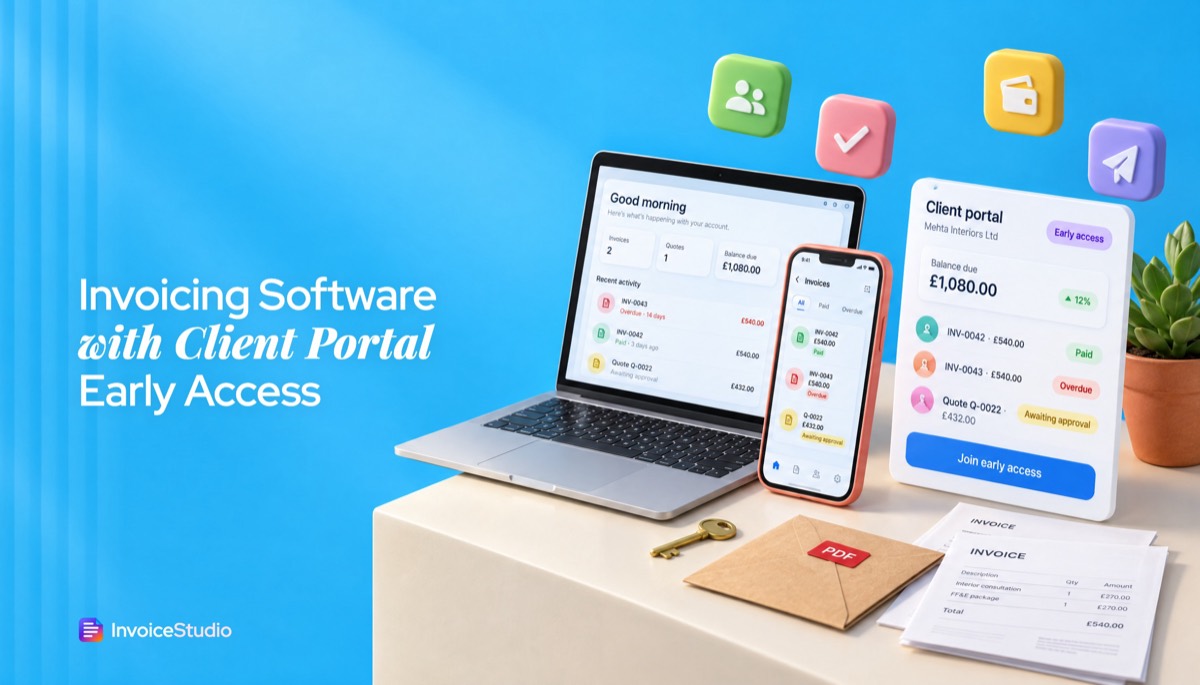
Leave your email for the portal invite. Below it, the free generator makes the branded PDF your clients will see in the portal.
The portal is planned to give each client a private page with every invoice and quote you have sent them. No more "can you resend that invoice from March?" emails.
Clients will see paid, part paid and due in one place, based on the payments you record. Until then, put the open balance in your invoice notes.
The portal is planned to use the same logo, colour and template as your PDFs. The branded PDFs already work today in 28 templates.
Clients who prefer attachments keep getting the PDF by email. The portal is planned to sit alongside email, not force a login on anyone.
Planned: clients accept or decline a quote with a time stamp. Today, quotes and estimates carry a client signature box on the PDF.
Early access members get invited before anyone else. Joining is free, and we only email you about the portal.
Add your work email and, if you like, how many clients you bill. It helps us invite the right people first.
Use the free generator below to set your logo, colour and template. That is the invoice your clients will see in the portal.
Download the PDF or sign up to email it with the PDF attached, track payments and send reminders while the portal is being built.
Pick one to load it into the tool above, then change anything.
£450 a month plus 20% VAT. The notes say what is paid, what is due and what is coming, which is the portal summary on a PDF.
Three equal milestones. The line names the milestone and quote number, and the notes show paid to date and what remains.
Two services in one monthly invoice. The partial payment is recorded, so the reminder asks only for the ৳42,500 balance.
A$6,000 plus 10% GST. The note lists the quarter's paid invoices so the client's bookkeeper can reconcile without asking.
Plain answers, worked examples and the rules that apply, all checked against the live product.
Client portal invoicing software gives each client a private, logged-in page to view their invoices, quotes, payment status and balance, and to download PDFs. Invoice Studio's client portal is not live yet; join the early access list. Today you can send branded PDF invoices, email them with the PDF attached, track payments and send one-click reminders.
Client portal invoicing software gives each client a private, logged-in page where they can see every invoice you have sent them, check what is paid and what is due, download PDFs and approve quotes. Invoice Studio's client portal is not live yet. It is in early access, and the form above puts you on the list. What does work today, for free, is the invoice generator on this page: branded PDF invoices with your logo and colours, the payment methods printed on the invoice, and, on paid plans, emailing with the PDF attached, one-click reminders and payment tracking.
I have invoiced clients who loved a portal and clients who never once logged in. Both taught me that a portal is only as good as the invoice inside it. This guide covers what a portal does, what clients see, where it beats email, and how to get most of the benefit today.
Client portal invoicing software is an invoicing tool with a secure, client-facing area where each customer logs in to view their invoices, quotes, payment history and balance. You publish the invoice once, and the client reads, downloads, approves or pays it from the same place instead of digging through email.
Other names for the same idea are customer portal invoicing, client billing portal, self-service billing portal and client hub, and many vendors simply sell "invoice software with client portal". Zoho Invoice and FreshBooks both include a client-facing area, and QuickBooks Online lets customers view and pay invoices from an emailed link. In practice, the portal part of most invoicing tools does five jobs:
Some products add file sharing, time sheets and chat. Those belong closer to project management, so judge the invoicing jobs separately.
The portal is not live yet. Invoice Studio does not have a client portal or online card checkout today, and clients cannot log in to view invoices online. The portal is in development, and people on the early access list will be invited first.
Here is the honest split between what you can use now and what the portal is planned to add. "Today" means it works in Invoice Studio right now. "Planned" means it is on the roadmap and not available.
| What you need | Today in Invoice Studio | Planned with the client portal |
|---|---|---|
| Branded invoice PDF | 28 templates, your logo, brand colour and font, A4 or Letter | The same branding on the client's portal page |
| Getting the invoice to the client | PDF download, or email invoice with PDF attached | A private link where the invoice always lives |
| Invoice history for a client | Kept in your account; export to CSV | Visible to the client without asking you |
| Payment status tracking | You record full or partial payments; overdue status on your dashboard | The client sees paid, part paid and due |
| Chasing late payments | One-click reminder emails with the PDF attached | Reminders that point to the portal page |
| Quotes and estimates | Quote and estimate PDFs with a client signature field | Approve or decline online, with a dated record |
| How clients pay | Methods printed under "How to pay": Stripe or PayPal links, Wise, bank, Payoneer, bKash, Nagad, cash and more | The same methods shown on the portal page |
| Online card checkout | Not available | Not promised; we will say so if that changes |
If you need clients to log in and pay by card next week, Invoice Studio is not the right fit yet. If you need invoices that look professional, reach the right person and get chased on time, the free tool above already does that.
A client sees a short list of their own documents and one number that matters: the balance due. Everything else is detail. Most vendor pages never show this view, so here is what a good portal screen looks like from the client's side, using a UK bookkeeping client as the example.
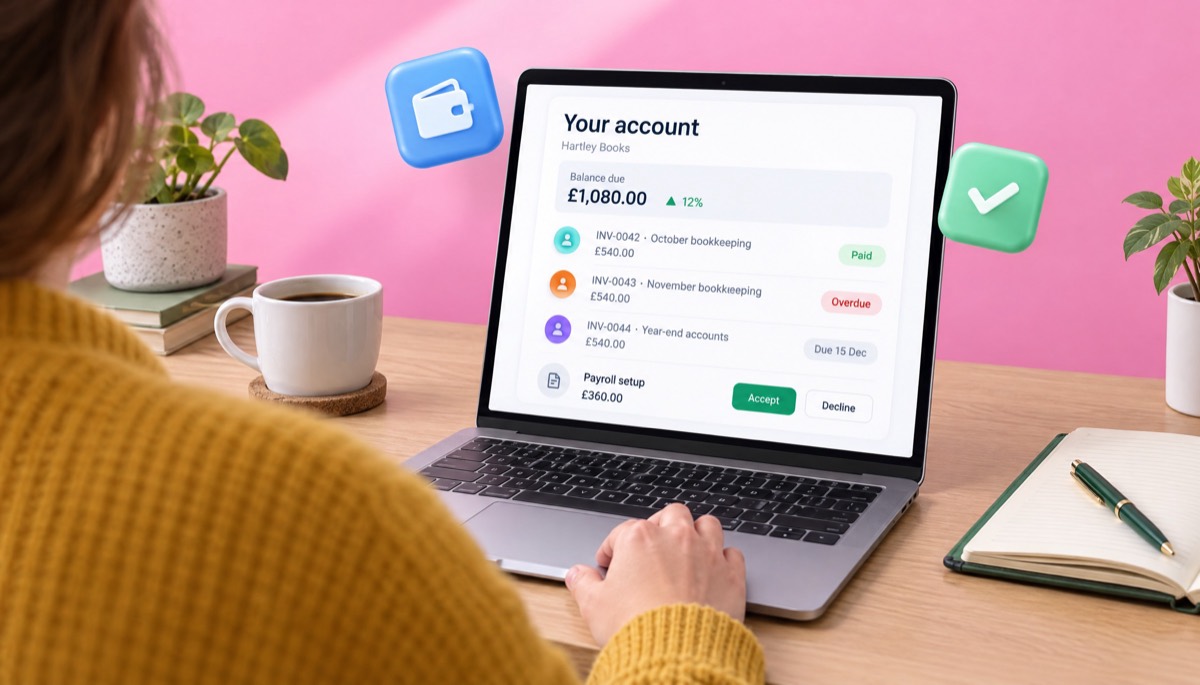
Notice what is missing: dashboards, charts, chat. Clients want to know what they owe, grab a copy for their accounts, and pay. Anything that slows those three jobs down is a design mistake.
Neither one gets you paid faster on its own. Clear invoices, sensible payment terms and consistent follow-up do. A portal helps most when a client has many invoices with you, and email works best when the client has one or two and just wants the PDF in their inbox.
Vendors rarely mention the downside: every portal asks the client to do something new. Accounts payable teams at larger companies often work from a shared inbox and will not create a login for each supplier. For them, a PDF attachment is the fastest route to payment. A sole trader client, on the other hand, may love a page that always shows what they owe.
| Factor | Email with PDF attached | Client portal |
|---|---|---|
| Setup for the client | None | A login or magic link |
| Works with AP inboxes and approval systems | Yes, the PDF is the format they expect | Often needs the PDF emailed as well |
| Client finds an old invoice | Searches their inbox | Opens the list |
| Client sees total balance across invoices | Only if you send a statement | Always visible |
| Quote approvals | Signed PDF or a reply email | One click, time-stamped |
| Risk of fake "new bank details" emails | Higher; email is easy to spoof | Lower, if clients are told to check the portal |
| Best for | One-off projects, corporate clients, low volume | Retainers, many invoices per client, small-business clients |
My rule of thumb: if a client gets more than four invoices a year from you, a portal starts to pay off. Below that, a clear PDF and email beat any login screen. That is why our portal is planned to sit alongside emailed PDFs, not replace them.
You can get most of what a portal does by making each invoice self-explanatory, numbering it consistently, recording payments as they arrive and sending a short balance summary when a client has more than one invoice open. Here is the process I use, step by step, with Invoice Studio as it works today.
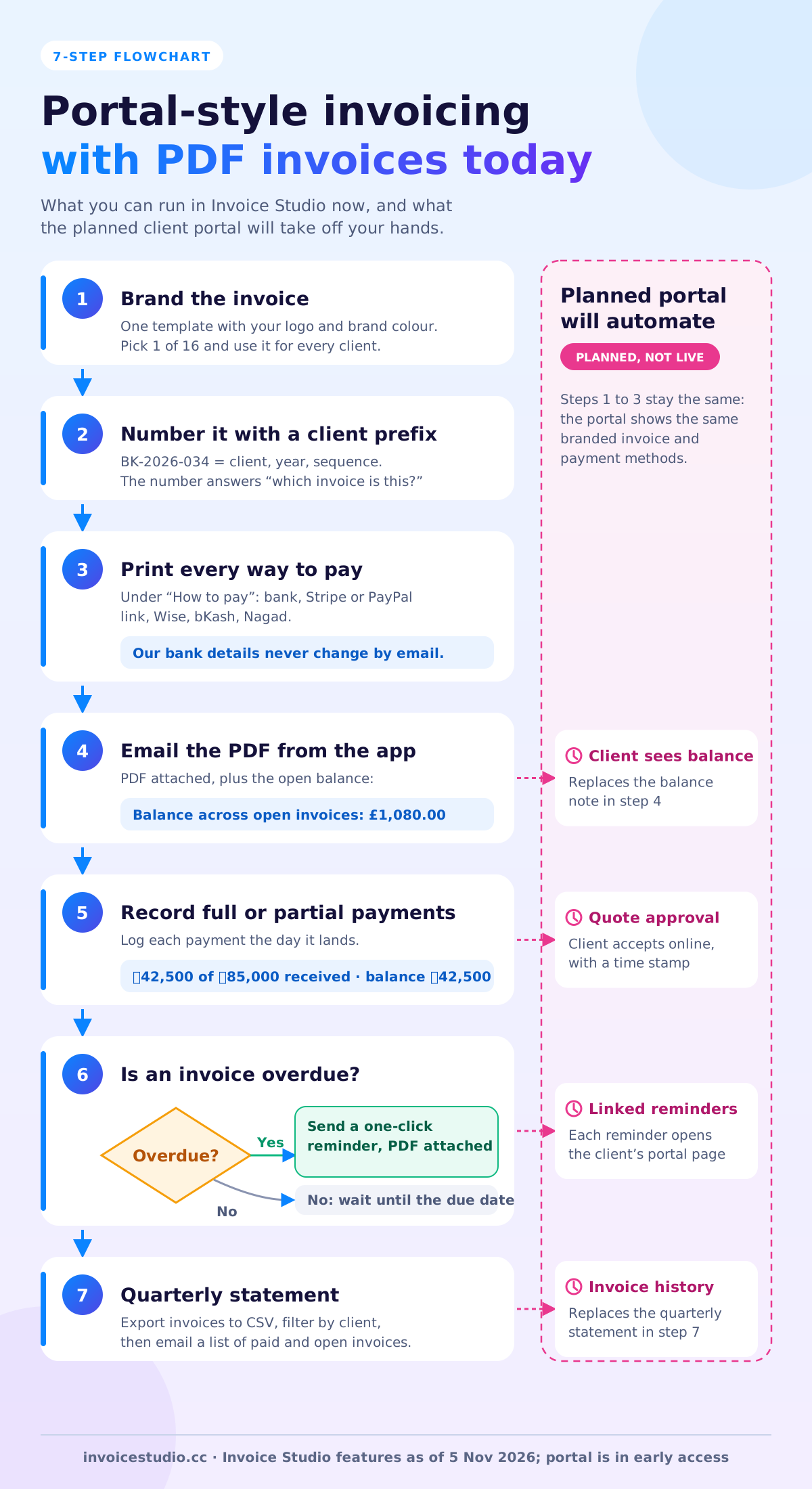
For retainers, add recurring invoices so the monthly invoice goes out on the same day every month. Consistency is what clients value most in a portal.
Here are three real billing patterns, each with the arithmetic, showing what the client needs to see and how to give it to them with today's tools. You can load each one into the generator above from the examples section.
A bookkeeper in Leeds charges £450 a month plus 20% VAT, so each invoice is £540.00. In November the client has October's invoice paid and November's open, and the year-end accounts invoice of another £540.00 is coming in December. The client's question is always "what do I owe you?"
Without a portal, the note on the November invoice reads: "October (BK-2026-031) paid with thanks. This invoice: £540.00 due 30 November. Year-end accounts invoice to follow on 1 December." It reads like a portal summary and costs nothing.
A two-person studio in Austin bills a $14,400 website in three equal milestones of $4,800: deposit, design sign-off and launch. Whether sales tax applies to web design varies by state and by what you deliver, so check with your state tax office.
Finance needs the whole picture to approve milestone 2 quickly. Name the milestone in the line description ("Milestone 2 of 3, design sign-off, quote Q-2026-018") and add a note: "Paid to date: $4,800.00. Remaining after this invoice: $4,800.00." A portal would show this as a progress bar. A good line description does the same job.
A managed IT firm in Dhaka supports a garment exporter for ৳60,000 a month, plus ৳25,000 for a cloud backup plan, so the monthly invoice is ৳85,000.00 before VAT. Bangladesh's standard VAT rate is 15%, though many services have special rates and registered businesses issue the Mushak-6.3 tax invoice, so confirm the treatment with your VAT consultant. The client pays half by bank transfer and half by bKash from different departments, which is exactly where a portal helps.
Until the portal exists, record each partial payment against the invoice in Invoice Studio. The balance updates, and the reminder you send asks only for what is still outstanding, for example "৳42,500.00 received by bank transfer on 3 November. Balance of ৳42,500.00 due by 15 November, payable by bKash or bank."
Agencies with several retainers can read the guide to invoicing software for agencies for retainers and ad spend at cost.
The right wording makes a plain PDF feel like a portal: the client knows what this is, what they owe and what to do next. Paste these and change the details.
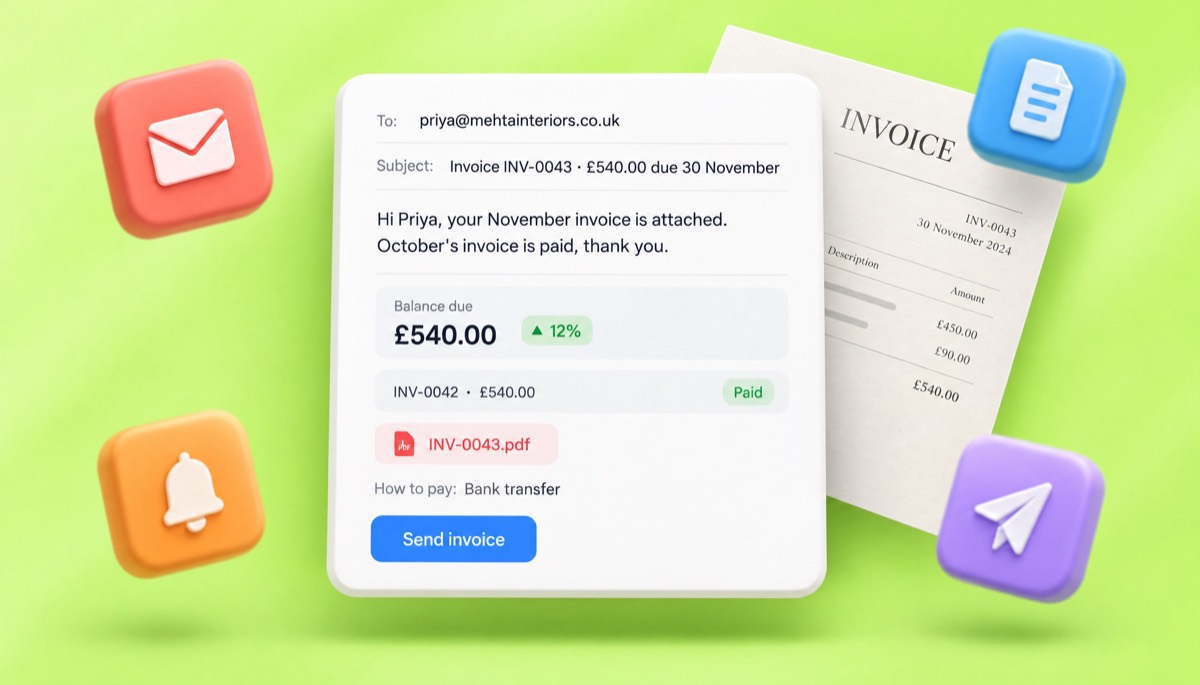
Subject: Invoice BK-2026-034 from Hartley Books, £540.00 due 30 November
Hi Priya, your November invoice is attached. October's invoice is paid, thank you. The balance on your account is £540.00, due on 30 November. Bank details are on the invoice; please quote BK-2026-034 as the reference.
Subject: Your account summary, July to September 2026
Hi Marcus, here is a quick summary of your account. Paid: 3 invoices, $9,600.00. Open: 1 invoice, $4,800.00, due 20 October. Copies of every invoice are attached in one folder. Reply to this email if anything does not match your records.
Subject: Quote Q-2026-018 for your approval
Hi Dana, the quote for the website project is attached: $14,400.00 in three milestones of $4,800.00. To approve, sign the client signature box on the PDF and send it back, or reply "approved" to this email. The quote is valid for 30 days.
Our bank details will never change by email. If you receive a message asking you to pay a different account, call us on the number on our website before you pay.
For more on subject lines, timing and who to send it to, read how to send an invoice. If clients pay several invoices in one transfer, ask them for remittance advice so you can match the payment to the right invoices.
A portal can be safer than email, mainly because it gives clients one trusted place to check your payment details. The biggest invoicing risk is not a stolen PDF. It is a criminal who sends your client a convincing email saying your bank details have changed.
The FBI's Internet Crime Complaint Center calls business email compromise "the $55 billion scam", based on exposed losses reported between October 2013 and December 2023. Fake invoices and changed payment instructions are a common version. The UK's National Cyber Security Centre has a free small organisations guide to cyber security covering the basics, and the US Small Business Administration lists practical steps to strengthen your cybersecurity.
Whether or not you use a portal, these habits cut the risk:
A portal adds one thing here: clients learn that the real invoice lives in one place, and anything else is suspect.
No country requires a client portal, but every country sets rules for how long you keep invoices and what they must contain, and a portal does not change those rules. Whatever tool you use, the invoice itself has to be correct, and you still keep your own copy.
Rules change, so treat these notes as a starting point and check with your local tax authority or accountant.
Look for a portal your clients will actually use: no forced passwords, the same PDF they would get by email, a clear balance, and an easy way out with your data. Then check the price per client or per seat, because some tools charge more as your client list grows.
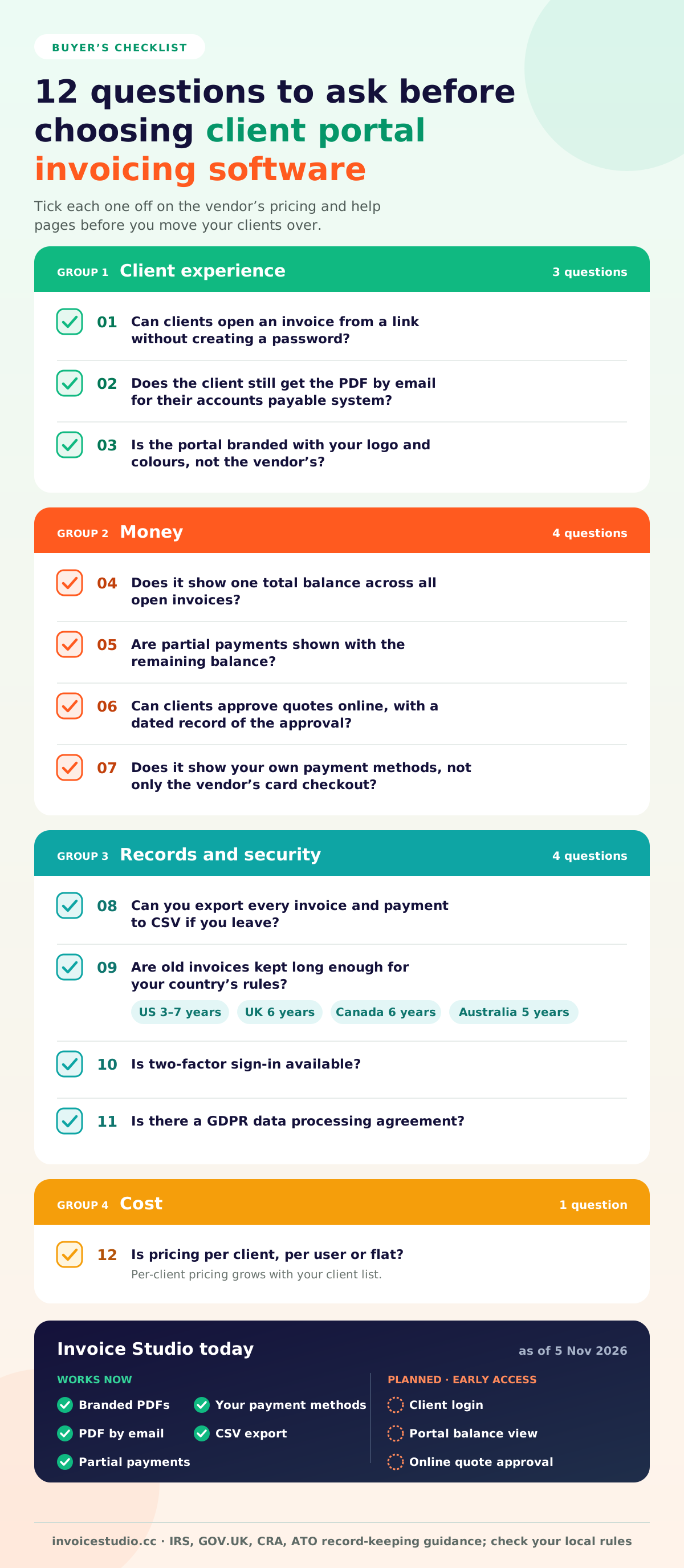
The questions I would ask any vendor, including us:
The most common mistake I see is buying a big "client hub" for eight clients and never switching it on. Start with the invoice; when clients ask for a portal, add one. The free invoice app guide compares the wider options, and if you bill in more than one currency, see multi-currency invoicing.
The planned Invoice Studio client portal will give each client a private, branded page with their invoices, quotes, payment status and balance, opened from a secure link in the invoice email. It is not available yet, and the details below may change before launch.
Early access members get invited first. If you are a developer or reseller, two related lists are open: white-label invoicing and the invoice API. Neither is live yet either.
In the meantime, use the free invoice generator to make a branded PDF in two minutes, compare plans from $3 a month if you want emailing, reminders and payment tracking, and browse the Invoice Studio blog for guides such as net 30 payment terms. InvoiceStudio: create invoices by voice, automate billing, and get paid faster. The portal is coming, and you can be one of the first to use it.

Monjur builds Invoice Studio and incorporated MotionTrust Digital in September 2022, where he leads Amazon strategy across the client base. Eight years in e-commerce and marketplace marketing taught him how much time invoices and late payments eat, so every guide here is tested against the real product and current tax rules before it goes live.
InvoiceStudio: create invoices by voice, automate billing, and get paid faster. Join the client portal list above, then create a branded invoice now and email it with the PDF attached.