Invoice Template Word, Excel and Google Docs: Free Guide 2026
Real build steps for Word, Excel, Google Docs, Sheets, fillable PDF, Canva and Pages invoice templates, with the formulas that make the totals add up and a table showing which formats calculate, number and track invoices.
- Written by
- Monjur Hossain
- Published
- Last updated
- Reading time
- 23 min read

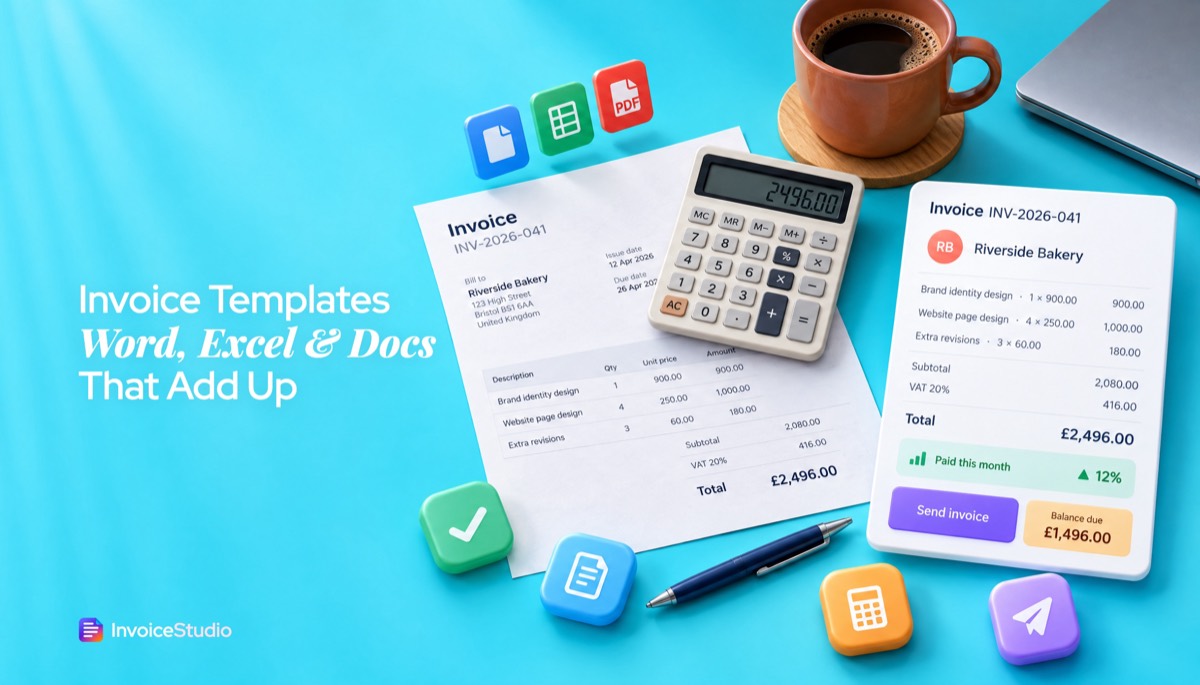
Word has free invoice templates under File > New (search "invoice"), and you can build your own with a table and formulas like =SUM(ABOVE), saved as a .dotx. Word totals only update when you press F9, so for itemised or taxed invoices Excel or Google Sheets is safer. Always send the finished invoice as a PDF.
On this page 12 sections
- Which invoice template format is best: Word, Excel, Google Docs or PDF?
- How to create an invoice in Word (step by step, with automatic totals)
- Invoice template Excel: build one with formulas that add up
- Invoice template Google Docs: how to make an invoice in Google Docs
- Invoice template Google Sheets: how to use one that totals itself
- Is a fillable PDF invoice template worth it?
- Can you make an invoice in Canva or Pages on a Mac?
- What are the limits of Word and Excel invoice templates?
- How to save, number and send a Word invoice as a PDF
- Invoice template Word layouts for UK VAT, India GST and Australian GST
- When should you switch from a template to an invoice generator?
- FAQs
An invoice template is a pre-built document with your business details, a line-item table and a totals box, which you copy and fill in each time you bill a client. The most searched version is the invoice template Word file, but Excel, Google Docs, Google Sheets, fillable PDF, Canva and Apple Pages all work too. They are not equal. Some add up your totals and some leave the maths to you. Some can number invoices for you, and none of them tell you which client still owes you money.
I sent my first 200 or so invoices from a Word file called invoice-FINAL-v3.docx, then moved to Excel, Google Sheets and finally a generator. This guide gives you real build steps for each tool, the formulas that make totals add up, VAT and GST layouts, and an honest answer on when a free template stops being worth the time.
Every example below uses the same invoice so you can compare tools like for like. Here it is:
| Description | Qty | Unit price | Amount |
|---|---|---|---|
| Brand identity design | 1 | 900.00 | 900.00 |
| Website page design | 4 | 250.00 | 1,000.00 |
| Extra revision rounds (hours) | 3 | 60.00 | 180.00 |
| Subtotal | 2,080.00 | ||
| VAT at 20% | 416.00 | ||
| Total | 2,496.00 | ||
| Less deposit paid | -1,000.00 | ||
| Balance due | 1,496.00 |
Invoice INV-2026-041, issued 5 November 2026, due in 30 days. If your template can produce that bottom line without you reaching for a calculator, it is doing its job.
Which invoice template format is best: Word, Excel, Google Docs or PDF?
For most freelancers, a spreadsheet (Excel or Google Sheets) is the best free invoice template format, because it calculates line totals, tax and the balance due for you. Word and Google Docs look nicer out of the box but treat numbers as plain text unless you add formulas yourself, and you should always send the finished invoice as a PDF, whatever you build it in.
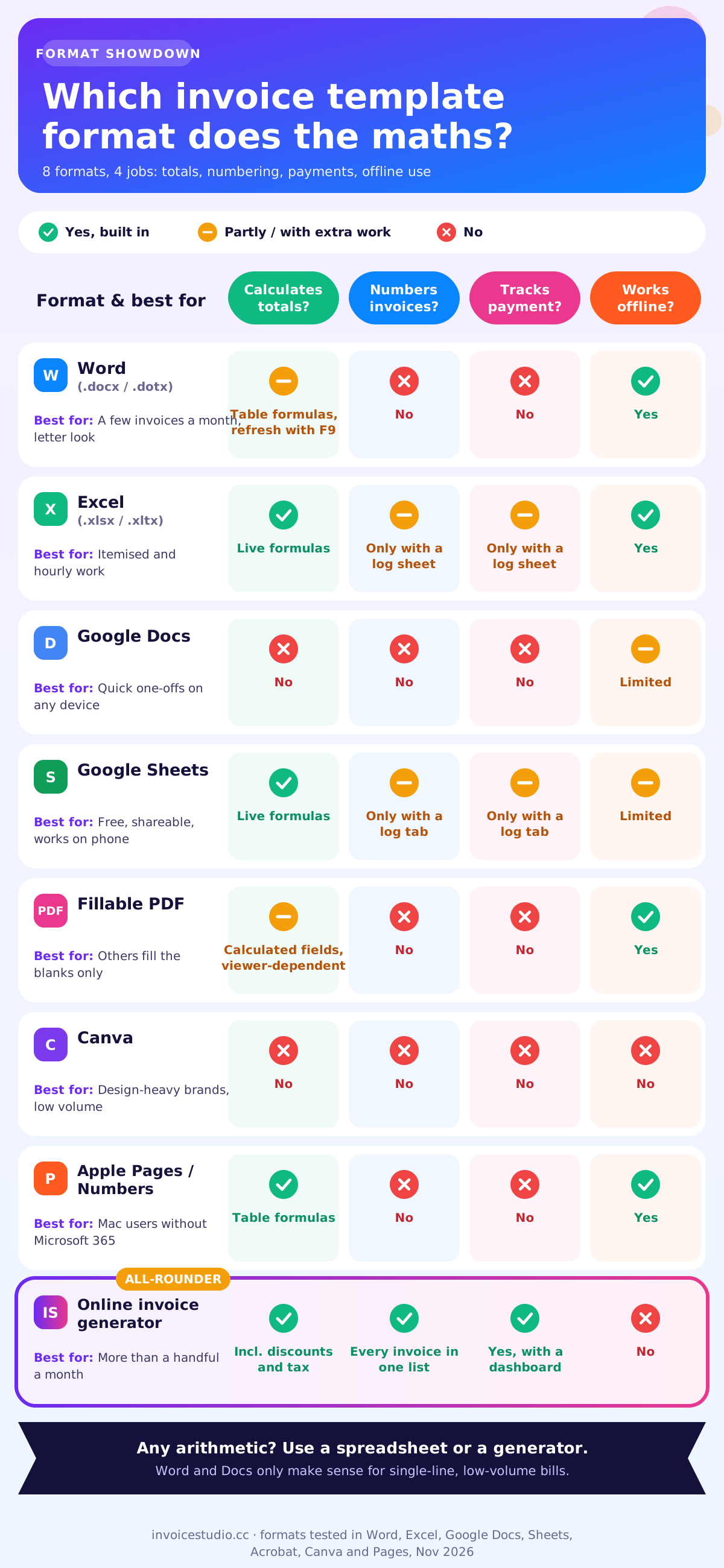
The longer answer depends on three questions galleries never ask: does it calculate totals, number invoices and track who has paid?
| Format | Calculates totals? | Numbers invoices? | Tracks payment? | Works offline? | Best for |
|---|---|---|---|---|---|
| Word (.docx / .dotx) | Only with table formulas, refreshed by hand (F9) | No | No | Yes | A few invoices a month, branded letter look |
| Excel (.xlsx / .xltx) | Yes, live formulas | Only with a log sheet you build | Only with a log sheet you build | Yes | Itemised work, hourly billing |
| Google Docs | No | No | No | Limited | Quick one-off invoices from any device |
| Google Sheets | Yes, live formulas | Only with a log tab you build | Only with a log tab you build | Limited | Free, shareable, works on a phone |
| Fillable PDF | Yes, if built with calculated fields (viewer-dependent) | No | No | Yes | Clients or staff who should only fill blanks |
| Canva | No | No | No | No | Design-heavy brands, low invoice volume |
| Apple Pages / Numbers | Pages tables and Numbers: yes | No | No | Yes | Mac users without Microsoft 365 |
| Online invoice generator | Yes, including discounts and tax | Each invoice saved in one list | Yes, in apps with a dashboard | No | Anyone sending more than a handful a month |
My own rule: if you send fewer than five invoices a month and every one is a single line ("Website build, fixed fee"), Word or Docs is fine. The moment you have quantities, hourly rates, discounts or tax, use a spreadsheet or a generator. Most people get this wrong the other way round. They pick the prettiest Word template and then type the totals by hand, which is where the £20 mistakes come from.
Whatever you choose, the invoice still needs the same fields: your name and contact details, the client's details, a unique invoice number, the issue date and due date, a description of the work, the amounts, tax where it applies and how to pay. If you want a field-by-field checklist first, read our invoice format guide with samples, then come back here to build it.
How to create an invoice in Word (step by step, with automatic totals)
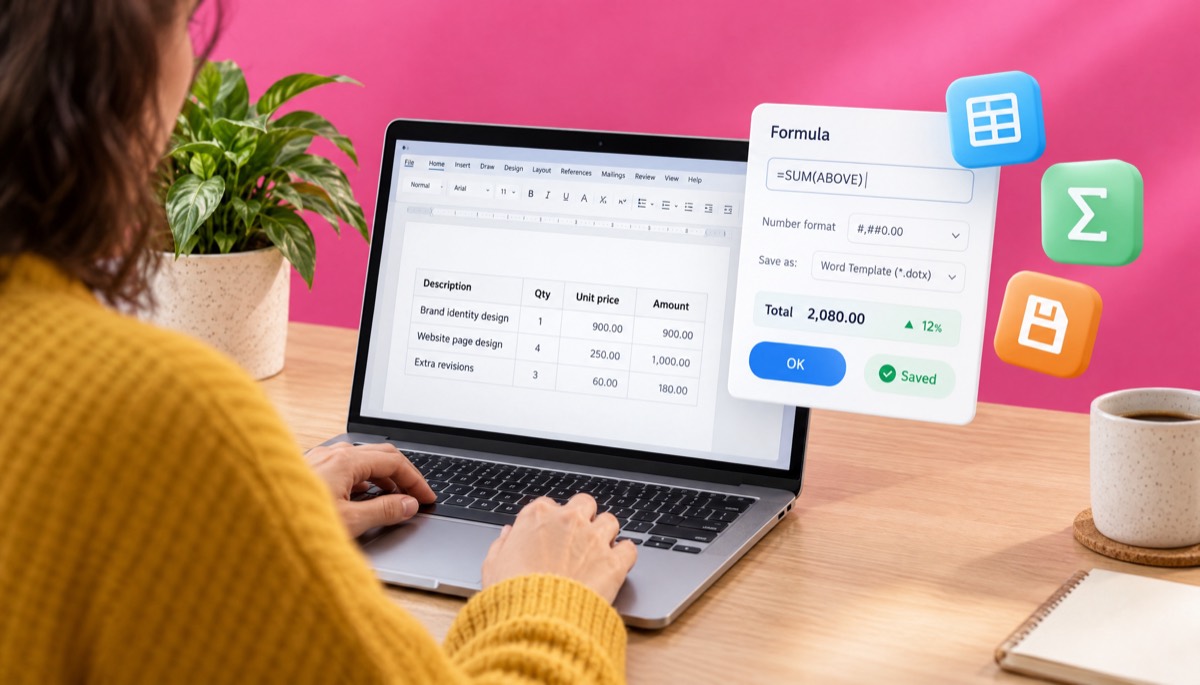
To create an invoice in Word, open File > New, search for "invoice" to pick a built-in template, or start from a blank document and insert a table for your line items. Add Word's table formulas, such as =SUM(ABOVE), so the totals calculate, then save the file as a Word Template (.dotx) so every new invoice starts clean.
Many guides claim Word can't do formulas. It can, as Microsoft explains in its guide to using a formula in a Word table. The catch is that Word formulas are fields, and fields do not update on their own. Keep that in mind and Word becomes a perfectly decent invoice tool.
Option 1: Use a built-in Word invoice template
If you searched for a simple invoice template or a free invoice template download, start here. The gallery costs nothing, needs no sign-up and the files open offline.
- Open Word and go to File > New.
- Type invoice in the search box to see Microsoft's designs.
- Pick one and click Create.
- Replace the placeholder text: your business name, address, email and, if you are registered, your VAT, GST or tax number.
- Click the Total cell. If it shades grey, it's a formula field. If not, add formulas as shown below.
Option 2: How to make an invoice in Word from scratch
I prefer this. Built-in templates carry content controls that break when you paste text. A home-made one takes about 20 minutes:
- Header. Your business name, address, email and phone, with INVOICE on the right. A borderless two-column table keeps it tidy.
- Invoice details. Below that, add: Invoice number, Issue date, Due date, Payment terms (for example, Net 30) and, if the client sent one, their purchase order (PO) number.
- Bill to. The client's name, company, address and, for B2B in the UK, EU or India, their VAT or GSTIN number.
- Line-item table. Go to Insert > Table and make a table with 4 columns and 15 rows: Description, Qty, Unit price, Amount. Row 1 is your header.
- Totals rows. Keep the last five rows of the same table for Subtotal, Tax, Total, Deposit and Balance due. Don't merge these cells. Formulas use cell addresses, and merged cells shift them.
- Payment block. Under the table: bank details, PayPal or Wise email, and a short note such as "Payment due within 30 days. Please quote INV-2026-041 as the reference."
Adding formulas to a Word invoice table
Word tables use spreadsheet-style addresses. Columns are A, B, C, D from left to right, and rows count from the top, so in our example the first line item's Qty sits in B2 and its unit price in C2.
- Click in the Amount cell for row 2 (D2).
- Go to the Table Layout tab (on Windows it's just "Layout" next to Table Design) and click Formula in the Data group.
- Delete whatever Word suggests and type =B2*C2. In Number format, type #,##0.00. Click OK.
- Repeat for each line row: =B3*C3, =B4*C4 and so on. Yes, it's tedious. Do it once in the template and never again.
- In the Subtotal cell (say D11) use =SUM(ABOVE), or to be safe, an explicit range like =SUM(D2:D10).
- In the VAT cell (D12) use =ROUND(D11*0.2,2). Swap 0.2 for your rate: 0.18 for 18% GST, 0.1 for Australian GST, 0.0825 for an 8.25% sales tax.
- In Total (D13) use =D11+D12. Type any deposit received into D14, and in Balance due (D15) use =D13-D14.
Why I use =SUM(D2:D10) instead of =SUM(ABOVE): SUM(ABOVE) can stop at an empty cell, so if row 6 is blank and rows 7 and 8 have items, part of your invoice silently drops out of the total. An explicit range never does that. Fill unused Amount cells with a formula too, so they show 0.00 rather than nothing.
The step everyone forgets: updating the totals
When you change a quantity, the formula result stays the same until you refresh it. Press Ctrl+A and then F9 on Windows, or select everything and press F9 (Fn+F9 on many Mac keyboards) on a Mac. You can also right-click a total and choose Update Field.
On Windows, also go to File > Options > Display and tick Update fields before printing. Then check one line in your head before sending.
Word for the web can't insert table formulas, according to Microsoft. If you built your template on the desktop, the formulas survive online, but you'll still need the desktop app to add or fix them.
Save it as a .dotx template
- Clear out the client details and line items, leaving your formulas and blank rows.
- Go to File > Save As, and in the file type list choose Word Template (*.dotx). On a Mac, choose File > Save as Template.
- Word saves it to your Custom Office Templates folder. Next time, go to File > New > Personal (Windows) or File > New from Template (Mac) and pick it.
Opening a .dotx creates a new, untitled document, so you can't overwrite your master. Microsoft's guide to creating a template covers the folders if yours isn't showing up.
Invoice template Excel: build one with formulas that add up
To make an invoice in Excel that calculates automatically, put quantities and unit prices in two columns, multiply them in a third, and total the column with =SUM or =SUMPRODUCT. Add a tax cell that multiplies the subtotal by your rate, then save the workbook as an Excel Template (.xltx).
Is there a free invoice template in Excel? Yes: File > New, search "invoice". That is the quickest answer to how to make an invoice in Excel, but building your own means you know where every number comes from. Here's a layout that has worked for me.
The layout
- A1 to A5: your business name, address, email, phone and tax number.
- E2: the word INVOICE. E3: Invoice no. with the number in F3.
- F4: issue date. F5: due date, using =F4+30 for Net 30 terms.
- A7 to A10: Bill to.
- Row 11: headers. A11 Description, D11 Qty, E11 Unit price, F11 Amount.
- Rows 12 to 21: ten line items.
- Rows 23 to 27: Subtotal, Tax rate and Tax, Total, Deposit, Balance due.
The formulas
Copy these into the cells shown:
| Cell | Formula | What it does |
|---|---|---|
| F12 (copy down to F21) | =IF(D12="","",D12*E12) | Line amount, blank when the row is empty |
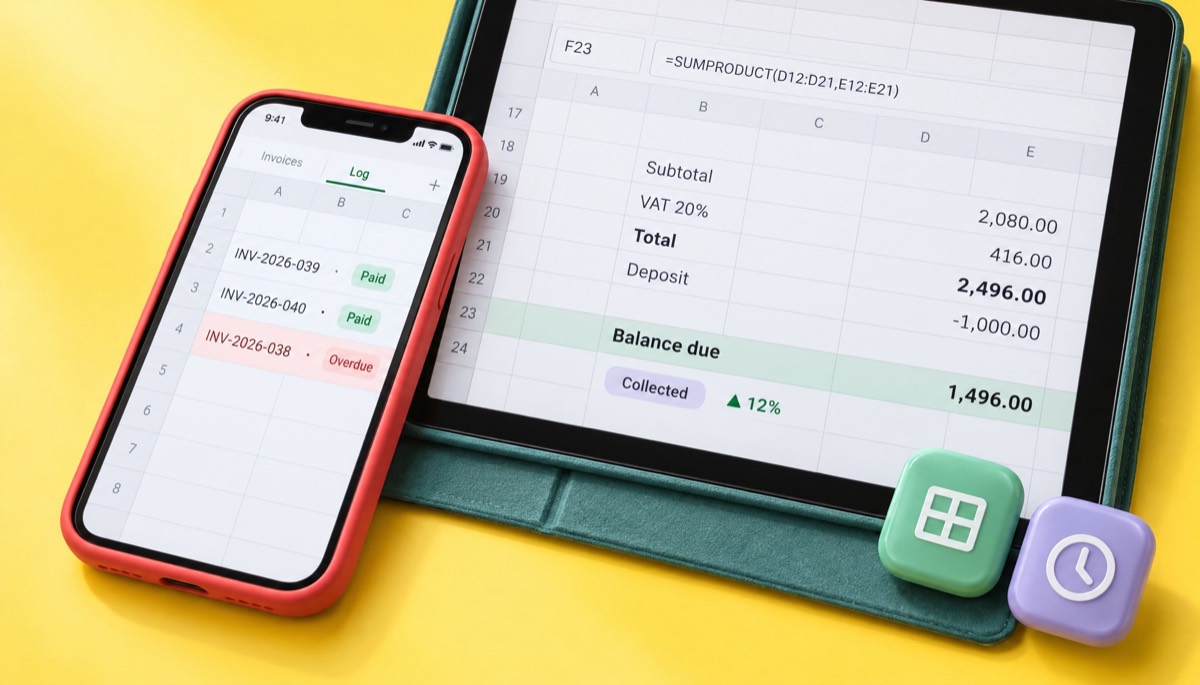
| F23 | =SUMPRODUCT(D12:D21,E12:E21) | Subtotal in one step, even if a line amount was overwritten |
| E24 | 20% | Tax rate you can change per invoice |
| F24 | =ROUND(F23*E24,2) | Tax, rounded to the penny or cent |
| F25 | =F23+F24 | Invoice total |
| F26 | 1000 | Deposit or payments received |
| F27 | =F25-F26 | Balance due |
| F5 | =F4+30 | Due date for Net 30 |
With our example (1 × 900, 4 × 250, 3 × 60), F23 shows 2,080.00, F24 shows 416.00, F25 shows 2,496.00 and F27 shows 1,496.00. Change the 4 to a 5 and everything updates instantly. That's the whole reason to use Excel over Word.
Why SUMPRODUCT? It multiplies each quantity by each price straight from your inputs, so if someone types over a line amount, the total is still right. Microsoft's SUMPRODUCT documentation explains the arguments if you want to add a discount column. For a per-line discount in column G as a percentage, use =SUMPRODUCT(D12:D21,E12:E21,1-G12:G21).
Little touches that save headaches
- Currency format. Select F12:F27, press Ctrl+1 and choose Currency with your symbol: $, £, €, ₹, A$ or ৳.
- Lock the formulas. Clear the Locked box on the input cells (Format Cells > Protection), then use Review > Protect Sheet. Now you can only type where you should.
- Print area. Select A1:F35 and choose Page Layout > Print Area > Set Print Area, then Fit to 1 page wide. This stops the PDF from spilling onto page two.
- Freeze the header. Select the row under your column headings and choose View > Freeze Panes, so the labels stay visible on a long invoice.
- Save as .xltx. File > Save As > Excel Template (*.xltx). Opening it creates a fresh copy, just like a Word .dotx.
Can Excel number invoices automatically?
Not by itself, but you can fake it. Add a second sheet called Log with columns for Invoice no., Date, Client, Total, Paid and Date paid. Each time you finish an invoice, paste its details into the next row. On the invoice sheet, set F3 to ="INV-2026-"&TEXT(COUNTA(Log!A:A),"000"), which gives you the next number in sequence as long as the log has a header row and you add every invoice. It's fragile, but it works. If you're unsure what format to use for the number itself, our invoice number format guide covers prefixes, yearly resets and what to do if you skip one.
Invoice template Google Docs: how to make an invoice in Google Docs
To make an invoice in Google Docs, create a new document, insert a table for your line items, type your details and amounts, then go to File > Download > PDF Document (.pdf) to send it. Google Docs tables can't calculate, so do the maths in a calculator or a linked Google Sheet first.
Does Google Docs have an invoice template? Not reliably. The Docs gallery leans to letters and reports, while the invoice template has lived in the Sheets gallery. Check File > New > From template, since galleries change.
Build a Docs invoice in 10 minutes
- Open a blank document and set A4 or Letter under File > Page setup.
- Insert a borderless 2-column table for the header: your details on the left, INVOICE, number and dates on the right, then a Bill to section.
- Go to Insert > Table and pick 4 × 8 for line items. Right-align the number columns.
- Type the totals rows. Double-check them with a calculator, because Docs won't.
- Add payment instructions and terms at the bottom.
- Rename the document "INVOICE TEMPLATE - master". For each new invoice, use File > Make a copy, never the master itself.
The trick that makes Docs calculate
Build the line-item table in Google Sheets with the formulas from the Excel section. Select the range, copy, and paste it into your Doc. Google offers to Link to spreadsheet. Accept. Now, when you change a number in the Sheet, an Update button appears on the table in Docs. You get the nicer Docs layout and Sheets maths. I used this for a year with a retainer client.
To send: File > Download > PDF Document, then attach it to an email. Or use File > Email > Email this file and pick PDF as the attachment type. Never send the Docs edit link itself. Clients can change it, and even if they don't, you lose a fixed record of what you billed.
Invoice template Google Sheets: how to use one that totals itself
To use an invoice template in Google Sheets, open sheets.new, choose File > New > From template gallery and pick the invoice template, or paste in the Excel layout above, since every formula in it works in Sheets unchanged. When it's filled in, download it as a PDF and send that file.
Sheets is my favourite free option if you invoice from a phone or share books with an accountant. =SUMPRODUCT and the rest behave just like Excel. Sheets-specific tips:
- One tab per invoice. Right-click the tab and choose Duplicate, then rename it with the invoice number. Your whole year sits in one file. Past about 50 tabs it gets slow, so start a new file each year.
- Log tab. Add a Log tab with columns A Invoice no., B Client, C Due date, D Total and E Paid. Select A2:E200, open Format > Conditional formatting and use the custom formula =AND($C2<TODAY(),$E2="") with a red fill. Any row past its due date with nothing in Paid lights up. That's a crude accounts receivable report, and it has caught more late payers for me than my memory ever did.
- PDF export settings. File > Download > PDF opens a print preview. Choose the current sheet only, Fit to width, and untick gridlines. Otherwise you'll send a PDF with grey lines everywhere and all your other invoices attached.
Anyone with edit access can change a shared Sheet, so protect the formula ranges with Data > Protect sheets and ranges.
Is a fillable PDF invoice template worth it?
A fillable PDF invoice template is worth it when other people fill in your invoice, such as staff, subcontractors or clients, because they can type only into the boxes you allow and can't break the layout. For a solo freelancer, it's usually more effort than a spreadsheet that you export to PDF.
An editable invoice template PDF is a normal PDF with form fields on top. You can create one in Adobe Acrobat Pro (Prepare a Form), and some other PDF editors can do it too. Acrobat lets you set calculated fields, so a Total field can be "the sum of" the Amount fields, or "the product of" Qty and Price. The free Adobe Acrobat Reader can fill these forms in and save them. If you'd rather skip form fields entirely, a PDF invoice generator builds the finished PDF for you.
What download sites don't tell you:
- Calculations depend on the viewer. Calculated fields rely on scripts that Acrobat and Reader run. Many browser viewers and Apple's Preview may skip them, so the total stays at 0.00.
- Building it costs money. Creating form fields with calculations usually needs a paid editor. Filling them in is free.
- Flatten before sending. Print to PDF again so the client gets a fixed document, not a live form they can edit.
The plain "invoice template PDF" most people download isn't fillable at all. It's a printable blank. If that's what you want, for handwriting invoices on site, say, see our blank printable invoice templates, which are designed for exactly that.
Can you make an invoice in Canva or Pages on a Mac?
Yes. Canva has hundreds of free invoice templates and exports a clean PDF, but it can't calculate anything, so every number is typed by hand. On a Mac, Apple Pages and Numbers are free, both have tables that support formulas, and both export to PDF, which makes them the best free invoice template option for Mac users without Microsoft 365.
Invoice template Canva: good looks, no maths
Search "invoice" in Canva and you'll get gorgeous layouts. They're design files. The line items are text boxes, and the total is a text box, so if you change a quantity, nothing else moves. I'd use a Canva invoice template only if you bill one fixed amount per project and your brand look really matters, such as for a wedding photographer or an interior designer. Download with Share > Download > PDF Standard.
Invoice template for Mac: Pages and Numbers
Word for Mac works the same as Windows for the most part (Save as Template lives under the File menu, and you refresh fields with F9 or Fn+F9). But if you don't pay for Microsoft 365, use Apple's free apps:
- Numbers has an Invoice template in the template chooser (look under Business). It calculates totals out of the box. Start here.
- Pages tables accept formulas. Click a cell, type =, and pick a function such as SUM, the same way as in Numbers. So a Pages invoice can add up, unlike Google Docs.
- Save your finished layout with File > Save as Template and it appears in My Templates.
- Send with File > Export To > PDF. Don't send a .pages or .numbers file. Windows clients can't open it.
What are the limits of Word and Excel invoice templates?
The main limits of Word and Excel invoice templates are that totals depend on formulas you have to maintain, invoice numbers are typed by hand, nothing tracks whether you've been paid, and nothing reminds the client when the invoice is overdue. They are documents, not a system.
Here's what went wrong for me and most freelancers I know:
- Stale totals. In Word, I changed a quantity from 3 to 4 and forgot F9. The client paid the old, lower amount. Technically correct of them. It cost me £240.
- Duplicate or skipped numbers. Two invoices called INV-063 because I copied last month's file. Tax authorities in the UK, EU and India expect unique, sequential numbers, and duplicates make your records hard to audit.
- No payment tracking. Your template doesn't know that INV-058 is 23 days overdue. Unless you keep a separate log, you only notice when your bank balance looks thin. That's when you start searching for how to ask for payment politely.
- File sprawl. After a year you have 120 .docx files, 120 PDFs and a folder structure only you understand. When your accountant asks for "all invoices from Q2", you spend an afternoon on it.
- Tax rate drift. Rates change. An old rate left in your master formula ends up on every invoice.
Templates aren't bad. They are a starting point, not a system.
How to save, number and send a Word invoice as a PDF
To convert a Word invoice to PDF, go to File > Save As and choose PDF as the file type, or on Windows use File > Export > Create PDF/XPS. On a Mac, use File > Save As and set File Format to PDF. Then email the PDF, never the .docx, with the invoice number in the subject line.
Should you send an invoice as a PDF? Yes, almost always. A PDF looks the same on every device, can't be edited by accident, and is what most accounts payable teams expect. A Word file can reflow on the client's computer. Fonts change, tables shift onto a second page, and it can be edited. Some countries are moving to structured B2B e-invoices, but PDF by email is still the freelance default.
A numbering system that won't let you down
Pick a format and stick to it. The one I use is INV-YYYY-NNN, so INV-2026-041 is my 41st invoice of 2026. It sorts properly in folders, tells you the year at a glance and leaves room for 999 invoices. Other common formats:
- Simple sequence: 1001, 1002, 1003. Starting at 1001 rather than 1 looks less like your first job.
- India GST: up to 16 characters, unique within each financial year, for example 2026-27/041.
Name the files consistently
Use the same pattern every time: INV-2026-041_RiversideBakery_2026-11-05.pdf. Number first so they sort in order, client second so you can search. Keep the PDFs in one folder per year. In the US, the IRS says to keep records that support your income for at least three years in most cases, and longer in some situations, as explained on its how long should I keep records page. In the UK, HMRC sets record-keeping rules for VAT-registered businesses. Check your own country's period, since they vary from about four to ten years.
Copy-paste email to send with your invoice
Subject: Invoice INV-2026-041 from [Your Business], due 5 December 2026
Hi [Name],
Please find attached invoice INV-2026-041 for the brand identity and website design work, totalling £2,496.00 including VAT. With the £1,000 deposit already paid, the balance due is £1,496.00 by 5 December 2026.
Bank details and other ways to pay are on the invoice. Please use INV-2026-041 as the payment reference.
Thanks again, it was a great project.
[Your name]
And a line for the notes box on the invoice itself: "Payment due within 30 days of the invoice date. Please quote the invoice number as your reference. Late payments may incur interest as permitted by law." If you're unsure what "Net 30" actually commits you to, our net 30 payment terms guide has worked dates. For the full routine of attaching, following up and using PayPal, see how to send an invoice.
Invoice template Word layouts for UK VAT, India GST and Australian GST
A Word invoice template for VAT or GST needs extra fields beyond a normal invoice: your tax registration number, the tax rate and tax amount shown separately, and in some countries the customer's tax number and specific wording such as "Tax invoice". The layouts below show what to add to the same Word or Excel template for each country.
UK VAT invoice layout
If you're VAT registered in the UK, HMRC requires a full VAT invoice for most sales to other VAT-registered businesses. Add these to your template, following the fields listed in VAT Notice 700 and on gov.uk's what invoices must include page:
- A unique, sequential invoice number.
- Your business name, address and VAT registration number.
- The invoice date and the time of supply (tax point) if it's different.
- The customer's name or trading name and address.
- A description of the goods or services, with the quantity and unit price of each.
- The rate of VAT per item, the total excluding VAT, any discount, and the total VAT charged.
In our example: subtotal £2,080.00, VAT at 20% £416.00, total £2,496.00. Retailers can issue a simplified VAT invoice for sales of £250 or less including VAT, with fewer fields. For services to an EU business customer, you may need a reverse charge note instead of charging UK VAT. Our UK VAT invoice requirements guide covers that wording. EU sellers should look at the European Commission's VAT invoicing rules, which set the common minimum fields across member states.
India GST invoice layout
An Indian tax invoice under GST needs more columns than a Western one, so widen your Word or Excel table:
- Supplier name, address and GSTIN.
- A consecutive invoice number of up to 16 characters, unique for the financial year, and the date.
- Recipient name, address and GSTIN if registered.
- Place of supply (state name and code), which decides which tax applies.
- Columns for Description, HSN (goods) or SAC (services) code, Qty, Rate, Taxable value.
- Tax columns: CGST and SGST for a sale within your state, or IGST for a sale to another state.
- Signature or digital signature of the supplier.
Worked example: a Pune designer bills a Mumbai client ₹50,000 for design services at 18%. Same state, so CGST 9% ₹4,500 plus SGST 9% ₹4,500, for a total of ₹59,000. Bill a client in Bengaluru instead and it becomes IGST 18% ₹9,000, the same ₹59,000 total. In Excel, use =IF(place_of_supply=your_state, taxable*0.09, 0) for each of the CGST and SGST cells and the opposite test for IGST. Our GST invoice format guide has a full Excel layout with these columns.
Australian GST tax invoice layout
If you're registered for GST in Australia, the ATO expects a tax invoice for taxable sales over A$82.50 including GST when the buyer asks for one. Add:
- The words "Tax invoice" at the top.
- Your business name and ABN.
- The invoice date and a description of what was sold, including quantity and price.
- The GST amount, or a statement like "Total price includes GST" when GST is exactly one-eleventh of the total.
- For sales of A$1,000 or more, the buyer's identity or ABN.
Worked example: a A$1,000 job plus 10% GST is A$1,100, with GST of A$100 shown on its own line. In your Word table that's =ROUND(D11*0.1,2). Check the ATO's tax invoice page for the current rules.
Quick notes for other countries
Rules change, so check your tax authority before relying on any layout.
- United States: there's no federal invoice format. Sales tax is set by states and often doesn't apply to services, so many freelancers have no tax row.
- Canada: if you're registered for GST/HST, the CRA asks for more detail as the sale gets bigger, with tiers for under $100, $100 to $499.99, and $500 or more. Your GST/HST registration number appears from the middle tier up.
- Bangladesh: VAT-registered businesses issue the Mushak-6.3 tax invoice with their BIN. A plain Word invoice is fine for unregistered freelancers billing foreign clients in USD.
When should you switch from a template to an invoice generator?
Switch from a template to an invoice generator when you send more than five to ten invoices a month, charge tax on most of them, have more than one or two overdue invoices at any time, or bill the same clients every month (a job for recurring invoices). At that point, the time you spend on totals, numbering and chasing costs more than any free template saves, so compare it with our 28 free invoice templates that add up on their own.
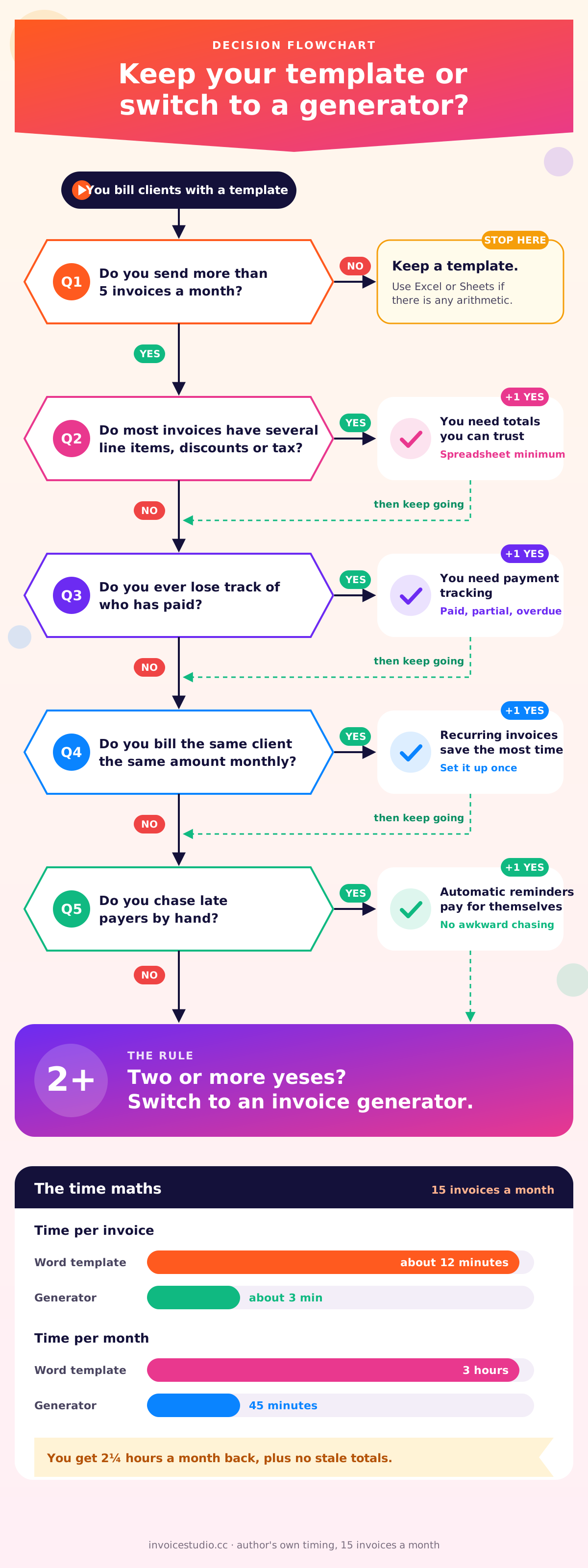
Here's the rough maths I did when I switched. Each Word invoice took me about 12 minutes: open the template, fill it in, refresh fields, check the arithmetic, save as PDF, rename, write the email, update my log. At 15 invoices a month, that's 3 hours. A generator got the same job down to about 3 minutes each, so 45 minutes. Two and a quarter hours a month back, plus no more stale totals.
Ask yourself these questions, which are also what the flowchart above walks through:
- Do you send more than 5 invoices a month? If no, a template is fine. Use Sheets or Excel if there's any arithmetic.
- Do most invoices have several line items, discounts or tax? If yes, you need calculation you can trust. Use a spreadsheet at minimum.
- Do you ever lose track of who has paid? If yes, you need payment tracking. A template can't do it without a log you maintain.
- Do you bill the same client the same amount monthly? If yes, recurring invoices save the most time.
- Do you chase late payers by hand? If yes, one-click reminders and a list of who is overdue pay for themselves the first month.
Two or more yeses? Switch. A free invoice generator such as Invoice Studio does the parts templates can't. Line items add up on their own, with per-line discounts and tax, shipping and "Tax & fees" rows for VAT, GST or sales tax. You pick one of 28 designs, add your logo and brand colour, and download a PDF or email it with the PDF attached. It handles 14 currencies plus custom ones, and prints PayPal, Wise, bank, bKash and other payment methods under "How to pay".
It also records partial and full payments, marks invoices overdue, sends reminders, runs recurring invoices and builds an invoice from your voice in 20 languages, Bangla included. It isn't an accounting ledger and there's no online card checkout or client portal, so if you need those you'll still want accounting software alongside it. If you're comparing options, our free invoice app guide lists what to look for.
Happy with templates for now? Fine. Use the Excel or Sheets layout above with a Log tab and send PDFs. When you're ready to stop refreshing fields, browse the invoice template gallery or check the plans: there's a free plan, and paid plans start at $3 a month. New to invoicing altogether? Read how to make an invoice first, then choose your tool, or grab a freelance invoice template built around hourly and project work.
One last thing from experience. The best invoice template is the one that gets you paid the right amount on time. Pick the format that does the maths, number every invoice once, send PDFs, and keep a list of who owes you. Do those four things, in Word, Excel, Docs or anything else, and you're ahead of most small businesses I've worked with.
Frequently asked questions
Does Word have an invoice template?
How do I make an invoice in Excel that calculates automatically?
Does Google Docs have an invoice template?
Should I send an invoice as a PDF?
How do I convert a Word invoice to PDF?
Is there a free invoice template in Excel?
Can I make an invoice in Word or Google Docs?
Monjur builds Invoice Studio and incorporated MotionTrust Digital in September 2022, where he leads Amazon strategy across the client base. Eight years in e-commerce and marketplace marketing taught him how much time invoices and late payments eat, so every guide here is tested against the real product and current tax rules before it goes live.
More guides by Monjur